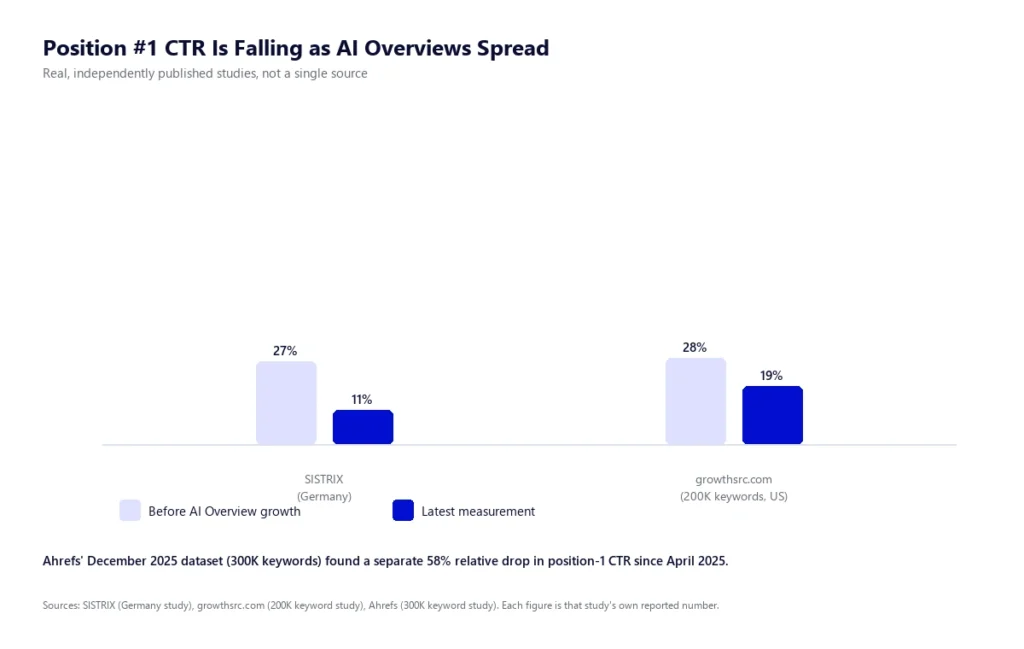

A client forwards you a LinkedIn post that says every site needs an “llms.txt file” now, asks if yours has one, and expects an answer before the call ends. You open a new tab, skim three articles that all describe it slightly differently, and twenty minutes later you still cannot tell if this is a real technical requirement or another acronym invented to sell an audit.
Here is the direct answer: llms.txt is a plain-text Markdown file, placed at yoursite.com/llms.txt, that gives AI language models a short, curated summary of a site’s most important pages instead of making them parse full HTML. It was proposed by Jeremy Howard’s team at Answer.AI in September 2024 and takes under an hour to build correctly. As of 2026, no major AI provider has confirmed using it to generate answers or decide citations, so it belongs on your technical SEO checklist as a low-cost, zero-risk addition, not as a ranking lever you can expect to move traffic on its own.
This guide covers what llms.txt actually is, where it came from, how it differs from robots.txt and sitemap.xml, what the current evidence says about whether it works, the exact Markdown structure to use, six implementation steps (including the WordPress and Rank Math shortcut), and how to verify the file is actually live once you are done.
What Is llms.txt?
llms.txt is a Markdown file hosted at a predictable URL on your domain, written specifically to be read by AI agents and large language models at the moment they need context about your site, rather than by human visitors browsing a page. The idea is straightforward: modern web pages are built for people, full of navigation menus, cookie banners, ads and JavaScript that a model has to wade through to find the actual content. llms.txt strips that away and hands the model a clean, curated index instead.
It is not a technical file in the way robots.txt or a sitemap is. There is no crawling directive, no XML schema, no required tags beyond one heading. It is closer to a well-written “start here” page for a machine reader: what this site is, what it does, and which pages matter most if you only have room to read a handful of them.
Where llms.txt Came From
The specification was published by Jeremy Howard, co-founder of Answer.AI and fast.ai, on llmstxt.org in September 2024. The stated goal was to solve a specific problem for developer-facing documentation sites: AI coding assistants were burning through their limited context windows trying to parse full HTML docs pages when a short, structured summary would have done the job in a fraction of the tokens. Documentation platforms picked it up quickly, and within about eighteen months it had spread well beyond docs sites into general marketing and content SEO, largely on the promise that it might help brands get cited by ChatGPT, Claude, Gemini and Perplexity.
It is worth being precise about what llms.txt is not. There is no W3C or IETF working group behind it, and it has not been adopted as an official standard by any browser, search engine or AI lab. It is a community convention, similar in spirit to how robots.txt started as a informal agreement among crawler operators decades before it was formalized. Some conventions like that eventually become load-bearing infrastructure. Others stay a nice-to-have. llms.txt is currently still deciding which one it will be, and the section below covers exactly what the evidence says so far.
llms.txt vs robots.txt vs sitemap.xml
These three files sit in the same directory and get confused constantly, but they solve different problems. Understanding the distinction is the fastest way to see what llms.txt is actually for.
| robots.txt | sitemap.xml | llms.txt | |
|---|---|---|---|
| Purpose | Controls what crawlers are allowed to access | Lists every indexable URL on the site | Summarises the site for AI agents in plain language |
| Format | Plain text, directive syntax | XML | Markdown |
| Coverage | Site-wide rules, by user agent | Exhaustive, every URL you want indexed | Curated, only what matters most, can link off-site too |
| Who honours it | Search engines and most reputable bots, by convention | Search engines, as a discovery hint | Unconfirmed. No major AI provider has documented using it |
| Standard status | De facto standard since the 1990s | Formal protocol, backed by major search engines | Community proposal, not formally adopted |
The practical takeaway is that robots.txt still governs access, and it is worth getting that right first. If GPTBot, ClaudeBot or PerplexityBot are blocked at the robots.txt level, adding an llms.txt file changes nothing, because the bot never gets far enough to look for it. Our guide on why a well-ranking site can still be invisible in ChatGPT covers how to check that first.
Does llms.txt Actually Work? What the 2026 Data Shows
This is the part most llms.txt guides skip, and it is the part that actually matters before you spend a client’s time on it. Two independent studies published in the last year give a consistent, sobering picture.
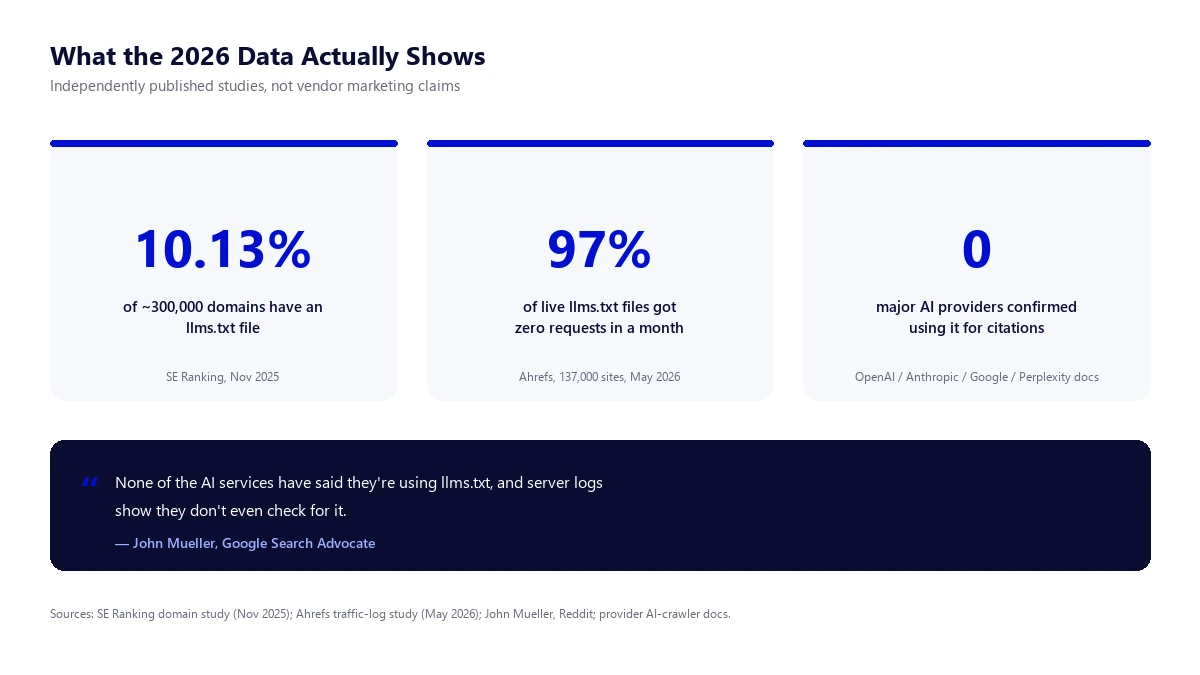
SE Ranking analysed roughly 300,000 domains in November 2025 and found llms.txt present on 10.13% of them, a fairly even split whether traffic was near zero or over 100,000 visits a month. More importantly, when they tested whether having the file correlated with how often a domain got cited in major LLM answers, they found no meaningful relationship. Removing the llms.txt variable from their prediction model did not hurt accuracy. It improved it slightly.
Ahrefs went further and checked whether the files were even being requested. Their May 2026 analysis of 137,000 sites with a live llms.txt file found that 97% of them received zero traffic to the file across the month. Of the 3% that did get hit, 96% of those requests came from generic bots and scanners, not from a documented AI crawler. None of the traffic in that sample was traceable to a major AI provider specifically fetching the file to build an answer.
Google’s own John Mueller addressed this directly on Reddit, comparing llms.txt to the old keywords meta tag: a file that lets a site claim things about itself, with no independent verification behind the claim. His comment, closely paraphrased: none of the AI services have said they use llms.txt, and you can tell from server logs that they do not even check for it. OpenAI, Anthropic and Perplexity’s own crawler documentation backs this up. All three publish guidance on user agents and robots.txt behaviour, and none of them mention llms.txt as a signal they read.
None of this means skip it. It means implement it with the right expectations: a low-effort, zero-downside addition that costs under an hour, not a growth lever you should be reporting on in a monthly ranking review. If a client asks whether it moved their AI Overview visibility, the honest answer in 2026 is that there is no published evidence it does, on its own.
The Exact llms.txt File Structure
The specification is deliberately minimal. Only one element is required: a single H1 heading with the name of the site or project. Everything else below it is optional but recommended, in this order: a blockquote summary, free-form Markdown context with no headings, then one or more H2-delimited sections listing curated links.
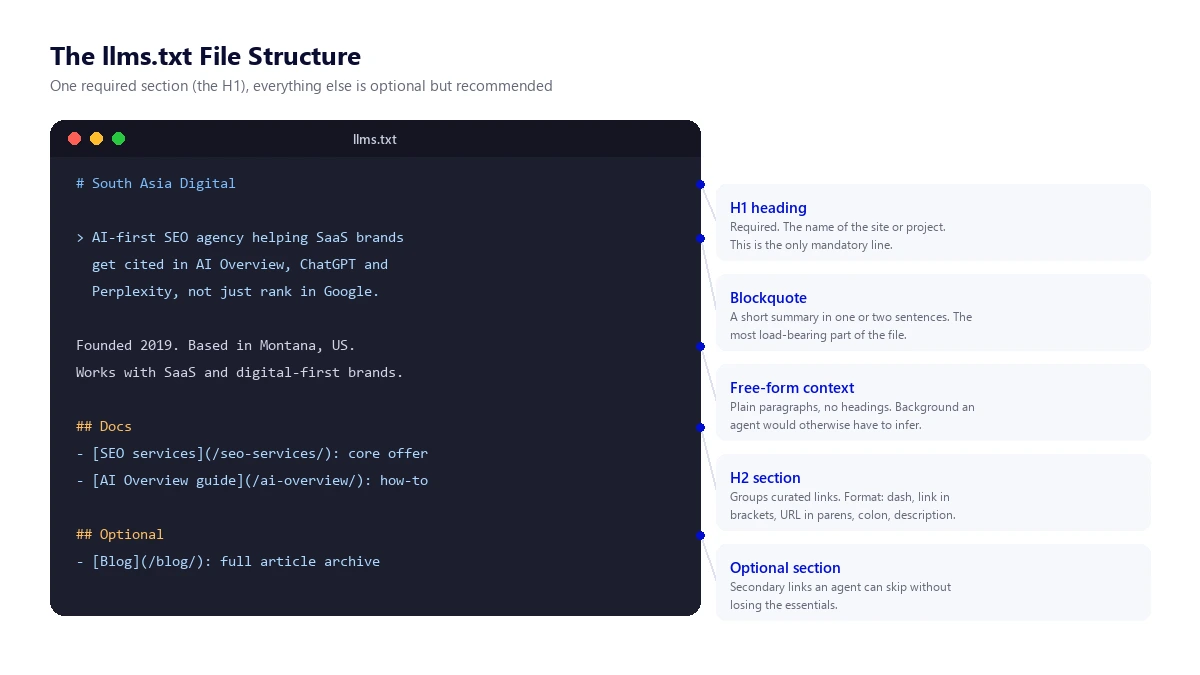
Here is a minimal but complete working example you can adapt directly:
# Acme SaaS

> Acme is a project management tool for remote engineering teams. This file summarises the pages an AI agent needs to answer questions about our product accurately.

Founded 2021. Self-serve and enterprise plans. Integrates with Slack, GitHub and Jira.

## Docs

- [Getting started](https://acme.example/docs/start): account setup and first project
- [API reference](https://acme.example/docs/api): full REST API documentation
- [Pricing](https://acme.example/pricing): current plans and limits

## Optional

- [Blog](https://acme.example/blog): product updates and engineering posts
- [Changelog](https://acme.example/changelog): release history
Each link line follows the same fixed format: a dash, the link title in square brackets, the URL in parentheses, then an optional colon and description. Keep descriptions short and factual. The file is meant to be read quickly by something with a limited context window, so treat every line as something you had to earn the right to include, not a place to dump your full navigation menu.
How to Implement llms.txt
The steps below apply whether you are hand-writing the file for a small site or rolling it out through a WordPress plugin for a larger one. Do them in order; skipping the curation step is the single most common reason an llms.txt file ends up useless.
Step 1: Decide what actually belongs in it
Before writing a line of Markdown, list the five to fifteen pages that genuinely represent what your site does: your core product or service pages, your documentation index if you have one, and maybe two or three of your best evergreen guides. This is not your sitemap. A file that lists two hundred URLs with no curation defeats the entire purpose, which is to save an agent the work of figuring out what matters.
Step 2: Write the file using the correct Markdown structure
Start with the H1, add a one or two sentence blockquote that would make sense to someone who has never heard of your company, then group your curated links under one or more H2 sections. Use the structure and example above as a template rather than starting from a blank file. Keep the whole file well under 10KB; if you are approaching that limit, you are including too much.
Step 3: If you are hand-managing it, upload the file to your site root
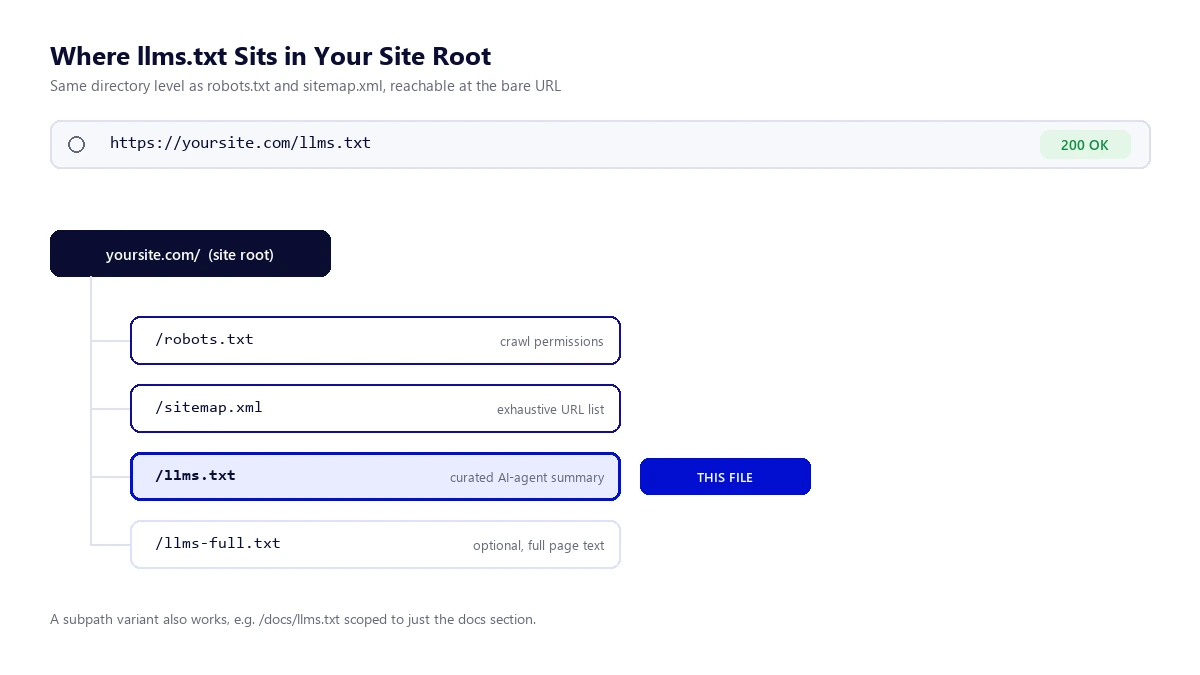
Save the file as plain text named llms.txt and upload it via FTP or your hosting file manager to the same directory as robots.txt, so it resolves at the bare URL yoursite.com/llms.txt, not inside a subfolder. Confirm the server returns it as plain text with an HTTP 200 status rather than triggering a download prompt or a redirect.
Step 4: On WordPress, use a plugin instead of hand-editing
Most WordPress sites should not hand-write this file at all, because it needs to stay in sync as content changes. If your site runs Rank Math, which is the SEO plugin behind this article, the feature is already built in: go to Rank Math SEO, then Dashboard, and toggle on the LLMS Txt module. From there open Rank Math SEO, then General Settings, then Edit llms.txt to choose which post types and taxonomies to include, set a post limit, and add any custom links by hand. Save changes and Rank Math generates and serves the file automatically at your site root from then on, updating it as you publish. Yoast, SEOPress and AIOSEO users have equivalent dedicated plugins available in the WordPress plugin directory if their SEO plugin does not yet build this in natively.
Step 5: Add discovery link tags if you run a documentation subpath (optional)
For sites with a large docs section that warrants its own scoped file at a path like /docs/llms.txt, the specification supports pointing to it with an HTML link relation in your page head, such as rel="describedby" referencing the file’s URL. Most marketing and blog sites do not need this step. It matters more for documentation platforms with deep, self-contained sections.
Step 6: Confirm it resolves before calling it done
Load the URL directly in a private browser window and confirm the raw Markdown displays or downloads correctly rather than returning your theme’s 404 page. This single check catches most of the implementation mistakes covered in the section below, and it takes ten seconds.
How to Verify llms.txt Is Actually Live and Working
Publishing the file is not the same as confirming it is reachable the way an agent would actually encounter it. Run through these checks before considering the job finished.
- Check the status code directly. From a terminal, request the file with a plain HTTP client and confirm a 200 response, not a redirect or a 404 dressed up as a normal page.
- Confirm the content type. The response should come back as plain text or Markdown, not as HTML wrapped in your site’s theme, which happens if a caching or security plugin is intercepting the request.
- Test as a specific crawler user agent. This confirms nothing is blocking known AI bots from reaching the file at the network or WAF level, separate from whether they read it.
curl -I https://yoursite.com/llms.txt
curl -A GPTBot -I https://yoursite.com/llms.txt
curl -A ClaudeBot -I https://yoursite.com/llms.txt
A 200 OK on every line means the file is reachable. If any of them return a 403 or a challenge page, check your firewall or bot-management plugin (Wordfence and similar tools sometimes block unfamiliar user agents by default) before assuming the file itself is wrong.
- Check your server logs periodically. Search recent access logs for requests to
/llms.txtfrom known AI crawler user agents. Given the adoption data above, do not be surprised if you see none. That is the current normal, not a sign of a broken setup. - Re-check it after any content or plugin change. If you added the file manually, remember it will not update itself the way a plugin-generated one does. A stale llms.txt that lists a page you deleted six months ago is worse than no file at all, because it is actively feeding an agent wrong information.
If you want a broader check on how your whole site looks to AI crawlers, not just this one file, a few of the SEO, AEO and GEO checker extensions we’ve tested cover crawler access and structured data in the same pass.
Common Mistakes That Make llms.txt Useless
- Dumping the sitemap into it. A file listing every URL on the site is not curated, defeats the purpose, and often blows past the size where it stays useful to a model with limited context.
- Letting it go stale. A hand-written file that never gets updated will eventually list dead pages and miss new ones. If you cannot commit to updating it, use a plugin that regenerates it automatically instead.
- Blocking the bots at robots.txt while adding llms.txt. If GPTBot or ClaudeBot cannot access your site at all, the presence of an llms.txt file is irrelevant. Fix crawl access first.
- Writing vague, marketing-toned summaries. “Industry-leading, innovative solutions” tells a model nothing concrete. State plainly what the product or service is, who it is for, and what it does.
- Treating it as a ranking or citation guarantee. Per the data above, set the expectation correctly with clients from the start: this is best-practice hygiene, not a lever with proven return.
Frequently Asked Questions
What is llms.txt?
llms.txt is a plain-text Markdown file placed at yoursite.com/llms.txt that gives AI language models a short, curated summary of a site’s purpose and most important pages, proposed by Jeremy Howard’s team at Answer.AI in September 2024.
Does llms.txt improve AI Overview or ChatGPT visibility?
There is currently no published evidence that it does. Independent studies from SE Ranking and Ahrefs in 2025 and 2026 found no correlation between having an llms.txt file and AI citation frequency, and no major AI provider has confirmed reading the file at all.
Is llms.txt an official standard from Google or OpenAI?
No. It is a community-proposed convention published on llmstxt.org, with no W3C or IETF backing and no formal adoption commitment from Google, OpenAI, Anthropic or Perplexity.
Where exactly do I put the llms.txt file?
At your site’s root directory, so it resolves at the bare URL yoursite.com/llms.txt, the same level as robots.txt and sitemap.xml. A scoped subpath version, such as yoursite.com/docs/llms.txt, is also valid for large documentation sections.
What is the difference between llms.txt and llms-full.txt?
llms.txt is a short, curated index of links with brief descriptions. llms-full.txt is an extended, optional companion file containing the actual full text content of your key pages concatenated into one Markdown document, intended for agents that can handle a larger context window and want the complete content rather than just links to it.
If you are auditing how your site looks to AI crawlers more broadly, our guide on how to get into Google AI Overview and our breakdown of entity mapping in SEO both cover signals that current evidence actually connects to AI visibility, which is a useful next stop once llms.txt is checked off the list. Developers working through the technical side of any of this may also find our SEO guide for front-end developers useful.
We implement llms.txt as part of the technical SEO work in our SEO services for clients who want it done correctly and kept current, though as covered above, we set that expectation honestly: it is good hygiene, not a proven ranking or citation lever on its own.