
The best SEO, AEO and GEO checker extension for most users is SAGE because it combines technical SEO, answer-readiness, structured data, AI crawler access and machine-readability checks in one browser-based audit.
However, SAGE is not automatically the best choice for every workflow.
SEO / AEO / GEO Checker by AI Rank Inspector is easier for writers and editors. Zicy is stronger for schema and AI crawler analysis. SellOnLLM adds optional AI citation tracking, while SEOFliq is designed for agencies that need competitor comparisons and branded reports.
The important point is that these extensions perform different jobs. Some inspect whether a page appears ready for search and AI systems. Others attempt to measure whether a brand is actually mentioned or cited.
A high readiness score can reveal useful improvements, but it cannot guarantee Google rankings, inclusion in AI Overviews or citations from ChatGPT, Gemini or Perplexity.
Best SEO, AEO and GEO Checker Extensions Compared
| Extension | Best for | SEO audit | AEO audit | GEO audit | Actual citation tracking | Free option |
|---|---|---|---|---|---|---|
| AI Rank Inspector | Actionable page audits with clear, prioritised fixes | Strong | Strong | Strong | No | Early access |
| SAGE | Comprehensive technical and content audits | Strong | Strong | Strong | No | 25 complete scans |
| Zicy | Schema and AI crawler accessibility | Basic | Strong | Strong | Separate Zicy platform | Yes |
| SellOnLLM AEO/GEO Audit Tool | Page audits plus AI visibility monitoring | Good | Strong | Strong | Yes, paid | Yes |
| SEOFliq | Agencies and competitor reporting | Good | Strong | Strong | No | Yes |
Our recommendation
Use AI Rank Inspector when you want a clear SEO, AEO and GEO audit with prioritised, actionable recommendations.
Use SAGE when you need a broad technical and content audit.
Use Zicy when structured data and AI crawler accessibility are your main priorities.
Use SellOnLLM when you also want to monitor AI citations and competitor visibility.
Use SEOFliq when client reporting and side-by-side competitor comparisons matter most.
What is an SEO, AEO and GEO checker?
An SEO, AEO and GEO checker is a tool that reviews whether a webpage is technically accessible, clearly structured and easy for search and answer systems to understand.
The three parts of the audit have different priorities:
- SEO, or search engine optimization, focuses on crawlability, indexability, relevance, page structure and conventional search visibility.
- AEO, or answer engine optimization, focuses on whether the content answers specific questions clearly enough to be extracted or summarized.
- GEO, or generative engine optimization, focuses on whether generative search systems can discover, understand, verify and potentially cite the content.
These are not three completely separate disciplines.
Google says its generative search experiences remain rooted in its core Search ranking and quality systems. From Google’s perspective, optimizing for AI Overviews and AI Mode is still SEO, even when marketers call some of the work AEO or GEO.
That means a useful checker should not ignore traditional SEO. A page still needs to be accessible, indexable, relevant and genuinely useful before answer formatting or AI-readiness scores become meaningful.
How we selected these extensions
We reviewed extensions that are specifically designed to analyze SEO, AEO, GEO or AI-search readiness inside Chrome.
The evaluation considered:
- Traditional on-page SEO coverage
- Direct-answer and question-format analysis
- Schema and entity checks
- AI crawler accessibility checks
- Readability and content-structure analysis
- Exporting and reporting options
- Privacy disclosures
- Public ratings and adoption
- Whether the tool measures readiness or actual visibility
- How clearly the tool explains its limitations
The product information and Chrome Web Store data in this article were reviewed on July 31, 2026. User counts, ratings, features and prices may change.
We did not treat any extension’s proprietary score as an official Google, ChatGPT, Gemini or Perplexity metric. Google states that third-party tools do not have access to its internal ranking or AI systems.
1. AI Rank Inspector – Best overall SEO, AEO and GEO checker extension
Best for: SEO specialists, content teams, agencies and website owners who want a clear audit with prioritised recommendations
AI Rank Inspector SEO and GEO checker tool is the strongest overall option for users who want to understand not only what is wrong with a page, but also which improvements should be handled first.
The Chrome extension analyses approximately 60 observable page signals across technical SEO, content relevance, AEO readiness, entity clarity, source support, trust and GEO readiness. Rather than producing a long list of generic warnings, it organises findings into passed, partial and failed checks, with supporting evidence and prioritised recommendations showing what deserves attention first.
It also explains why an issue was raised, identifies the affected page element and provides practical recommendations that can be used by content teams, SEO specialists and developers. Standard webpage audits run locally within Chrome, making it useful for quickly reviewing individual pages while browsing.
AI Rank Inspector is now available directly from the Chrome Web Store. As a newly released extension, it does not yet have enough public ratings or long-term usage data to assess user satisfaction, so its recommendations should still be treated as diagnostic guidance rather than a guarantee of rankings or AI citations.
What does AI Rank Inspector check?
Its technical audit covers:
- Page titles and meta descriptions
- Canonical URLs
- Robots directives
- Heading hierarchy
- Internal and external links
- Image alternative text
- Structured data
- HTTPS usage
- Indexability
- Viewport configuration
- Page language signals
- Content rendering and accessibility
- Crawlable page elements
- Technical issues affecting page interpretation
Its content and relevance checks include:
- Alignment between the title, H1 and page content
- Main topic clarity
- Search-intent alignment
- Supporting subtopics
- Page-type relevance
- Content depth
- Repetitive sections
- Formulaic or robotic wording
- Unclear introductory paragraphs
- Internal-link relevance
- Descriptive anchor text
- Unnecessary content patterns
Its AEO audit reviews:
- Direct answers near the beginning of the page
- Question-based headings
- Clear question-and-answer sections
- Paragraph length
- Sentence clarity
- Definition-style passages
- List and table usage
- Featured-snippet readiness
- FAQ coverage
- Conversational query alignment
- Clear section structure
- Extractable answers
- Supporting context around important claims
Its GEO and trust checks examine:
- Author information
- Organisation details
- Source attribution
- Supporting evidence
- Entity clarity
- Structured data coverage
- sameAs references
- Content ownership signals
- Dates and freshness information
- Machine-readable page structure
- Citation-ready statements
- Trust and transparency elements
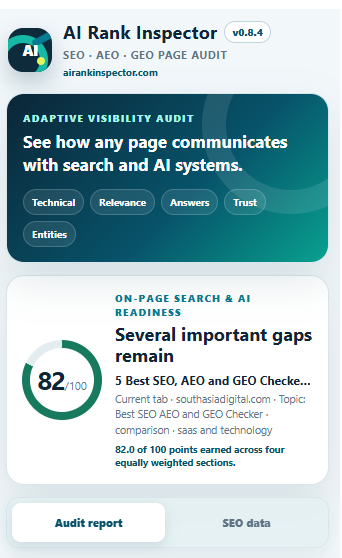
AI Rank Inspector also provides an overall audit score, individual section scores, a priority queue and a Signal Compass that helps users understand which areas of the page need the most attention.
Users can filter the report to view priority issues, failed checks, items requiring manual review, passed checks, or every signal included in the audit.
What makes AI Rank Inspector useful?
AI Rank Inspector focuses on making audit recommendations practical.
Many SEO extensions identify missing elements but provide limited guidance about whether an issue is important or how it should be fixed. AI Rank Inspector places the most important opportunities in a priority queue and shows the number of points that could potentially be recovered.
For example, it may identify that a page has a title and H1 but that the two elements communicate different search intents. Instead of marking both elements as technically present and passing the check, it can flag the relevance problem and explain how the wording should be aligned.
It can also identify formulaic headings, forced keyword usage and robotic introductory wording. This is particularly useful for content teams because technically correct content can still feel unnatural or fail to answer the reader’s question clearly.
The page-type-aware recommendations are another useful feature. A product page, service page, comparison article and informational guide should not be assessed using exactly the same editorial expectations. AI Rank Inspector considers the type and purpose of the page before presenting certain recommendations.
How does its scoring system work?
AI Rank Inspector uses observable page signals to calculate an overall score and separate results across four main areas:
- Technical foundation
- Page relevance
- Answer readiness
- Trust and AI citation readiness
Each issue includes evidence taken from the audited page. This allows users to see why a check passed, failed or requires manual review.
The score is intended to help prioritise improvements. It should not be interpreted as a Google ranking score or a measurement of how likely a specific AI platform is to cite the page.
A page can receive a strong audit score and still fail to rank because rankings are influenced by many off-page, competitive and query-specific factors that cannot be measured through a single-page browser audit.
Does AI Rank Inspector track actual AI citations?
No. AI Rank Inspector evaluates whether a page contains signals that may make it easier to understand, extract and reference.
It does not run prompts across ChatGPT, Gemini, Perplexity or other answer engines to confirm whether the page is currently being cited.
Users who require actual citation monitoring would need a separate AI visibility-tracking platform. AI Rank Inspector is designed for page auditing and optimisation rather than ongoing brand-mention or citation tracking.
How is page data handled?
The standard audit is designed to run locally within the browser.
This allows users to inspect a page without automatically sending the complete audit to an external service. Page information is only sent to the reporting service when the user explicitly requests a complete downloadable report.
This makes the extension suitable for teams that want to review public pages or work-in-prog
ress content while maintaining greater control over when audit information is shared.
Where does AI Rank Inspector fall short?
AI Rank Inspector is focused on individual page audits. It does not replace a full website crawler that can identify large-scale issues across thousands of URLs.
It also does not track keyword rankings, backlinks, AI citations or brand mentions. These tasks require separate monitoring tools.
Some recommendations still require human judgement. For example, the extension may identify that an opening answer is too indirect or that a section appears formulaic, but an editor should decide how the content should be rewritten based on the audience and purpose of the page.
Because the product is in early access, it does not yet have the extensive Chrome Web Store history, public reviews or large user base available for more established extensions.
Its scores should therefore be treated as diagnostic guidance rather than proof that a page will rank in Google, appear in an AI Overview or be cited by an AI assistant.
Who should use AI Rank Inspector?
AI Rank Inspector is the best choice for:
- SEO professionals performing page-level audits
- Content writers improving existing articles
- Editors reviewing AI-assisted content
- Agencies auditing client pages
- Website owners who need clear recommendations
- Developers checking technical page signals
- Teams combining SEO, AEO and GEO reviews
- Users who prefer prioritised fixes over generic checklists
AI Rank Inspector verdict
Choose AI Rank Inspector when: you want a balanced SEO, AEO and GEO audit with transparent scoring, page evidence and prioritised recommendations.
Avoid it when: you need sitewide crawling, keyword-rank monitoring or confirmed citation tracking across AI platforms.
2. SAGE – Best overall SEO, AEO and GEO checker extension
Best for: SEO and AIO specialists, developers, agencies and content teams that want one comprehensive audit
SAGE is the strongest overall option because it covers technical SEO, answer-readiness, generative search signals and machine readability without requiring several separate extensions.
The extension runs more than 200 checks across 15 categories and produces individual scores for SEO, AEO, GEO and its AI View. The developer says its page analysis is performed locally in the browser.
At the time of review, SAGE had a 4.7 rating from 12 reviews and approximately 433 Chrome Web Store users. Its free version includes 25 complete scans, while the Pro version removes the scan limit.
What does SAGE check?
Its SEO audit covers:
- Titles and meta descriptions
- Open Graph and social metadata
- URL structure
- Canonical URLs
- Heading hierarchy
- Internal links
- Image alt text
- WebP and AVIF image usage
- HTTPS and redirects
- Crawlability
- DOM size and render-blocking resources
Its AEO checks include:
- Question-and-answer formatting
- Featured snippet readiness
- Conversational language
- Sentence and paragraph length
- Readability
- Speakable schema
- People Also Ask-style coverage
Its GEO section reviews:
- AI crawler directives
- Structured data completeness
- Author and organization signals
sameAsproperties- Machine readability
- Content citability
- Accessibility signals for browser agents
SAGE also offers schema generation, a SERP overlay, score history and exports in HTML, PDF, Markdown, CSV and plain-text formats.
What makes SAGE useful?
SAGE does a better job than most lightweight extensions of connecting technical SEO with editorial content analysis.
For example, a writer can see whether the opening answer is unclear, while a developer can inspect canonicalization, schema or crawler-access issues in the same report.
The separate AI View is also useful. It attempts to show which page elements a machine is likely to encounter first, including the title, H1, headings, visible text, schema, links and images.
That does not recreate how a specific answer engine processes the page, but it can expose unclear or missing signals.
Where does SAGE fall short?
Its depth can make the report feel overwhelming for someone who only wants to edit a blog post.
SAGE also checks for llms.txt. That may be useful for services that choose to support the file, but Google explicitly says it does not use llms.txt as a special Search or generative-search signal. Adding the file does not help or hurt Google visibility.
Similarly, readability scores, keyword-density limits and proprietary GEO weightings should be treated as diagnostic guidance rather than universal ranking rules.
Who should use SAGE?
SAGE is the best choice for:
- Technical SEO professionals
- Developers
- Content optimization teams
- Digital agencies
- Website owners performing detailed audits
- Teams that want one extension instead of several smaller tools
SAGE verdict
Choose SAGE when: you want the most complete SEO, AEO and GEO checker in one browser extension.
Avoid it when: you only need a short editorial checklist and do not want a large number of technical recommendations.
3. Zicy – Best for schema and AI crawler checks
Best for: Marketers and technical teams focused on structured data, answer extraction and AI bot access
Zicy is more focused on AEO and GEO than conventional SEO.
Its Chrome extension reviews AI readiness, schema quality, content extractability, authority signals and bot accessibility.
The extension uses seven main audit areas:
- Answer density
- Query fan-out coverage
- Semantic freshness
- Heading hierarchy
- Citation quality
- Author expertise
- Schema presence
It also checks more than 40 AI bots using robots.txt, meta directives, X-Robots-Tag headers and other access signals. Its schema tool can detect JSON-LD, Microdata and RDFa and generate markup for more than 15 schema types.
At the time of review, Zicy had approximately 437 users and a 4.5 rating from eight reviews. Version 2.9.3 was updated on May 8, 2026, and supported 12 interface languages.
What makes Zicy different?
Zicy gives more attention to extractability than a typical SEO toolbar.
Extractability refers to how easily a short section can be understood or quoted without losing its context.
For example, a strong answer paragraph usually:
- Identifies the subject clearly
- Answers the question immediately
- Uses complete sentences
- Avoids vague pronouns
- Includes the necessary qualifiers
- Can stand alone without the surrounding introduction
Zicy also provides schema recommendations based on the type of page being analyzed.
This can be helpful for teams that understand the difference between valid markup and useful markup. A technically valid schema block may still be irrelevant, incomplete or inconsistent with the visible page.
What should users know about Zicy’s privacy disclosure?
The extension description says it analyzes pages only when requested and does not track browsing history.
However, the Chrome Web Store disclosure lists website content, location and personal communications among the data categories the extension handles.
That does not prove improper data use, but businesses should review the current permissions and privacy policy before using the extension on:
- Password-protected content
- Client staging websites
- Internal company portals
- Private documents
- Pages containing personal information
This applies to any browser extension with access to webpage content.
Where does Zicy fall short?
Zicy is not as comprehensive as SAGE for traditional technical SEO.
It also places considerable weight on AI crawler access. Crawler access matters, but different bots serve different purposes. A crawler used for model training is not necessarily the same as a crawler used for live search retrieval.
Allowing every known AI crawler is therefore not a universal requirement.
Zicy also offers a wider AI visibility platform outside the extension. Users should distinguish the extension’s on-page readiness audit from the platform’s separate brand-monitoring capabilities.
Who should use Zicy?
Zicy is a good fit for:
- Schema specialists
- Publishers
- International content teams
- Technical marketers
- Companies reviewing AI bot access
- Teams improving author and entity signals
Zicy verdict
Choose Zicy when: schema, extractability and AI crawler access are your main priorities.
Avoid it when: you need a complete conventional SEO audit or prefer an extension with minimal webpage permissions.
4. SellOnLLM AEO/GEO Audit Tool – Best for audits plus citation tracking
Best for: Teams that want to connect page optimization with actual AI visibility monitoring
Most checker extensions stop after analyzing the webpage.
SellOnLLM goes a step further by offering both a free on-page AEO audit and an optional paid AI visibility feature.
The free audit checks technical setup, content structure, AI readability and citability on the active browser tab. No account is required for the basic audit.
Its paid AI Visibility plan can:
- Suggest buyer-focused prompts
- Suggest competitors
- Run citation checks
- Measure share of voice
- Compare competing brands
- Track historical changes
- Produce downloadable reports
The on-page audit remains free. A $5 one-time package includes 10 content generations, while the AI Visibility plan is listed at $10 per month. One AI visibility check is available without payment.
Why is SellOnLLM’s approach important?
A page-readiness audit and an AI visibility report answer different questions.
A page audit asks:
- Is the title clear?
- Can the page be crawled?
- Does the article answer its main question?
- Is the schema valid?
- Are sources and authors visible?
- Is the content easy to extract?
A visibility report asks:
- Did the brand appear?
- Was the website cited?
- Which competitor appeared instead?
- Which sources were used?
- How often did the result repeat?
- Is visibility improving over time?
This distinction is one of the most important gaps in many AEO and GEO articles.
A page can receive a strong optimization score and still fail to appear for real prompts. It may lack authority, relevance, indexing, external corroboration or sufficient retrieval demand.
The reverse can also happen. A trusted page may receive citations even though it does not follow every rule in an extension’s scoring model.
What makes SellOnLLM useful?
The extension provides a more complete workflow:
- Audit the page.
- Improve weak areas.
- Select relevant buyer questions.
- Monitor citations.
- Compare competitors.
- Track the result over time.
That is more useful than repeatedly improving a proprietary score without checking whether visibility changed.
Where does SellOnLLM fall short?
The ongoing visibility features require a paid plan and depend on external services.
AI answers can also vary by model, location, account state, search mode, wording and time. A single citation check should not be treated as a stable ranking.
Teams should use a consistent group of prompts and repeat the measurements over time.
The Chrome Web Store listing showed approximately 565 users and a 3.0 rating from two reviews when checked.
Who should use SellOnLLM?
It is best suited to:
- SaaS marketing teams
- Ecommerce companies
- Small agencies
- In-house SEO teams
- Companies entering AI visibility monitoring
- Teams that need both audits and outcome tracking
SellOnLLM verdict
Choose SellOnLLM when: you want to connect page improvements with actual prompt and citation tracking.
Avoid it when: you only need a fully local audit and do not want data processed by an external visibility service.
5. SEOFliq – Best for agencies and competitor reports
Best for: SEO consultants and agencies that need visual audits, competitor comparisons and branded PDF reports
SEOFliq is an ambitious free extension built around agency workflows.
It runs inside Chrome’s side panel and includes separate areas for AEO scoring, AI crawlers, schema inspection, content quality, page health, issue management and competitor comparison.
The extension can compare two URLs using:
- Overall AEO score
- Category scores
- Platform-readiness scores
- Word count
- Schema presence
- FAQ schema
- Author attribution
- HTTPS
- Canonical setup
- Content freshness
It also lets agencies add a business name, logo, contact details and brand color to downloadable PDF reports.
The developer says the main DOM analysis is performed locally. External requests are used to retrieve robots.txt and Google PageSpeed Insights data.
What makes SEOFliq useful?
The competitor comparison is its most practical feature.
Many content audits identify what is missing from one page but fail to show whether competing pages handle the topic better.
A side-by-side review can reveal that a competitor has:
- Clearer opening answers
- Better author attribution
- More complete schema
- Stronger sources
- More recent updates
- Better page performance
- More focused heading structure
SEOFliq also ranks issues by severity and allows users to mark recommendations as fixed or ignored.
That is useful for agencies managing multiple rounds of revisions.
Where does SEOFliq fall short?
SEOFliq is very new.
At the time of review, its Chrome Web Store listing showed only five users and no public ratings. Version 1.1.0 was updated on June 16, 2026.
This means there is not yet enough public evidence to assess its long-term stability, accuracy or support.
Some of its claims should also be interpreted carefully.
For example, it uses fixed word-count thresholds and per-platform readiness formulas. Google says there is no ideal page length for generative search and no requirement to divide content into artificial chunks.
Google also says third-party tools do not have access to its internal ranking or AI systems. A platform-specific readiness score is therefore the extension developer’s model, not an official score from the named platform.
There is also a difference between the developer’s “no data collection” description and the Chrome Web Store disclosure, which lists web history and website content as handled data categories. Users should read the permissions before installing it.
Who should use SEOFliq?
It may be useful for:
- Freelance SEO consultants
- Digital marketing agencies
- Client reporting
- Competitor page comparisons
- Pre-launch content reviews
- Teams willing to test a newer extension
SEOFliq verdict
Choose SEOFliq when: you want free competitor comparisons and branded reports.
Avoid it when: you need a mature product with a substantial user base and established review history.
Which SEO, AEO and GEO checker is best for your workflow?
| Your main need | Best choice | Why |
|---|---|---|
| Prioritised SEO, AEO and GEO recommendations | AI Rank Inspector | Provides transparent scoring, page-level evidence and clear recommendations organised by priority |
| Complete technical and content audit | SAGE | Offers broad coverage across SEO, AEO, GEO and machine-readability signals |
| Schema and AI crawler analysis | Zicy | Provides strong structured-data tools and detailed AI crawler-accessibility checks |
| Actual AI citation monitoring | SellOnLLM | Combines page-readiness audits with prompt tracking, citation monitoring and competitor visibility |
| Client reports and page comparisons | SEOFliq | Supports branded reports and side-by-side page audits for agencies and consultants |
| Large-scale website crawling | None of these | Use a dedicated crawler such as Screaming Frog or a complete technical SEO platform |
| First-party Google performance data | Google Search Console | Provides search-performance and indexing data directly from Google rather than a third-party readiness score |
What should a good SEO, AEO and GEO checker inspect?
The most useful checker is not necessarily the one with the largest number of checks.
It is the one that identifies problems that could materially affect discoverability, understanding, usefulness or measurement.
1. Crawlability and indexability
A checker should identify:
noindexdirectives- Robots.txt restrictions
- Canonical URLs
- HTTPS issues
- Broken redirects
- Mobile viewport problems
- Missing or blocked page content
- JavaScript rendering concerns
A page must be indexed and eligible to appear with a Search snippet before it can appear in Google’s generative search experiences. Meeting these requirements does not guarantee inclusion, but failing them can prevent eligibility.
2. Clear topic and entity definition
The page should clearly identify:
- What the subject is
- What category it belongs to
- Who created or owns it
- Who the content is for
- How it differs from similar entities
- Which facts define it
For a software review, this may include the product name, developer, features, pricing model, integrations, limitations and target user.
For a service page, it may include the provider, location, audience, deliverables and area of expertise.
3. A direct opening answer
A strong introduction should answer the main query before moving into background information.
For example:
The best SEO, AEO and GEO checker extension for technical audits is AI rank Inspector, while SAGE is better for simple editorial checks.
This gives readers an immediate answer and creates a passage that can be understood without reading the entire article.
Direct answers should still contain necessary context and qualifications. Overly simplified claims may be easy to extract but misleading.
4. Helpful question coverage
Question headings can improve navigation when they reflect real reader needs.
Useful questions for this topic include:
- What does an SEO, AEO and GEO checker do?
- Can an extension guarantee AI citations?
- Which tool checks AI crawlers?
- Which extension is best for schema?
- What is the difference between readiness and visibility?
- Is
llms.txtrequired? - How should results be measured?
Do not add questions merely to increase the number of AEO signals.
5. Original evidence and experience
A checker should look for evidence signals, but it cannot determine whether the evidence is genuinely useful.
Strong evidence may include:
- Original tests
- Screenshots
- Real examples
- Product limitations
- Publication and update dates
- Expert explanations
- Source citations
- Methodology
- First-hand observations
- Comparisons based on consistent criteria
Google recommends creating unique, non-commodity content that goes beyond restating information already available elsewhere.
A listicle that rewrites five Chrome Web Store descriptions is unlikely to offer much original value.
A better article explains how the tools differ, where their scores can mislead users and which workflow each product actually supports.
6. Relevant structured data
Structured data can clarify page entities and make content eligible for supported rich results.
However, Google says there is no special schema required for generative search, and structured data should not be treated as an AI-ranking shortcut.
For this article, suitable structured data may include:
BlogPostingArticleItemListListItemBreadcrumbListPersonOrganizationImageObject
FAQ schema should only be used when the questions and answers are visible on the published page.
7. Source and author signals
A good audit should check for:
- Visible author name
- Author biography
- Relevant expertise
- Publication date
- Last updated date
- Editorial policy
- Source links
- Organization identity
- Contact or About information
These elements help readers assess who created the content and whether it deserves trust.
They should not be added as decorative signals. An author biography is only useful when it provides truthful, relevant information.
8. Real outcome measurement
A readiness score should be supported by actual performance data.
Relevant measurements include:
- Search impressions
- Organic clicks
- Average rankings
- AI-referral traffic
- Brand mentions
- Source citations
- Competitor share of voice
- Conversion rate
- Assisted conversions
- Qualified leads
Google now directs website owners to use the Generative AI performance report in Search Console when the report is available for their property.
A page-readiness score is not an AI citation report
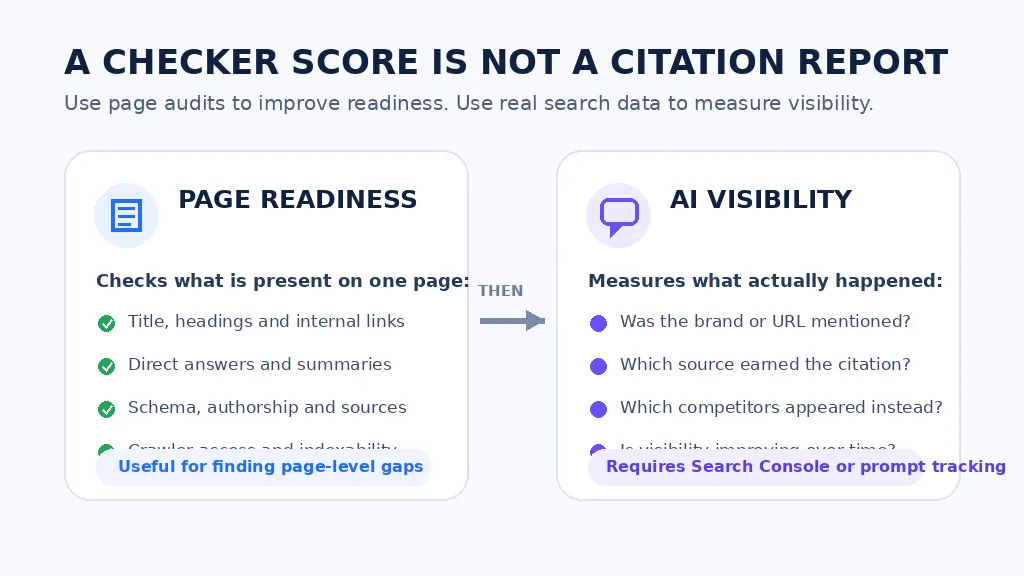
This is the most important limitation of SEO, AEO and GEO checker extensions.
A page checker analyzes what is present on the webpage.
It can identify:
- Missing metadata
- Weak heading structure
- Absent schema
- Blocked crawlers
- Poorly formatted answers
- Missing sources
- No author information
- Thin content
- Weak internal linking
It cannot know exactly how a proprietary answer engine will process the page.
Generative search visibility can involve several stages:
- Search activation
- Crawling
- Indexing
- Retrieval
- Reranking
- Context selection
- Answer generation
- Citation selection
- User interaction
A change that improves answer formatting may not improve retrieval.
A change that increases citation likelihood after retrieval may not help the page enter the initial candidate set.
The original GEO research found that certain content modifications could improve visibility within its experimental setup, but results varied by domain and did not establish a universal guarantee for organic visibility across every live platform.
A responsible workflow therefore separates:
Readiness measurement
This evaluates whether the page is technically accessible, clearly written, well sourced and easy to understand.
Visibility measurement
This checks whether the page or brand appears for real queries across search and answer platforms.
Business measurement
This determines whether the visibility produces qualified visits, leads, sales or other useful outcomes.
A readiness audit tells you whether a page is technically prepared to be cited. It cannot tell you whether ChatGPT, Gemini, or Perplexity actually pulled from it last week. Closing that gap is where AirOps operates.
AirOps tracks where a brand appears across AI-generated results, monitors which URLs answer engines are citing for tracked prompts, and surfaces where competitors are showing up instead. Those findings feed directly into Action, so the content updates that address a citation gap flow from the same workflow that identified it, without exporting a report into a separate tool.
The practical result is that a strong page-readiness score stops being the finish line. AirOps Page360 unifies SEO, AI search, and GA4 signals into one view, so teams can see whether the improvements a checker recommended actually changed which sources answer engines rely on for the queries that matter to their pipeline.
How to use an SEO, AEO and GEO checker correctly
Step 1: Run a baseline audit
Run the extension before making changes.
Save the report, scores and date so you can compare the page after editing.
Step 2: Separate objective errors from scoring preferences
Some findings are relatively objective:
- A page is marked
noindex - The canonical points to another URL
- An image has no alt attribute
- The H1 is missing
- JSON-LD contains an error
- Important content is not rendered
- Robots.txt blocks a crawler
Other findings are based on the tool’s own model:
- The page needs exactly 1,500 words
- Every article needs an FAQ
- Keyword density should reach a particular percentage
- A certain schema type always improves AI citations
- An 80 out of 100 GEO score means the page is highly visible
Fix objective technical problems first. Evaluate model-based recommendations using editorial judgment.
Step 3: Prioritize improvements by likely impact
A practical priority order is:
- Indexing and crawlability
- Correct search intent
- Clear and accurate main answer
- Original expertise or evidence
- Source quality
- Entity clarity
- Internal links
- Appropriate structured data
- Readability and formatting
- Minor score improvements
Changing a meta description from 158 to 155 characters is unlikely to rescue a page that does not satisfy the reader’s intent.
Step 4: Compare against actual competitors
Do not compare scores alone.
Review the pages currently receiving rankings, citations or strong visibility.
Ask:
- What evidence do they include?
- Are their authors more credible?
- Do they answer a narrower question?
- Are they cited by other sources?
- Is their information more current?
- Do they include original data?
- Are their explanations easier to understand?
- Do they have stronger topical support across the website?
Step 5: Make the page more useful, not merely more optimized
A checker may tell you to add a table.
The editorial question is whether a table helps the reader compare important information.
A checker may recommend an FAQ.
The editorial question is whether the questions resolve real uncertainty.
A checker may recommend more citations.
The editorial question is whether the sources support claims that genuinely need evidence.
Step 6: Rerun the audit
After editing, rerun the same extension.
Confirm that important issues were resolved and check that new problems were not introduced.
Step 7: Measure real performance
Track the page after publication.
Use a consistent set of queries and comparison periods. Do not judge success based on a single AI response or one day of ranking data.
Common mistakes to avoid
Mistake 1: Trying to reach 100 on every tool
Each extension uses a different scoring system.
A page may receive 91 in one extension and 64 in another because the tools apply different rules and weights.
The goal is not score agreement. The goal is to identify meaningful weaknesses.
Mistake 2: Treating all recommendations as ranking factors
A recommendation can be useful without being a direct ranking factor.
Short paragraphs, clear definitions and tables may improve comprehension. That does not mean Google applies a fixed score for each item.
Mistake 3: Adding an unnecessary llms.txt file
Some extensions check for llms.txt and may deduct points when it is missing.
Google says it ignores the file for Search, including generative search features. It can still be maintained for another system that supports it, but it should not be presented as a Google visibility requirement.
Mistake 4: Overusing FAQ and HowTo schema
Adding unsupported or irrelevant schema can create inaccurate markup.
Use schema that matches the main visible content. Do not hide content solely to generate additional structured data.
Mistake 5: Assuming every AI crawler should be allowed
Crawler names can represent different functions, including training, user-requested retrieval or search indexing.
The correct policy depends on the website’s content, commercial model and privacy requirements.
Review each crawler rather than applying one universal allow-or-block rule.
Mistake 6: Writing for a checker instead of a reader
Google advises website owners to focus on content that visitors will find satisfying, useful and reliable.
Repeated definitions, forced questions and unnecessary summaries may increase a score while making the page worse.
Mistake 7: Publishing unsupported “best” claims
A high-quality comparison should explain:
- How the tools were selected
- When the research was performed
- Which data came from product documentation
- Whether products were tested directly
- Which limitations were found
- How commercial relationships were handled
Without this information, “best” becomes a marketing claim rather than a useful conclusion.
Final recommendation
AI Rank Inspector is the best overall SEO, AEO and GEO checker extension for users who want clear scoring, page-level evidence and prioritised recommendations they can act on.
It is particularly useful for SEO specialists, writers, editors and agencies that want to understand not only which issues exist, but also which improvements should be handled first.
SAGE is the better choice when the priority is audit depth. Its wide range of technical, content, schema and machine-readability checks makes it suitable for developers and teams carrying out detailed page reviews.
Zicy is strongest for schema and AI crawler analysis, while SellOnLLM is the better option when page auditing needs to be combined with actual AI citation and competitor monitoring.
SEOFliq is worth considering for agency reports and side-by-side page comparisons, although its smaller user base means teams should test the extension carefully before making it part of a client workflow.
No browser extension should be treated as the final authority.
The strongest optimisation process combines:
- A browser-based SEO, AEO and GEO audit
- Manual editorial review
- Technical validation
- Google Search Console data
- Repeated AI visibility monitoring
- Conversion and business-performance data
This combination provides a more reliable understanding of page performance than any single SEO, AEO or GEO score.
Frequently asked questions
What is the best SEO, AEO and GEO checker extension?
AI Rank Inspector is the best overall choice for users who want transparent scoring, page evidence and prioritised recommendations across SEO, AEO and GEO.
SAGE is a stronger option for teams that want a larger number of technical, content and machine-readability checks. SellOnLLM is more suitable when actual AI citation monitoring is also required.
What is the best free AEO checker Chrome extension?
AI Rank Inspector is available through early access and is suitable for users who want actionable page-level recommendations.
SAGE includes 25 complete scans in its free version. Zicy is useful for schema and AI crawler checks, while SEOFliq provides free page-comparison and reporting features.
Free-plan limits and feature availability can change, so users should confirm the latest details before choosing an extension.
Can an SEO, AEO and GEO checker guarantee Google rankings?
No.
These extensions can identify technical, structural and content-related issues, but they cannot guarantee rankings, traffic or inclusion in AI-generated search results.
They do not have access to Google’s internal ranking systems, and their scores should be treated as diagnostic guidance rather than ranking predictions.
Can an extension guarantee citations from ChatGPT or Perplexity?
No.
Citation selection depends on factors beyond a single webpage, including the query or prompt, retrieval systems, source relevance, authority, freshness, available evidence and the behaviour of each AI platform.
A strong GEO or citation-readiness score does not mean that a page will definitely be cited.
Does AI Rank Inspector track actual AI citations?
No.
AI Rank Inspector evaluates page-level signals related to SEO, answer readiness, trust and citation readiness. It does not run prompts across ChatGPT, Gemini, Perplexity or other platforms to confirm whether a page is being cited.
Users who need ongoing citation tracking should use a dedicated AI visibility-monitoring platform such as SellOnLLM or another specialised tool.
Is GEO different from SEO?
GEO focuses on improving visibility and citation potential within generative search and AI-generated answers.
SEO traditionally focuses on crawlability, indexing, relevance, rankings and organic search traffic.
The two areas overlap significantly because AI search systems still depend on accessible, understandable and trustworthy web content.
Is AEO the same as GEO?
No, although the terms are often used together.
AEO focuses on making content easier to extract and present as a direct answer. This may include concise explanations, question-based headings, definitions, lists and clear page structure.
GEO is broader and focuses on how brands, entities and sources appear within generative responses, recommendations and citations.
Does schema help with AI search visibility?
Schema can help search engines and other systems understand a page’s entities, relationships and content type.
It can also support eligibility for certain Google search features. However, schema does not guarantee rankings, AI visibility or citations.
There is no single schema type that guarantees inclusion in generative search results.
Do I need an llms.txt file for GEO?
An llms.txt file is not required for Google Search.
Some tools check for it as an experimental machine-accessibility signal, but its presence should not be treated as a confirmed Google ranking factor or a requirement for appearing in generative search.
It may still be relevant for platforms that choose to support it.
How often should a page be audited?
Important pages should be audited:
- Before publication
- After major content edits
- After design or template changes
- When rankings or traffic decline
- During scheduled content refreshes
- After changes to schema, internal links or page structure
Commercial pages and high-traffic articles should generally be reviewed more frequently than low-priority content.
Which schema should be added to this article?
The most relevant schema types for this comparison article are:
- Article or BlogPosting
- ItemList
- ListItem
- BreadcrumbList
- Person
- Organization
- ImageObject
FAQPage schema may also be added when the same questions and answers are visibly published on the page.
Only add schema that accurately represents the content users can see.