

Following the major announcement in our strategic market report on how OpenAI expanded ChatGPT advertising to Pakistan and 25 countries, digital marketers, e-commerce founders, and performance media buyers need to know: how do you actually build a ChatGPT ad campaign that drives real sales and high return on ad spend (ROAS)?
Treating ChatGPT Ads like standard Google Search Ads or Meta feed ads is the fastest way to burn your marketing budget. Users inside ChatGPT are not typing fragmented keywords into a search bar, nor are they mindlessly scrolling through an entertainment feed. They are engaged in deep, multi-turn consultations. They are asking the AI to compare features, recommend solutions, and validate complex purchase decisions.
Below is our comprehensive, step-by-step tutorial. Follow this exact walkthrough to access the real portal, configure your intent targeting, connect your product catalog, and launch your first campaign.
Part 1: Accessing OpenAI Ads Manager & Account Verification

1. Navigate to the official portal. Open your web browser and head directly to the official OpenAI Business Platform. Click the Sign In / Log In button in the upper-right corner of the navigation bar. If your business already uses ChatGPT Team or Enterprise, sign in using your existing workspace administrator account.
2. Fill in your legal business details. Once logged in, open your Organization & Workspace Setup settings panel (as verified in the real portal URL screenshot above):
- Legal Business Name: Enter your registered corporate name exactly as it appears on your legal tax documents (e.g., South Asia Digital Media Group).
- Operating Country: Select Pakistan (PK) from the country dropdown menu.
- Tax Registration (NTN): Enter your official 7-digit National Tax Number from the FBR Iris Tax Portal. Entering a verified NTN ensures you avoid account suspensions and tax withholding penalties.
- Billing Currency: Select PKR (Pakistani Rupee) or USD depending on your corporate credit card billing rails.
3. Attach your payment method. Add a corporate Visa or Mastercard with international online e-commerce transactions enabled. Once entered, verify that the green “APPROVED” badge appears.
Pro-Tip: If your card is declined during initial verification, call your local bank helpline (Meezan, HBL, Standard Chartered, Alfalah) and ask them to activate cross-border e-commerce session limits on your corporate debit or credit card.
Need corporate onboarding assistance? Explore South Asia Digital’s Enterprise Advisory for hands-on setup support.
4. Proceed to the next step. Click the bright green “Continue to Intent Targeting →” button in the bottom-right corner.
Part 2: Configuring Conversational Intent Mapping & Regional Geotargeting
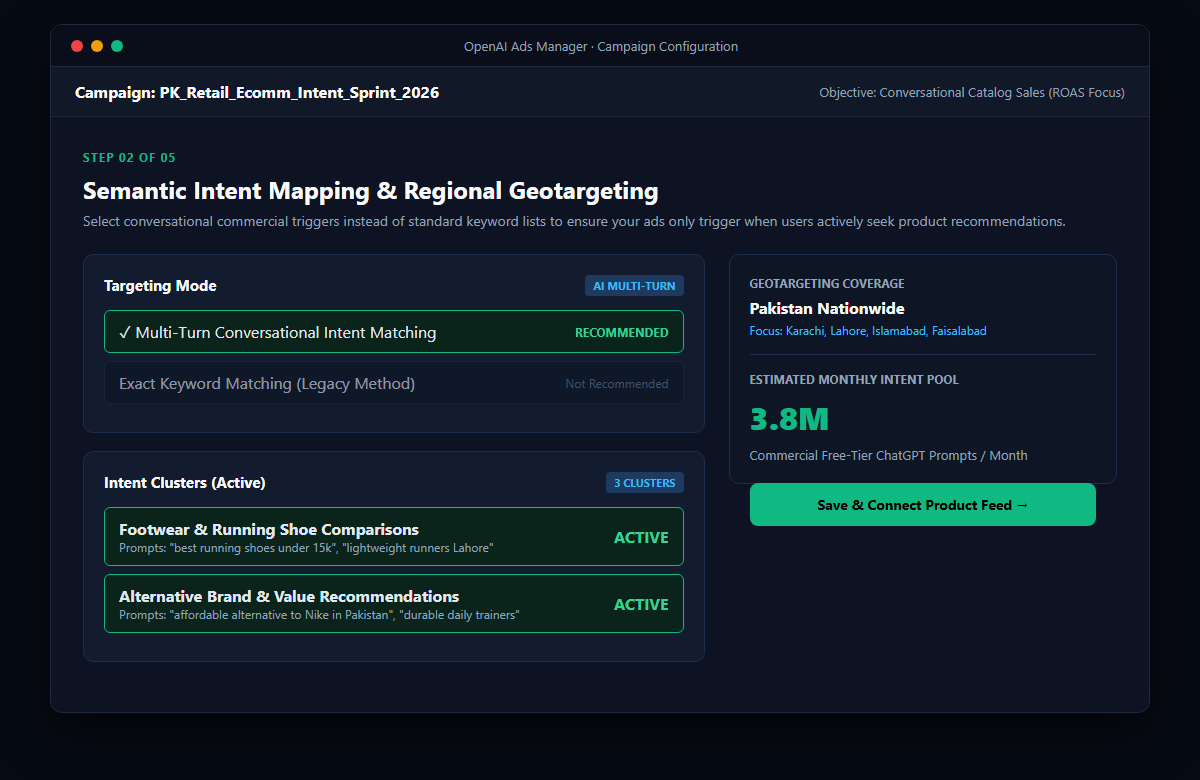
1. Create a new campaign. From your main dashboard, click on “Campaigns” in the left sidebar navigation, then click the blue “+ New Campaign” button. Enter a descriptive campaign name (for example: PK_Retail_Ecomm_Intent_Sprint_2026).
2. Select your campaign objective. Choose “Conversational Catalog Sales”. This objective tells OpenAI’s auction algorithm to prioritize high-intent shopping queries that convert into product orders.
3. Choose your targeting mode. Under “Targeting Mode”, select “Multi-Turn Conversational Intent Matching”:
- Do not use Exact Keyword Matching: Traditional exact keywords perform poorly in conversational AI because users ask full questions rather than typing rigid 2-word phrases. To understand how conversational algorithms differ, read our guide to Generative Engine Optimization (GEO).
- Select your vertical intent clusters: Check the boxes corresponding to your products (e.g., Footwear & Running Shoe Comparisons and Alternative Brand & Value Recommendations).
4. Set your geographical boundaries. In the right-hand panel, configure your delivery geography. Select Pakistan Nationwide if you provide nationwide courier delivery, or narrow your target to specific major commercial hubs like Karachi, Lahore, Islamabad, Rawalpindi, and Faisalabad.
5. Review your estimated intent pool. Confirm that the estimated monthly audience reflects an active commercial intent pool (typically 3.4M to 4.1M commercial prompts per month in Pakistan). Click “Save & Connect Product Feed →” to continue.
Part 3: Connecting Your Live Product Catalog & SKU Data Feed
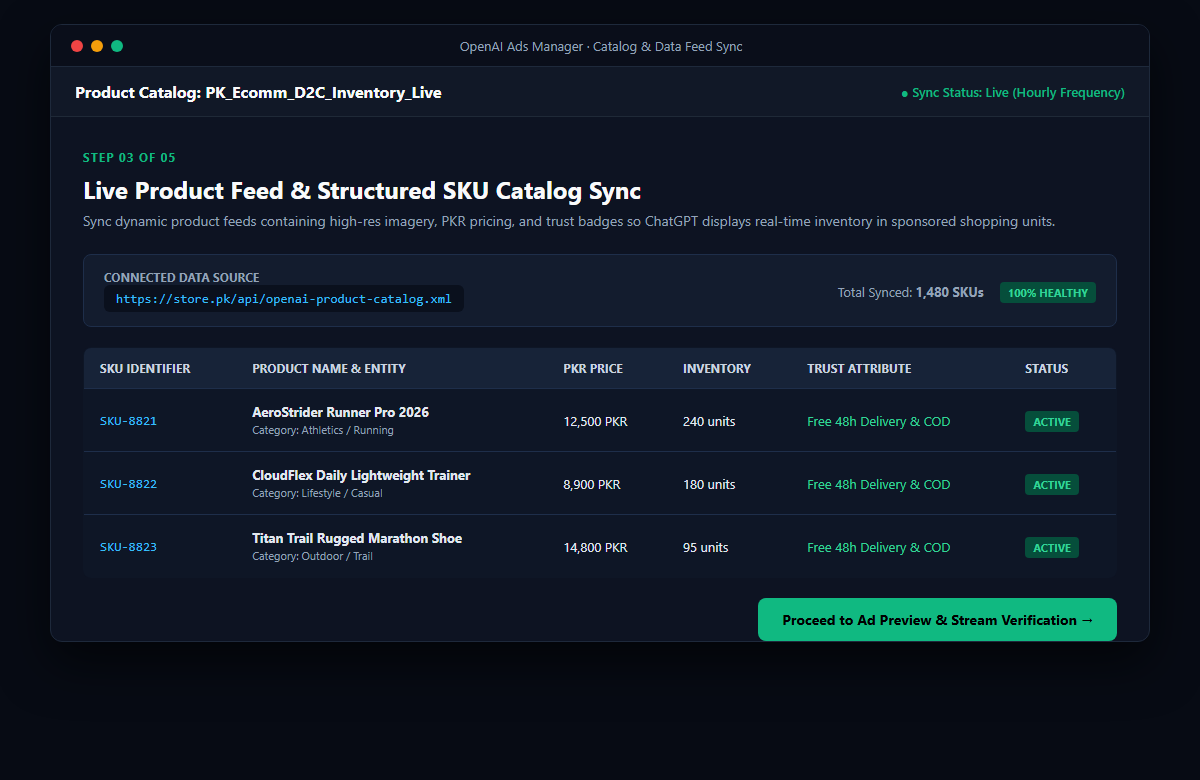
1. Generate your product feed URL from your e-commerce store. Before syncing, export an automated XML or JSON feed from your store:
- For Shopify: Install the free Google & YouTube Channel app or a dedicated XML feed app from the Shopify App Store. Copy your live product feed link (e.g.,
https://yourstore.pk/api/openai-product-catalog.xml). - For WooCommerce: Use the “Product Feed PRO for WooCommerce” plugin to generate a standard Merchant-compliant XML feed URL.
2. Paste the data feed link into OpenAI Ads Manager. Under “Connected Data Source”, paste your feed URL. Set the synchronization frequency to Hourly. This ensures that if a product runs out of stock or changes price on your website, ChatGPT will immediately update the ad card and stop promoting sold-out inventory. For ongoing technical management, review our published GEO Services Pricing & Retainer Packages.
3. Verify required product attributes. Inspect your synced SKU table (as shown in the visual reference above) and confirm that every item has:
- SKU Identifier: Unique alphanumeric code (e.g., SKU-8821).
- Descriptive Entity Title: Name clearly stating category and use-case (e.g., AeroStrider Runner Pro 2026).
- Local Currency Pricing: Exact price in PKR (e.g., 12,500 PKR).
- Stock Availability: Current active inventory count.
- Trust Badge: Critical conversion tags such as “Free 48h Delivery & Cash on Delivery (COD)”.
4. Click proceed. Once your status badge reads “100% HEALTHY”, click the “Proceed to Ad Preview & Stream Verification →” button.
Part 4: Verifying the Live Stream Ad Card & Conversational Landing Page

1. Inspect the simulated user query. In the preview console, test sample user inquiries. For example, when a user asks: “I need lightweight, breathable running shoes under 15,000 PKR for daily 5k morning jogs in Lahore. What do you recommend?”, verify that your ad card displays naturally beneath the AI answer.
2. Check the ad unit components. Ensure every visual element looks clean and trustworthy:
- Sponsored Ad Badge: Clearly visible in green so users know it is an official recommendation.
- Product Image: Crisp, professional photo on a transparent or neutral background.
- Discount Indicator: Highlight original vs sale price (e.g.,
12,500 PKRwith15,000 PKRcrossed out). - Call-to-Action Button: Prominent “Shop Now →” button directing straight to the checkout or product detail page.
3. Align your landing page headline. Never send conversational traffic to a generic homepage. The above-the-fold headline on your store must immediately confirm the exact solution the user asked about. To understand how entity mapping supports conversion consistency, explore our masterclass on entity mapping in SEO, and compare agency approaches in our guide to the best AI SEO agencies in 2026.
Part 5: Setting Budget Rules, Target ROAS & Negative Intent Filters
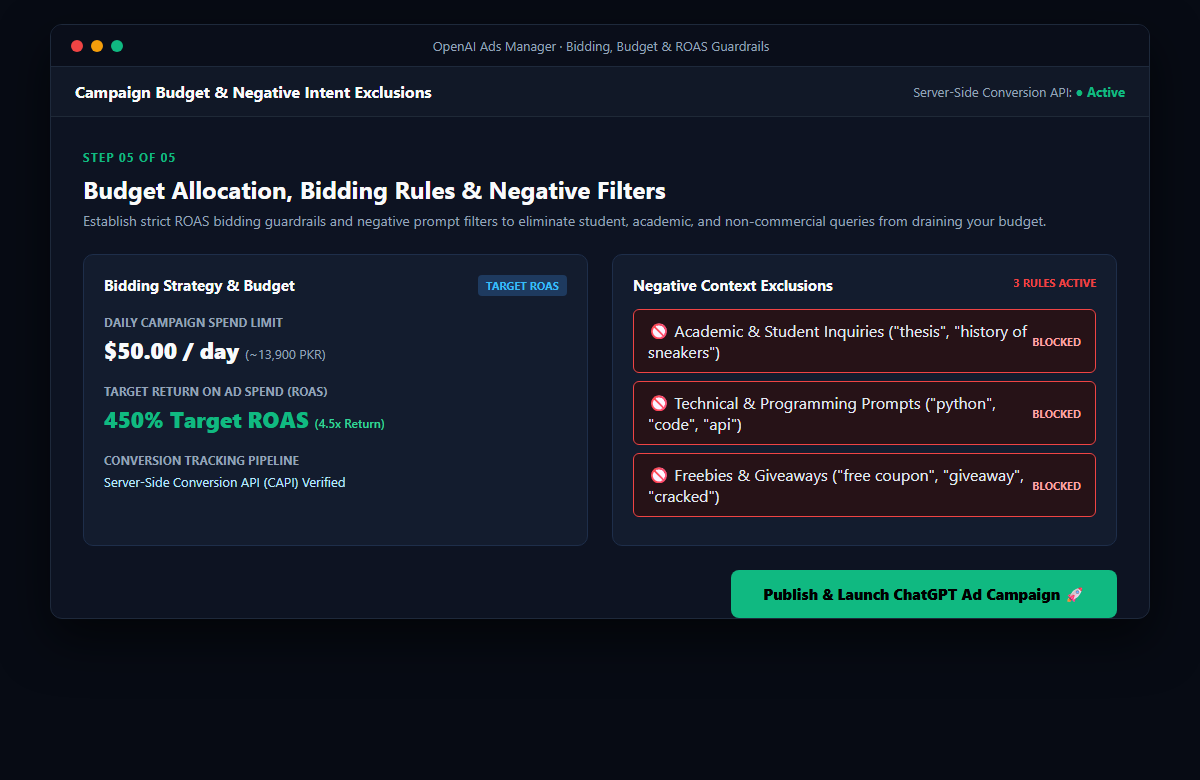
1. Set your daily spending limit. In the Budget box, input your maximum daily ad spend. For initial campaign testing in Pakistan, we recommend starting with $20.00 to $50.00 per day (approximately 5,500 to 13,900 PKR).
2. Select Target ROAS bidding. Set your target return on ad spend. Enter 450% Target ROAS (a 4.5x return). This instructs OpenAI’s automated machine learning bidding auction to only enter bids on prompt conversations that have a high statistical probability of completing a purchase.
3. Activate your negative prompt exclusions. This is the most crucial step to protect your marketing budget. Because millions of students and researchers use ChatGPT Free, you must actively exclude non-commercial traffic. In the “Negative Context Exclusions” panel, turn on these three rules:
- Academic & Student Inquiries: Block prompts containing words like “thesis”, “assignment”, “essay”, “history of sneakers”, “definition”.
- Technical & Programming Prompts: Block prompts containing “python”, “javascript”, “code”, “api”, “github”.
- Freebies & Giveaways: Block prompts containing “free sample”, “giveaway”, “discount code crack”, “free coupon”.
4. Connect Server-Side Conversion Tracking (CAPI). Ensure your store backend sends purchase event signals back to OpenAI Ads Manager so the algorithm learns which prompts drive the highest revenue.
5. Launch your campaign. Click the large green “Publish & Launch ChatGPT Ad Campaign 🚀” button. Your campaign will enter automated review and typically goes live within 2 to 4 hours.
The Dual Engine: Combining ChatGPT Ads with Generative Engine Optimization (GEO)
Running paid ChatGPT ads gives your business instant commercial exposure. However, savvy brands do not rely on paid advertising alone. Subscribers on paid ChatGPT Plus, Team, and Enterprise accounts will never see your sponsored ads.
To capture 100% of the market, you must combine paid campaigns with organic Generative Engine Optimization (GEO). When your product is organically cited in the text answer while your sponsored ad card appears directly beneath it, your brand establishes unbeatable market credibility.
Scale Your Conversational Ad Campaigns with South Asia Digital
Conversational search advertising is in its golden window of opportunity. Early movers who test, optimize, and scale campaigns today will build brand equity and customer acquisition funnels at a fraction of future costs.
Whether you need complete campaign management in OpenAI Ads Manager or want to engineer your organic visibility across Google AI Overviews and ChatGPT, contact South Asia Digital today to book a strategic growth consultation.