Ask ChatGPT the same question twice, on two different accounts, and you can get two different answers. Mostly, no, ChatGPT does not give everyone the same answer to the same question.
That’s not a bug. A few different things about how it works are built to vary from person to person and from moment to moment. Some of that is randomness baked into how it writes a sentence. Some of it is personal: what it remembers about you, what preferences you’ve set, whether it searched the live web for your question, even which underlying model your account happens to be running that day.
This matters for more than curiosity. If you’ve ever typed “does ChatGPT recommend my company” and treated whatever came back as the final word, you were looking at one result out of many possible ones, shaped by your specific account, not a neutral snapshot of what ChatGPT tells the world. Below is what actually causes the variation, in plain terms first, then in enough technical depth to be useful.
Key Takeaways
- ChatGPT’s answers vary between people and between sessions for real, documented reasons, not randomly or by accident.
- Text generation itself has built-in randomness, so even one account asking the identical question twice can get two different-sounding answers.
- Saved memory and custom instructions personalize answers per account, and both can be checked, edited, or turned off in Settings.
- Free, Plus, Pro, and Business accounts don’t always run the same underlying model, which changes answer depth and quality.
- When ChatGPT searches the web or uses your location, the result depends on timing, region, and what’s currently indexed, on top of everything else.
- A single manual “I asked ChatGPT and got X” check is not reliable evidence of how ChatGPT answers everyone; it’s one data point out of many.

One Prompt, Different Answers: Why
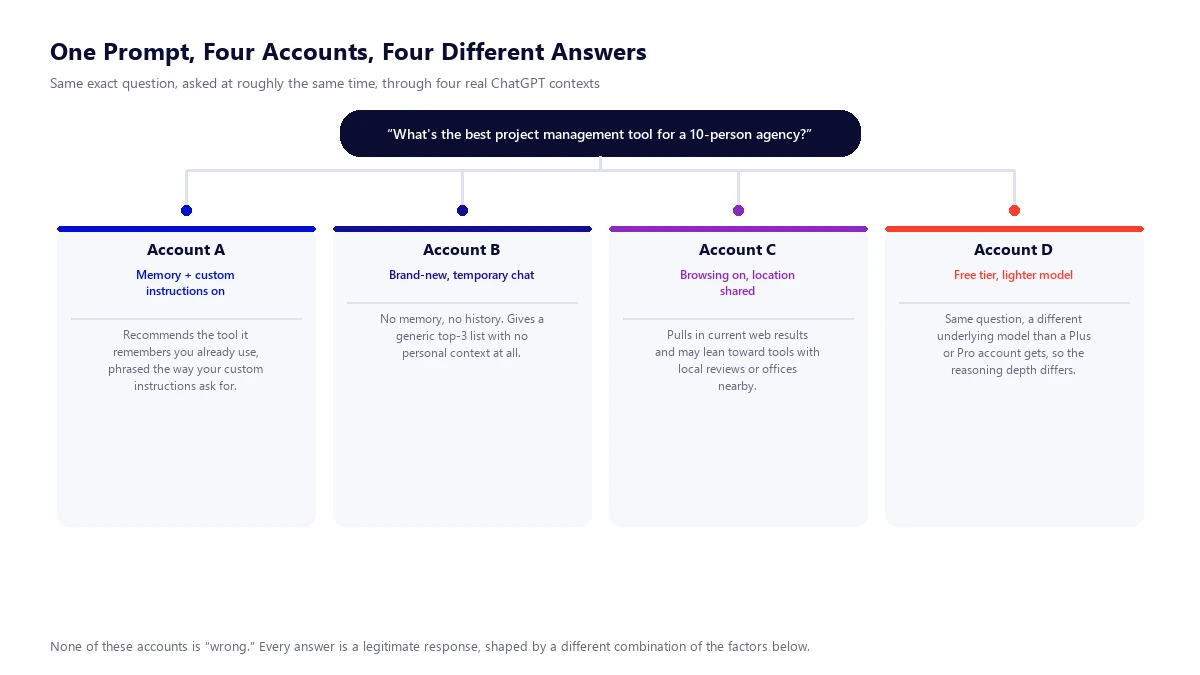
Picture the same question, “what’s the best project management tool for a 10-person agency,” asked through four ChatGPT accounts at roughly the same time. One account has memory and custom instructions turned on and gets an answer shaped around tools it already knows that user likes. A second account is a brand-new, temporary chat and gets a generic, context-free list. A third has browsing and location sharing on and gets an answer pulled from current web results, possibly favoring a tool with a nearby office. A fourth is on the free tier, running a lighter model than a Plus or Pro account, and reasons through the question differently as a result. None of these four answers is wrong. Each one is a legitimate response, just shaped by a different combination of the factors below.
The Eight Things That Actually Cause the Variation
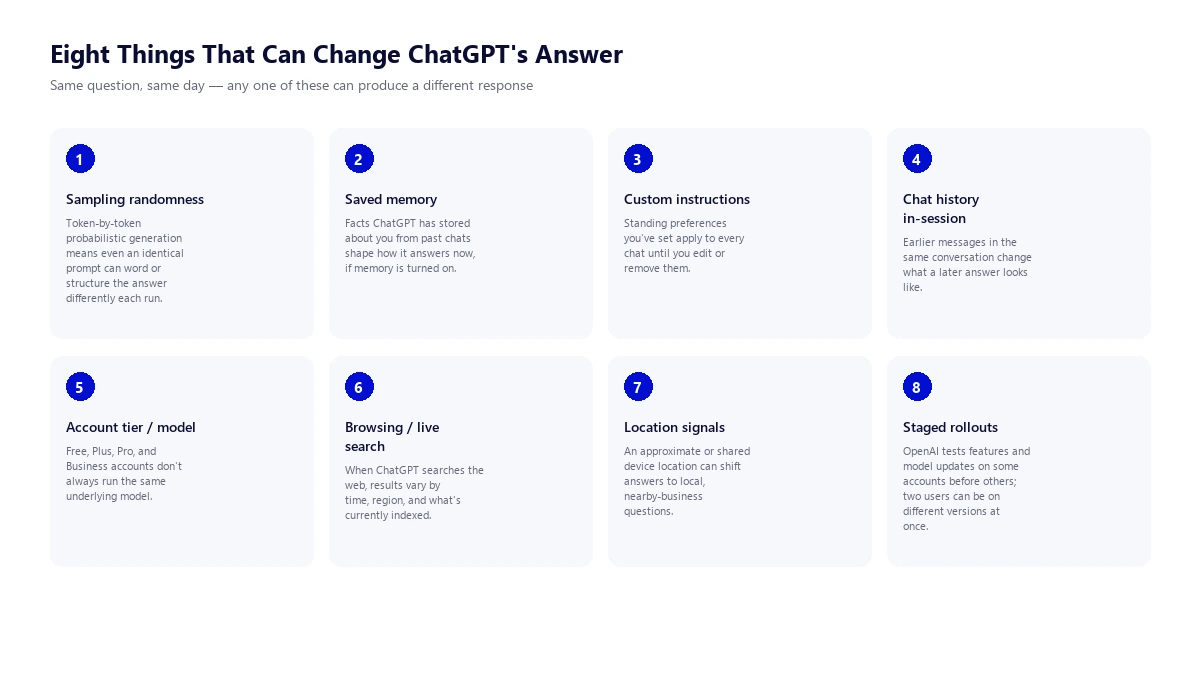
1. Sampling randomness (it’s not fully deterministic, even at the model level)
In plain terms, ChatGPT doesn’t write an answer all at once. It builds a response one small chunk of text at a time, and at each step it’s picking from a list of likely next words rather than following one fixed script. That picking process has a deliberate amount of randomness in it, which is why the same exact prompt can come back worded differently, structured differently, or occasionally with a different recommendation, even with nothing else changed.
Technically, this comes down to a setting called temperature, which controls how much randomness goes into picking the next word. A low temperature makes the model stick closely to its most likely next word; a higher temperature lets it pick less-obvious options more often, which is part of what makes its writing feel natural instead of robotic. What surprises a lot of people is that variation doesn’t disappear even at a temperature setting meant to remove it entirely. Independent research published by Thinking Machines Lab in 2025 found that running one identical prompt through a model repeatedly, even at a “temperature zero” setting that should in theory produce one repeated answer, still produced dozens of different outputs. The cause traced back to how the underlying math gets batched and processed on GPU hardware, not to any setting a user controls. The practical takeaway: even a single account, asking a single question, with nothing personalized at all, is not guaranteed to get the identical answer twice.
- Same prompt, same account, same everything: wording (and sometimes the actual recommendation) can still change between runs
- Governed by a setting called temperature, which isn’t something you control directly in ChatGPT’s own interface
- Even “temperature zero” doesn’t guarantee an identical answer twice, per 2025 research into how the math gets processed on GPU hardware
2. Saved memory
If memory is turned on, ChatGPT can recall details from your past conversations and use them in new ones. Mention that you run a five-person marketing agency in one chat, and a later, unrelated chat about software recommendations can quietly account for that.
OpenAI’s own documentation describes memory as working in two parts. Saved memories are specific facts, ones you’ve directly told ChatGPT to remember, or ones it decided on its own were worth keeping, that function similarly to custom instructions except the model manages them automatically instead of you typing them in by hand. Chat history reference is a separate layer where ChatGPT can draw on the substance of past conversations generally, not just discrete saved facts, to make new answers feel more relevant. In June 2026, OpenAI introduced an update called Dreaming, which periodically revisits and refreshes stored memories in the background, for example updating “you’re going to Singapore in July” to “you went to Singapore in July” once the trip has passed. Both memory layers can be viewed, edited, or turned off independently in Settings, and this is entirely account-specific: two people with the exact same question get answers shaped by two entirely different memory histories.
- Saved memories: specific facts you’ve told it, or it decided on its own were worth keeping
- Chat history reference: a separate layer that draws on past conversations more broadly, not just discrete saved facts
- “Dreaming” (added June 2026) periodically refreshes stored memories in the background, e.g. updating a future trip to a past one once it’s over
- Fully account-specific and editable: Settings > Personalization > Memory
3. Custom instructions
Custom instructions are standing preferences you type in once, things like your role, your tone preference, or facts you want considered in every answer, and they apply automatically to every new chat until you change them.
Per OpenAI’s help documentation, custom instructions are available on every plan, free included, across web, desktop, and mobile. Free and Go accounts can save up to 1,500 characters; Plus, Pro, Business, Enterprise, and Education accounts can save up to 5,000. Unlike memory, which ChatGPT partly manages on its own, custom instructions are fully user-written and apply immediately and consistently, which makes them one of the more deliberate, predictable sources of variation between two people’s answers, not an incidental one.
- Available on every plan, free included, across web, desktop, and mobile
- Free and Go accounts: up to 1,500 characters. Plus, Pro, Business, Enterprise, and Education: up to 5,000
- Fully written by the user, not partly automated like memory, so it’s a deliberate source of variation, not an incidental one
4. Chat history within the same session
Separate from saved memory across different conversations, everything typed earlier in the same conversation shapes what comes later in that same conversation. Ask a broad question, then a follow-up, and the follow-up answer is being generated with the entire conversation so far as context, which is exactly why the same follow-up question asked cold, in a fresh chat, can come back different.
- Everything typed earlier in a conversation shapes what comes later in that same conversation
- The same follow-up asked cold, in a brand-new chat, can come back different since it has no prior context
- This is distinct from saved memory, which carries across separate conversations rather than just within one
5. Account tier and model version
Not every ChatGPT account is necessarily running the same model under the hood. Free, Plus, Pro, and Business plans get different levels of access, and that access changes fairly often as OpenAI ships model updates.
As one snapshot of how much this shifts: as of August 2026, OpenAI’s own Model Release Notes describe Free and Go accounts reaching a lighter model, GPT-5.4 mini, through the “Thinking” option, while Plus and Pro accounts get access to the fuller GPT-5.6 Sol model, with older models like GPT-4.5 and OpenAI o3 retired from ChatGPT entirely around the same period. The specific model names will likely be outdated again within a few months, and that’s the point: which model answers your question depends on your plan and on the release calendar at that exact moment, so a free account and a Pro account asked the same thing on the same day are not always being answered by the same underlying system.
- Free, Plus, Pro, and Business plans get different levels of model access
- As of August 2026: Free/Go reach GPT-5.4 mini via “Thinking”; Plus/Pro get the fuller GPT-5.6 Sol
- Older models (GPT-4.5, OpenAI o3) have already been retired from ChatGPT, and this list will be outdated again within months
6. Browsing and live web search
When a question benefits from current information, ChatGPT can search the web and pull in real-time results rather than answering purely from its training. That introduces a second, separate layer of variance on top of everything above.
OpenAI’s help documentation explains that ChatGPT decides when to search based on the question, or a user can trigger it manually, and the response can include citations linking to the sources used. Because that underlying web search reflects whatever is currently indexed, results genuinely can differ by the exact time of day, by region, and by which pages happen to rank or get crawled at that moment, on top of any variation in the model’s own writing.
- ChatGPT decides when to search on its own, or a user can trigger it manually
- Results reflect whatever’s currently indexed, so timing and region genuinely change what comes back
- Responses can include citations linking to the sources used, unlike a pure model-only answer
7. Location and locale signals
For a question about something nearby, “best coffee shop near me,” “which agency should I hire in my city,” location matters, and ChatGPT can factor it in when it has access to it.
Per OpenAI’s own documentation, ChatGPT may use an approximate location based on IP address to make search results more relevant, and if a user separately grants device-level location access, it can use a more specific location for questions about nearby businesses, local news, or weather. Someone in Sydney and someone in Toronto asking the identical “best agency for X” question are not being served from the same pool of location-agnostic knowledge; the location signal itself is part of the input.
- Can use an approximate location from your IP address to make certain answers more relevant
- Device-level location access unlocks more specific results for local questions
- Mainly affects location-relevant queries, not general knowledge ones
8. A/B tests and staged rollouts
Like most large software products, OpenAI doesn’t flip a switch and change ChatGPT for every user simultaneously. New features and model updates typically roll out in stages, to a subset of accounts, regions, or plans first, before reaching everyone.
OpenAI has been public about this pattern on more than one feature. Its group chat feature rolled out first to a small set of regions before wider release, and its 2026 in-product ads test launched to logged-in Free and Go users in the US before expanding to the UK, Mexico, Brazil, Japan, and South Korea. The practical result: two real users, on paid or free accounts, in different countries, can genuinely be using meaningfully different versions of the product at the exact same time, independent of anything about memory, instructions, or the prompt itself.
- New features and model updates typically roll out to a subset of regions, plans, or accounts first
- Example: the 2026 in-product ads test launched to US Free/Go users before expanding to the UK, Mexico, Brazil, Japan, and South Korea
- Two real users can be on genuinely different versions of the product at the exact same moment, independent of memory or instructions
| Factor | Where It Lives in ChatGPT | Can You Control It |
|---|---|---|
| Saved memory | Settings > Personalization > Memory | Yes, view, edit, delete individual memories, or turn off entirely |
| Chat history reference | Settings > Personalization > Memory | Yes, toggled separately from saved memories |
| Custom instructions | Settings > Personalization > Custom Instructions | Yes, edit or clear at any time |
| Temporary chat | Toggle when starting a new chat | Yes, per conversation |
| Location sharing | Browser or device location permission | Yes, revoke at any time |
| Model / account tier | Plan settings (Free, Go, Plus, Pro, Business) | Only by changing plan |
Why This Matters If You’re Trying to Track Your Brand in ChatGPT
This isn’t only a curiosity about how ChatGPT works. It’s the reason a common habit, manually asking ChatGPT “do you recommend my company for X” once and treating the answer as ground truth, doesn’t hold up.
Every factor above can independently change the answer you get. Ask from your own logged-in account with memory on, and you may see your brand mentioned because ChatGPT has learned you work there or have asked about it before, a result that says nothing about what a prospective customer with no history would see. Ask from a fresh, logged-out session, and you get a different, less personalized answer that also isn’t necessarily what most real users see, since most real users aren’t logged out either. Ask twice in a row and the sampling randomness alone can shift the wording or the list of names that comes back. Ask on a free account and a colleague asks the same thing on a Pro account, and you may be getting answers from two different underlying models. None of these single checks is fake, exactly, but none of them is representative either.
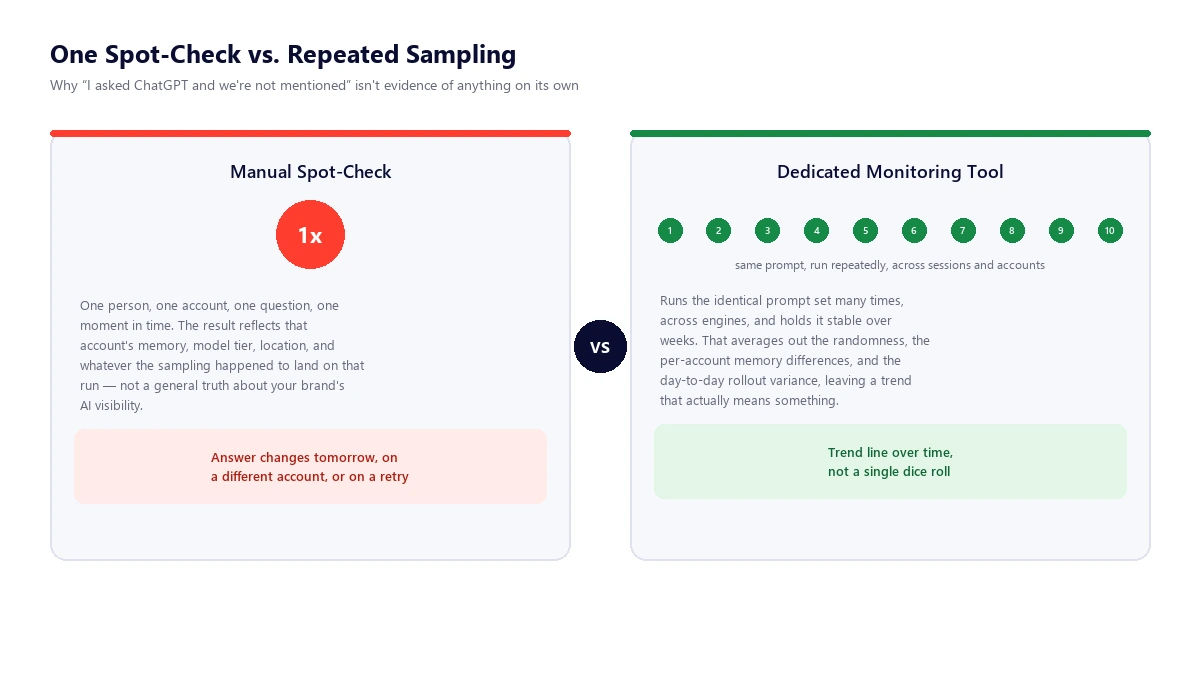
This is exactly why dedicated AI visibility tracking software exists, and why the credible ones don’t just ask a question once. They run the same prompt set repeatedly, across sessions, often across multiple accounts and engines, and hold that prompt set stable over weeks, so a single odd run (or a single memory-influenced, logged-in run) doesn’t get mistaken for the real picture. Averaging many samples over time is how you separate “ChatGPT happened to answer this way for me, right now” from an actual, trackable trend in whether your brand gets mentioned. Our roundup of AI visibility monitoring tools covers exactly how that repeated-sampling methodology works platform by platform, and which tools are worth paying for depending on your budget. If you’re newer to the broader question of why a brand doesn’t show up in ChatGPT answers at all, our piece on why a SaaS company might not be showing up in ChatGPT is the right starting point before this one.
One more practical point: ChatGPT is the largest consumer AI assistant, but it isn’t the only one worth watching. Google Gemini has its own memory system (Saved Info and a “Personal Intelligence” layer over past chats), Microsoft Copilot rolled out its own memory feature across Microsoft 365 in 2026, and Perplexity has built memory into its agent products too. The same underlying lesson applies to all of them: any assistant with memory, custom settings, or live search behaves differently per account and per session, so a one-time check on any one of these tools carries the same limitation ChatGPT does.
If tracking turns up a real gap, thin content, missing structured data, or pages an AI system genuinely can’t extract facts from, that’s a fixable technical problem. Our SEO services include AI Overview and ChatGPT visibility work as part of standard technical SEO, alongside the traditional ranking factors that still matter.
Frequently Asked Questions
Why did ChatGPT give me a different answer than my coworker got?
Most likely some combination of memory, custom instructions, chat history, or account tier differs between your two accounts, and the sampling process itself adds a layer of wording variation on top even when nothing else differs. It’s rarely just one cause.
Does ChatGPT remember me between separate conversations?
If memory is turned on for your account, yes. ChatGPT can save specific facts you’ve told it or that it picked up on its own, and it can also reference the substance of past chats generally to make new answers feel more relevant. Both can be reviewed or turned off in Settings under Personalization and Memory.
Does using a temporary or incognito chat remove all personalization?
Mostly, but not entirely. A temporary chat doesn’t use or create memories, and it won’t appear in your chat history, so the memory-driven part of personalization is off. But custom instructions, if you have them turned on, still apply inside a temporary chat, since they’re a separate setting from memory.
Why do AI visibility tools ask ChatGPT the same question over and over instead of just checking once?
Because a single answer reflects one account’s memory, one moment’s sampling randomness, and whatever model version and rollout stage happened to be active at that instant, not a general truth about how ChatGPT answers everyone. Running the same prompt repeatedly, across sessions and often across accounts, and averaging the results over time produces a trend that’s actually meaningful, instead of one unrepresentative data point.
Does ChatGPT know my location?
It can. ChatGPT may use an approximate location from your IP address to make certain answers more relevant, and if you grant device-level location access, it can use a more specific location for questions about nearby businesses, local news, or weather. This mainly affects location-relevant questions, not general knowledge ones.
Is everyone’s ChatGPT account running the same underlying model?
Not necessarily. Free, Plus, Pro, and Business accounts don’t always have access to the same model, and OpenAI updates and retires models on an ongoing basis, so which model actually generates your answer depends on your plan and the release calendar at that moment.
Can I make ChatGPT give me a consistent, repeatable answer?
You can reduce variation, using a fresh temporary chat with no memory or custom instructions removes the personalization layers, but you can’t fully eliminate it. The underlying text generation process has a degree of randomness that persists even under otherwise identical conditions, which is a structural feature of how these models produce text, not a setting you can switch off from the ChatGPT interface.