

You open Search Console on a Monday morning and the line just falls off a cliff. Clicks that were steady for months are suddenly a third of what they were, or a tenth. The first thing most people do is panic, and the second thing they do is guess, often wrong. Was it something Google’s reviewers did to you on purpose, or something an algorithm update did to the whole web and your site happened to be in the blast radius?
Those are two genuinely different problems with two genuinely different fixes, and mixing them up wastes weeks. A manual action is a human decision, applied to your site specifically, visible in a specific report, reversible through a specific request process. An algorithmic penalty, more accurately called an algorithmic demotion, is your site being reassessed by an automated system alongside billions of other pages, with no report entry, no human reviewer, and no form to fill in asking for a second look.
This guide walks through how to tell which one you’re actually dealing with using the tools Google gives you for free, what Google’s own documentation says the real recovery process looks like for each, and the specific spam policy categories most sites get caught on. Every claim about Google’s process below is sourced directly to Google’s own Search Console Help and Search Central documentation, linked inline, not guessed from forum threads.
Key Takeaways
- Check the Manual Actions report first, always: it is the only place a real manual action will ever show up, and it costs nothing to check.
- No entry does not mean no problem: it usually means an algorithmic system, a core update, a spam update, or an ongoing automated demotion, is involved instead.
- Manual actions get a reconsideration request. Algorithmic demotions do not. Google’s own core updates documentation states plainly that there is no review process to request for an algorithmic change.
- The shape and timing of the drop is itself diagnostic evidence: an instant, isolated cliff looks different from a decline that tracks a confirmed update’s rollout window.
- Google publishes the dates. The Search Status Dashboard lists confirmed core and spam update rollout windows, and Search Console’s Performance report lets you compare your own traffic against those exact dates.
- Reconsideration requests take days to weeks, sometimes longer for link-related issues, per Google’s own stated guidance, not a fixed number of business days.
- Algorithmic recovery has no guaranteed timeline. Google states some changes take effect within days, others take months, and full recovery may not happen until the next relevant update.
- Most “penalties” trace back to one of 16 named spam policy categories Google publishes publicly, covering everything from cloaking to scaled, unhelpful AI content.
What “Google Penalty” Actually Means
Google doesn’t actually use the word “penalty” in its own documentation very often. It’s an SEO-industry shorthand for any situation where a site’s visibility in Search drops because Google, in one way or another, decided the site or some of its pages shouldn’t rank as well as they used to. Under that one umbrella sit two mechanically different things.
A manual action is, in Google’s own words, what happens when “a human reviewer at Google has determined that pages on the site are not compliant with Google’s spam policies,” according to Google’s manual actions help page. A person looked at your site, matched it against a specific published policy, and applied a specific, named action that is visible to you in a specific report.
An algorithmic penalty, more precisely an algorithmic demotion, is what happens when one of Google’s automated ranking systems, anything from a broad core update to a narrower system aimed at a specific kind of spam, reassesses your content and ranks it lower. Google’s own spam policies page confirms violations are caught through “both automated systems and, as needed, human review,” and Google’s how search works page states that its automated systems alone “find 40 billion spammy pages every day.” The overwhelming majority of spam enforcement on the web happens this way, automatically, with no human reviewer and no notification email naming your specific site.
That difference, human-applied-and-logged versus automated-and-silent, is the entire reason the diagnostic and recovery paths below look so different from each other.
Manual Action vs. Algorithmic Penalty: The Real Difference
| Manual Action | Algorithmic Penalty / Demotion | |
|---|---|---|
| Who applies it | A human reviewer at Google | An automated ranking system |
| Where you see it | Named, specific entry in the Manual Actions report | Nowhere. No report entry exists |
| Notification | Email to the verified site owner | None |
| Scope | Named: specific URLs, a directory, or site-wide | Rarely explained; inferred from affected pages/queries |
| How you appeal it | Reconsideration request, reviewed by a person | No appeal process exists |
| How it lifts | Reviewer approves your reconsideration request | Next relevant update or re-crawl/re-evaluation |
| Typical timeline | Days to weeks after an approved request | Weeks to months, sometimes until the next update |
Which Kind of Drop Do You Have? Start Here
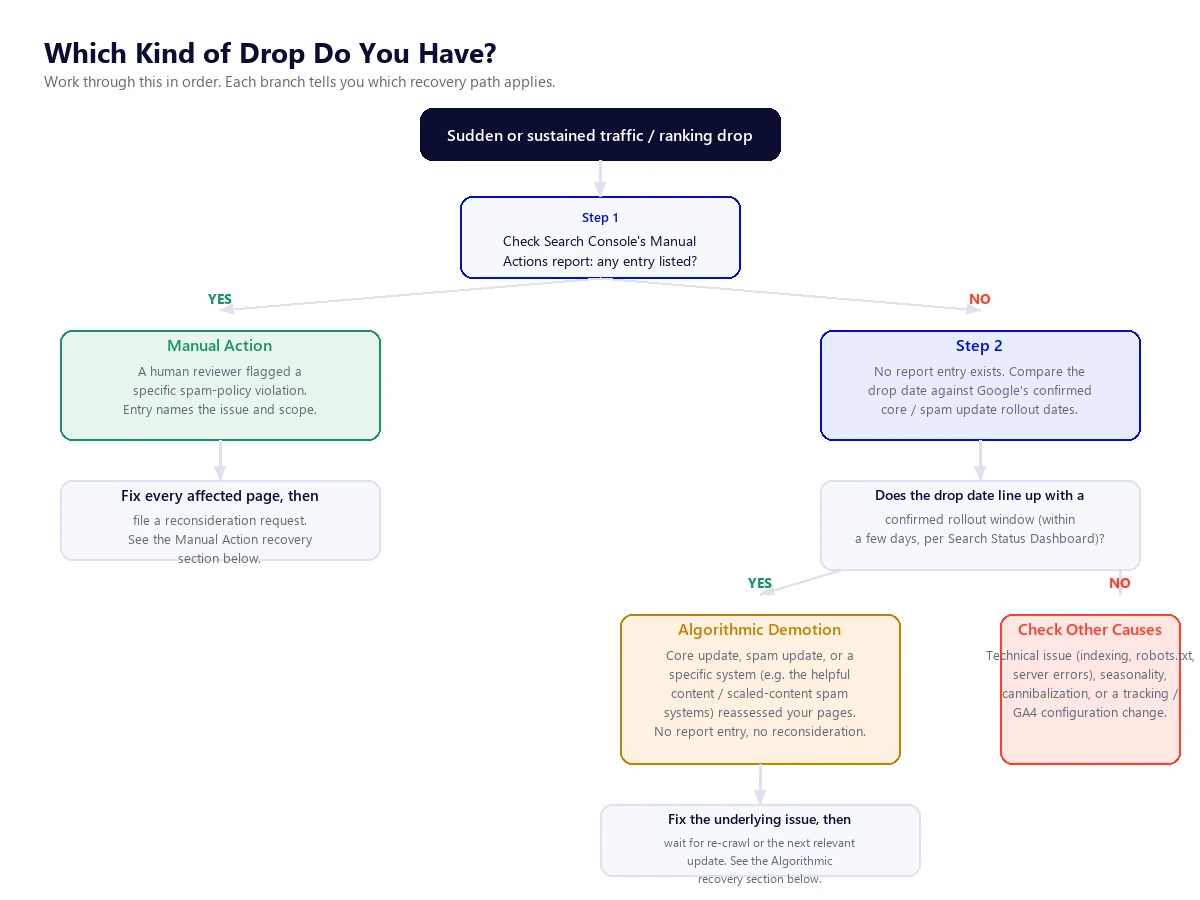
Work through the four steps below in this order. Each one rules something out before you spend time on the next, and by the end you’ll know which of the two recovery paths (or a third, non-penalty cause) actually applies to you.
Step-by-Step: How to Diagnose Your Traffic Drop
Step 1: Read the Manual Actions Report Correctly
In Search Console, open Security & Manual Actions > Manual actions from the left-hand menu. Google’s own manual actions help page describes exactly what you’ll see if there’s a problem: “if a site has a manual action, some or all of that site will not be shown in Google search results.” If the report says “No issues detected,” a manual action is not your problem and you can move straight to Step 2.
If there is an entry, read it carefully rather than just noting that one exists. Each entry names the specific policy violated (examples Google documents include unnatural links, thin content with little or no added value, cloaking and sneaky redirects, structured data issues, and user-generated spam) and states the scope: either a URL pattern showing which specific pages or directories are affected, or a statement that the action affects the entire site. That scope detail changes your whole response. A partial match (one directory, one content type) means you fix and resubmit that scope specifically. A site-wide match means the issue is broad enough that Google’s reviewer believes it affects the site as a whole, which usually means your fix needs to be broad too.
Expand the entry. Google’s guidance says you should be able to see example URLs the reviewer flagged. Use the URL Inspection tool on a sample of those pages to confirm Google can actually crawl and render them the way you intend, since a page you can’t fully fix without first confirming Google can see it clearly.
Step 2: Study the Shape and Timing of the Drop
If Step 1 came back clean, the shape of the drop in your Performance report is a genuine diagnostic clue, even before you check anything else. Open Search Console’s Performance report and look at the daily clicks and impressions line, not just the aggregated total.
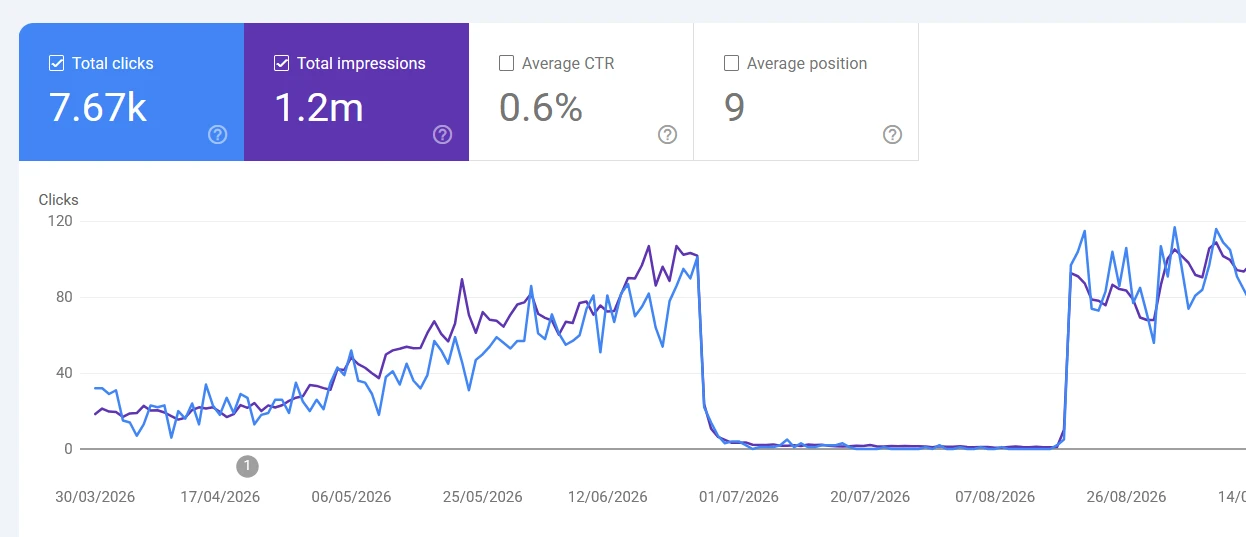
A manual action, when it does happen, tends to produce an unmistakable, instant cliff on one specific day, often affecting a clearly bounded set of pages or queries, and staying flat at the bottom rather than drifting further down afterward. The recovery, when it comes, is just as abrupt: a vertical jump back up on the day a reconsideration request is approved, not a gradual climb. A real Search Console report showing exactly this shape looks like the one below.
An algorithmic demotion usually looks different. The decline or change tends to track the multi-day or multi-week window of a specific update’s rollout rather than a single day, it’s rarely an instant cliff to zero, and movement (whether up or down) tends to be gradual and noisy day to day, sometimes not settling until a later, unrelated update reassesses the same content again. The report below shows that gradual, noisy shape, no instant cliff, no flat zero line, in contrast to the one above.
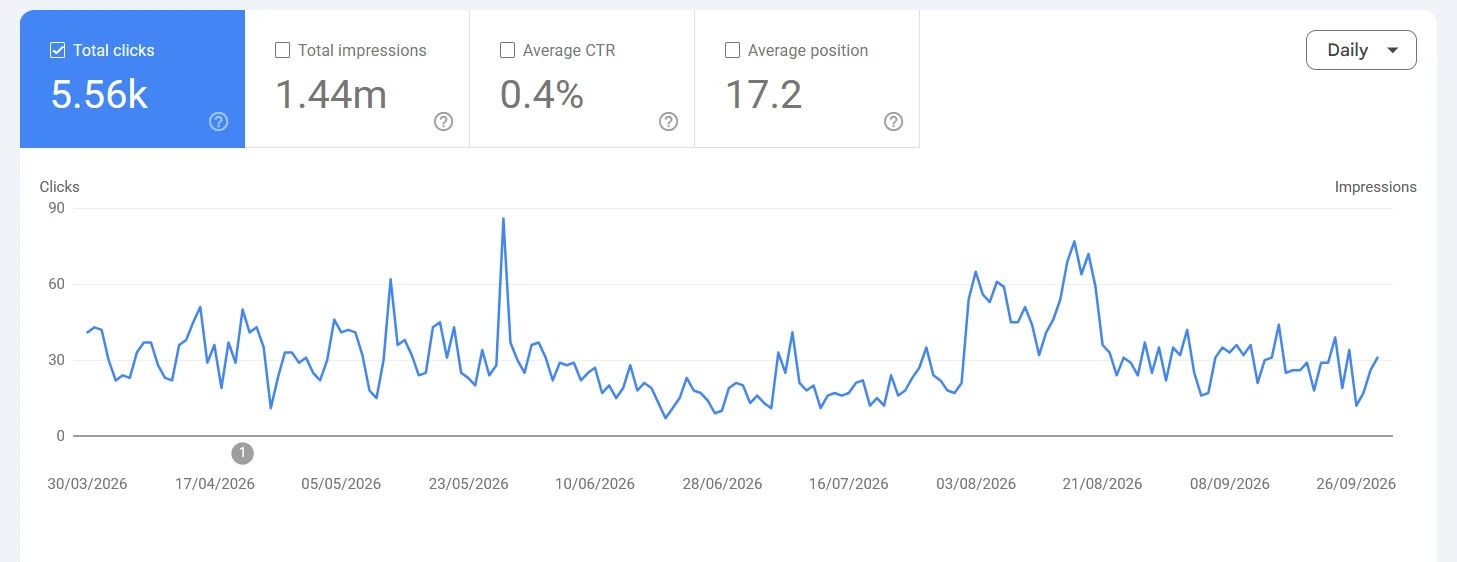
Neither pattern is proof on its own. Treat it as one input alongside Steps 1, 3, and 4, not a standalone diagnosis.
Step 3: Cross-Reference the Drop Date Against Confirmed Google Update Dates
This is the step most “is this a penalty” checklists skip, and it’s the single most useful piece of evidence available to you for free. Google maintains a public, dated Search Status Dashboard ranking updates history listing every confirmed core update, spam update, and other named ranking system change, with start and (once finished) end dates. A selection of recent entries, useful as reference points while you’re cross-checking your own dates, is below. Always check the live dashboard for the current full list and exact hours, since this table is a snapshot, not a substitute for it.
| Update | Started | Type |
|---|---|---|
| September 2026 spam update | September 24, 2026 | Spam |
| August 2026 spam update | August 18, 2026 | Spam |
| June 2026 spam update | June 24, 2026 | Spam |
| May 2026 core update | May 21, 2026 | Core |
| March 2026 core update | March 27, 2026 | Core |
| March 2026 spam update | March 24, 2026 | Spam |
| December 2025 core update | December 11, 2025 | Core |
| August 2025 spam update | August 26, 2025 | Spam |
| March 2024 core + spam update | March 5, 2024 | Core and spam, same window |
To actually run the comparison rather than eyeballing it, use the Performance report’s own built-in date comparison feature: open the report, click the date filter, and choose to compare your current range against a prior period. Pull up the week immediately before a candidate update’s start date against the week immediately after, filtered to the pages or queries that dropped. If your decline begins within a day or two of a confirmed rollout’s start date and continues through roughly its documented duration, that’s a real, checkable correlation, not a coincidence you’re assuming. If your drop happened three weeks before the nearest update, or during a stretch with no confirmed update at all, an algorithmic ranking change becomes a much less likely explanation and you should look harder at technical causes: a bad deploy, a robots.txt change, an expired SSL certificate, accidental noindex tags, or a tracking/GA4 configuration issue that only looks like a Google-side drop.
Step 4: Check for a Pattern Match Against Known Spam Policies
Whether or not you found a date correlation, it’s worth an honest self-audit against Google’s published spam policies (the full list is further down this page). This matters for both scenarios: a semantic match strengthens an algorithmic-demotion diagnosis (automated systems enforce these same policies at scale), and it’s also exactly what a human reviewer would be checking if a manual action does eventually land. Go through the list honestly, not defensively. Sites rarely intend to violate these policies outright; the common real-world version is a few aggressive guest-post link exchanges, a batch of AI-drafted pages published without real editing or added value, or a affiliate category that was never meant to scale as far as it did.
Recovering From a Manual Action: The Real Reconsideration Process
Google’s documentation is specific about the order of operations here, and skipping ahead is the most common way reconsideration requests fail. Before you request review, you need to have already: fixed the issue on every affected page, not just a sample; confirmed Google can actually access and render the fixed pages (no accidental login walls, paywalls, or robots.txt blocks); and used the URL Inspection tool to verify the live, rendered version reflects your fix.
A strong reconsideration request, per Google’s own guidance, does three things: it explains the exact quality issue Google found on the site, it describes the concrete steps taken to fix it, and it documents the outcome of that work (for a links-based action, this typically means a visible outreach and removal or disavow effort, not just a promise to do better). Vague requests (“we’ve improved the site”) without specifics about what was actually wrong and what was actually changed are the most common reason a first request gets rejected.
On timeline, the same manual actions help page states plainly that “most reconsideration reviews can take several days or weeks, although in some cases, such as link-related reconsideration requests, it may take longer than usual.” There is no published fixed SLA. You’ll be notified by email once a decision is made, and Google’s own guidance explicitly asks site owners not to resubmit a new request while one is still pending, since that doesn’t speed anything up and can muddy the review.
Recovering From an Algorithmic Demotion: Why There’s No Reconsideration Request
This is the part most competing explanations get wrong by implication, even when they don’t say it outright: there is no form to fill in, no reviewer to appeal to, and no ticket number for an algorithmic ranking change. Google’s own core updates documentation states this directly, that no reconsideration request exists for this category of change, and frames core updates using a restaurant-guide analogy: if a well-reviewed restaurant drops out of a “best 20” list after the guide updates its criteria, it’s not because that restaurant did something newly wrong, it’s that the relative ranking shifted. Google’s own words: “restaurants that move down aren’t necessarily ‘bad’; there are just other restaurants that make your top 20.”
Google’s recommended process for assessing and responding to a suspected core update impact is: first confirm the update has actually finished rolling out via the Search Status Dashboard, then wait at least a full week after completion before drawing conclusions, then compare the week of the update against the week before it in the Performance report, reviewing affected pages and queries, and analyzing search types (Web, Image, Video, News) separately since an update can affect them differently. A small ranking slip (say, position 2 to 4) doesn’t call for drastic changes. A larger one (position 4 to 29) warrants a genuinely deep content and quality review.
On what to actually do, Google’s guidance is consistent and, frankly, less satisfying than a reconsideration request because there’s no shortcut: the same core updates guidance says to “avoid doing ‘quick fix’ changes,” and focus instead on “changes that make sense for your users and are sustainable” over the long run, treating deleting content as a last resort rather than a first response. On timeline, Google is equally direct: some changes take effect within days, but it can take several months, and “if it’s been a few months and you still haven’t seen any effect, that could mean waiting until the next core update.” That’s a genuinely open-ended timeline, and setting that expectation honestly with stakeholders early avoids a much worse conversation two months in.
For algorithmic demotions tied to a specific spam-focused system rather than a broad core update, the mechanism is the same in spirit: genuinely fix the underlying policy violation, confirm it across the whole site (not just a sample), and wait for Google’s systems to re-crawl and re-evaluate the content. There’s no separate “spam update reconsideration” either; the next crawl and the next relevant system update are what eventually reflect the fix.
The Real Spam Policy Categories You Might Be Violating
Google publishes a specific, named list of spam policies that cover both manual actions and automated demotions. Below is the full list with plain-language context for each, drawn directly from Google’s own spam policies documentation.
| Policy | What It Actually Covers |
|---|---|
| Cloaking | Showing Google different content than what a real visitor sees, specifically to manipulate rankings. |
| Doorway abuse | Pages (often many near-duplicates targeting different cities or regions) built to rank for a query and funnel users to a different, less useful destination. |
| Expired domain abuse | Buying a lapsed domain for its existing authority and hosting unrelated, low-value content on it (Google’s own example: affiliate content hosted on a former charity’s domain). |
| Hacked content | Spammy pages, redirects, or injected code placed on your site by someone who exploited a security hole, not content you created. |
| Hidden text and link abuse | Text or links visible to Google but hidden from users: white text on white, zero font size, off-screen CSS positioning. |
| Keyword stuffing | Repeating keywords or numbers unnaturally until the content reads as artificial rather than written for a person. |
| Link spam | Buying or selling links that pass ranking signal, excessive link exchanges, automated link creation, and undisclosed paid placements. |
| Machine-generated traffic | Sending automated queries to Google, including bulk rank-check scraping, which also violates Google’s Terms of Service. |
| Malicious practices | Installing malware or unwanted software, or hijacking the browser back button to trap visitors on the page. |
| Misleading functionality | Promising a tool, generator, or service on the page that doesn’t actually do what it claims. |
| Scaled content abuse | Generating many pages, including with AI, primarily to manipulate rankings rather than to genuinely help users; this is the policy that specifically covers unedited, low-value AI-drafted content published at volume. |
| Scraping | Republishing other sites’ content, often lightly reworded, without adding original value or attribution. |
| Site reputation abuse | Publishing third-party content on an established, high-authority site specifically to exploit that site’s existing ranking signals, not a ban on third-party content itself. |
| Sneaky redirects | Sending Google to one page and real visitors to a completely different one. |
| Thin affiliation | Affiliate pages using product descriptions copied straight from the merchant, with no original review, testing, or analysis added. |
| User-generated spam | Spam that other people post into your comments, forums, or file uploads, which is still your responsibility to moderate. |
The scaled content abuse policy is worth sitting with longer than the others right now, because it’s the one most sites are at genuine, present-day risk of tripping without realizing it. Google’s policy doesn’t ban AI-assisted writing. It targets content generated (by AI or any other automated means) at volume specifically to manipulate rankings rather than to help a reader, including thin AI drafts published with no editing, fact-checking, or added expertise. We’ve written a full breakdown of where that line actually sits in whether AI-generated content works for SEO, including what “added value” means in practice.
Practical Prevention Checklist
Most of this is less about a one-time audit and more about habits that catch problems before they compound into either kind of penalty.
- Check the Manual Actions report monthly, not just when traffic drops. It’s free, it takes thirty seconds, and catching an entry early (before it’s buried under weeks of guesswork) shortens the whole recovery timeline.
- Audit new content for genuine added value before publishing at scale, especially anything AI-assisted. A real editor’s pass, original examples, and direct experience with the subject are the clearest signal that separates helpful content from scaled content abuse.
- Review inbound and outbound link patterns periodically. A sudden spike in unnatural anchor text, paid placements, or link exchanges is exactly what both human reviewers and automated link-spam systems are built to catch.
- Keep a record of every third-party publishing arrangement (guest posts, sponsored content, syndication), including whether links are disclosed and nofollowed where required, so you have real documentation ready if a reconsideration request ever becomes necessary.
- Subscribe to or periodically check the Search Status Dashboard so a future drop can be cross-referenced against a rollout date within minutes, not days of research.
- Build content around genuine structure and clarity, not just keyword coverage. Our guide on getting into Google’s AI Overviews covers the same clarity and semantic-structure fundamentals that also make a site less likely to read as thin or manipulative to either a human reviewer or an automated system.
- Moderate user-generated areas (comments, forums, profile fields) on a real schedule, since you’re responsible for spam posted there even when you didn’t write it yourself.
- Treat an algorithmic dip as a quality-review prompt, not a race to find a quick technical trick. Google’s own guidance is explicit that “quick fix” changes made under pressure are the wrong response.
A Real Example: Recovering From a Confirmed 2026 Spam Update
Diagnosis frameworks are easier to trust with a real, published example attached. We’ve documented an actual client recovery from one of the 2026 spam updates covered in the table above in our job board spam update recovery case study, including the real before-and-after Search Console data and what the fix actually involved. It’s a useful companion to this guide for seeing the diagnostic process (correlating a drop against a confirmed update date, then genuinely fixing the underlying issue) applied to one specific, real site rather than only in the abstract.
Not Sure Which Kind of Drop You’re Looking At?
We diagnose manual actions and algorithmic demotions the same way outlined above, then build the actual recovery or prevention plan around what the evidence shows, not a guess.
Frequently Asked Questions
What is a Google penalty, exactly?
It’s an informal, widely used term for any drop in Search visibility caused by Google determining a site or its content doesn’t deserve its previous ranking. It covers two mechanically different things: a manual action (a human reviewer’s specific, logged decision) and an algorithmic penalty or demotion (an automated ranking system reassessing the content, with no human reviewer and no log entry).
What is the main difference between a manual action and an algorithmic penalty?
A manual action is applied by a human reviewer at Google, appears as a named entry in Search Console’s Manual Actions report, triggers an email notification, and can be appealed through a reconsideration request. An algorithmic penalty is applied automatically by a ranking system, has no report entry, no notification, and no appeal process; recovery depends on genuinely fixing the issue and waiting for a re-crawl or the next relevant update.
How do I check if I have a manual action?
Open Google Search Console, go to Security & Manual Actions in the left menu, then Manual actions. If it says “No issues detected,” there is no manual action on the site. If an entry exists, it will name the specific policy violated and whether it affects specific URLs or the whole site.
Can Search Console show me an algorithmic penalty directly?
No. There is no report that lists algorithmic demotions by name, since they’re not individually logged decisions the way manual actions are. You infer one indirectly, by ruling out a manual action first, then correlating your traffic drop’s timing against Google’s confirmed core and spam update rollout dates on the Search Status Dashboard using the Performance report’s date comparison feature.
How long does it take to recover from a manual action?
Once you submit a reconsideration request, Google’s own guidance states most reviews take several days to a few weeks, though link-related requests specifically can take longer. There’s no fixed guaranteed number of days, and resubmitting while a request is still pending does not speed up the review.
Is there a reconsideration request for an algorithmic penalty?
No. Google’s own core updates documentation states directly that no such review process exists for algorithmic changes. The only path is fixing the genuine underlying quality or policy issue and waiting for Google’s systems to re-evaluate the site, either at the next re-crawl or the next relevant update.
How long does recovery from an algorithmic demotion or core update take?
Google states some effects can appear within days, but it can take several months, and if no improvement shows after a few months, that may mean waiting for the next core update entirely. This is an intentionally open-ended timeline; there’s no guaranteed recovery date.
What are Google’s spam policies?
A published set of 16 named categories covering manipulative practices Google enforces against, both through manual review and automated systems. They include cloaking, doorway abuse, expired domain abuse, hacked content, hidden text and link abuse, keyword stuffing, link spam, machine-generated traffic, malicious practices, misleading functionality, scaled content abuse, scraping, site reputation abuse, sneaky redirects, thin affiliation, and user-generated spam.
Can AI-generated content trigger a Google penalty?
It can, but not simply because AI was involved in writing it. The relevant policy is scaled content abuse, which targets content, AI-generated or otherwise, published at volume primarily to manipulate rankings without adding genuine value for a reader. AI-assisted content that is fact-checked, edited, and adds real expertise or original analysis is not what this policy targets.
Can a manual action affect only part of my site?
Yes. Google’s Manual Actions report states explicitly whether an action affects specific URLs or URL patterns (for example, one directory or content type) or the entire site. Reading that scope correctly determines whether your fix needs to be narrow or site-wide before you request reconsideration.
How do I find out when the last Google core update happened?
Check Google’s Search Status Dashboard, which lists every confirmed core update, spam update, and other named ranking system change with its start date and, once finished, its duration. This is the same source to use when correlating your own traffic drop date against a specific rollout window.
Can a site have both a manual action and an algorithmic demotion at the same time?
Yes, and it’s worth checking for both even after finding one. Fixing a manual action and getting it lifted doesn’t automatically undo separate algorithmic effects from a core or spam update that happened around the same time, and vice versa. Work through both diagnostic paths independently rather than assuming one explanation covers the whole drop.