Every AI visibility tool we’ve evaluated for clients eventually runs into the same question from a prospect: why does this cost per seat, and why is our own brand-mention data sitting on someone else’s server? It’s a fair question. Tracking how often ChatGPT, Gemini, or Perplexity mention a brand is, underneath the dashboard, a fairly mechanical job: run a set of prompts on a schedule, parse the answers for names and citations, store the results. None of that strictly requires a monthly subscription.
It also doesn’t mean a self-hosted tool quietly does everything a paid one does for free. We spent time with the open-source side of this category this year, the same way we’d evaluate any commercial option before recommending it, and the honest picture is mixed. The core tracking job is genuinely there. Several things a mature paid tool handles out of the box are not there yet, and the project’s own documentation says so plainly.
This article covers what a self-hosted AI visibility tracker can actually do today, what it still can’t, who it genuinely makes sense for, and what running one actually involves beyond clicking a few buttons.
Key Takeaways
- Self-hosted AI visibility tracking is real and functional today, not a vague roadmap idea. One actively maintained open-source project, Elmo, runs on Docker Compose, tracks brand mentions and citations across ChatGPT, Google AI Overviews, Gemini, Perplexity, and Microsoft Copilot, and is released under the MIT license.
- The core mechanism is the same one commercial tools use: a set of prompts runs on a schedule against each AI platform, and each answer is parsed for the brand’s name, aliases, domain, and any cited sources.
- It genuinely cannot do everything yet. Its own documentation lists real, current gaps: no sentiment analysis, no AI-crawler-specific analytics, no on-page content audits, no prompt volume estimates, and no built-in SEO dataset integration.
- Self-hosting trades a monthly per-seat fee for a one-time setup job: a server, Docker Compose, API keys for whichever model providers you want to query, and someone on your team responsible for keeping it running.
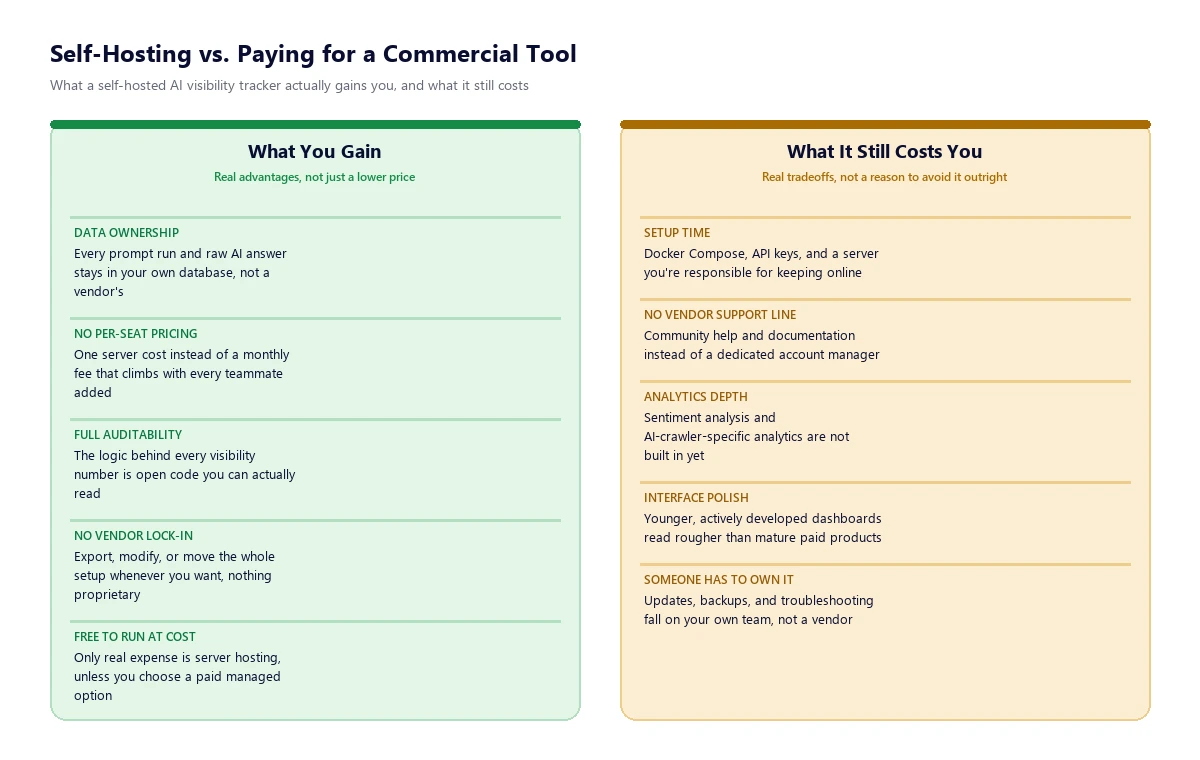
- Data ownership is the strongest real reason to self-host. Every prompt run and raw AI answer stays in a database you control, not a vendor’s, and the scoring logic behind every number is open code rather than a black box.
- Commercial tools still lead on interface polish, dedicated support, and analytics depth, the kind of things that matter more to a team that wants to log in and get an answer than one that wants to own the pipeline.
What “Self-Hosted AI Visibility Tracking” Actually Means
AI visibility tracking, whether paid or self-hosted, solves a specific problem: when someone asks ChatGPT, Gemini, or Perplexity a question related to your category, does your brand get mentioned, and does your site get cited as a source? Commercial tools like the ones we’ve covered separately answer that question as a managed service, with data that never touches your own infrastructure.
A self-hosted version does the same core job on software you run yourself. The one we spent the most time with, Elmo, describes itself as an open-source Answer Engine Optimization and Generative Engine Optimization platform, released under the MIT license, deployed with Docker Compose on a server you control. It isn’t a browser extension or a one-off checker; it’s a full application with a scheduler, a database, and a dashboard, the same shape as a commercial product, just one you install rather than subscribe to.
It’s worth being precise about what counts here, because “open source AI tool” gets used loosely. This is specifically about tools that run their own prompt-testing pipeline against live AI platforms and store the results, not content-optimization checkers or one-time scoring tools, which solve a related but different problem.
Who Actually Benefits From Self-Hosting
Self-hosting isn’t automatically the cheaper or smarter choice. It’s the better fit for a specific set of circumstances, and worth being honest about when those circumstances don’t apply.
- Data privacy and ownership matter to the business. Regulated industries, agencies handling multiple clients’ competitive data, or any brand that doesn’t want its mention and citation history sitting on a third-party server has a genuine reason here, not just a preference.
- Per-seat or per-brand pricing doesn’t scale for the use case. An agency tracking visibility across a dozen client brands pays a commercial tool’s fee a dozen times over. A self-hosted instance scales with server capacity, not headcount or brand count.
- There’s real technical capacity to run it. Someone needs to be comfortable with Docker Compose, environment variables, and basic server maintenance. This is a genuine requirement, not a formality, and it rules self-hosting out for a lot of otherwise-good-fit teams.
- The team wants to see and verify the methodology. Because the code is open, you can check exactly how a visibility score or a citation count is calculated instead of trusting a vendor’s black-box number.
A small in-house marketing team without a developer on staff, or anyone who just wants a number on a dashboard without touching infrastructure, is usually better served paying for a managed tool. That’s a legitimate answer too, not a consolation prize.
What a Self-Hosted Tool Can Realistically Do Today
The core tracking loop is genuinely built out, and it works the way you’d expect a real AI-visibility product to work. Prompts get defined per brand, either written by hand or suggested from the brand’s own website during setup. A background worker then runs those prompts on a schedule, multiple times a day by default, against each configured AI platform.
Two separate access methods cover different platforms. Browser-based scraping handles the AI products that don’t expose a clean public API for this purpose: ChatGPT, Google AI Mode, Google AI Overviews, Gemini, and Microsoft Copilot. Direct model API access, through providers like OpenAI, Anthropic, Mistral, and OpenRouter, covers Claude, Grok, and other models with web search enabled.
Once an answer comes back, it’s parsed for the brand’s name, known aliases, and domain, and for any URLs the AI cited as a source. From there, the platform we tested supports:
- Visibility scoring per prompt and per model, tracked over time
- Citation analysis, with cited URLs categorized by domain type
- Competitor benchmarking and share-of-voice comparisons
- Query fan-out analysis, showing the actual web searches an AI engine ran to answer a prompt
- Prioritized recommendations for where to earn more citations
- Shareable reports that don’t require the recipient to have an account
- A REST API for pulling the raw data into your own reporting
One detail worth flagging for anyone used to a closed tool: every raw AI answer gets stored, not just the derived metric. That means if the scoring methodology changes later, historical data can be re-processed rather than lost, something a black-box SaaS tool rarely offers.
What It Genuinely Can’t Do Yet
This is the part worth being direct about, because it’s the part a vendor pitch would skip. The gaps below aren’t guesses; they’re the limitations the project’s own documentation states openly, and we checked them against its current state rather than relying on an old snapshot.
| Can do today | Can’t do yet |
|---|---|
| Scheduled prompt testing across ChatGPT, AI Overviews, Gemini, Perplexity, Copilot | Sentiment analysis of how a brand is discussed, not just whether it’s mentioned |
| Brand mention detection by name, alias, and domain | AI-crawler-specific analytics, separate from the prompt-testing results |
| Citation tracking and competitor share of voice | On-page content audits or optimization recommendations |
| Query fan-out visibility into what the AI actually searched for | Prompt volume estimates (how often real users ask a given question) |
| Raw answer storage, so metrics can be recalculated later | Built-in integration with a broader SEO keyword/traffic dataset |
None of these gaps are dealbreakers for the core job of tracking mentions and citations, but they’re real reasons a team that also wants sentiment scoring or deep AI-crawler log analysis out of the box will still end up pairing a self-hosted tracker with something else, or choosing a commercial tool that already bundles it.
What Self-Hosting Actually Requires
This is the part that gets glossed over in “just self-host it” advice. Running this kind of tool is a real operational commitment, not a one-time setup:
- A server. Something capable of running Docker Compose continuously, whether that’s a VPS, an on-prem box, or a cloud instance your team already manages.
- Initial setup. Installing the CLI, running an init wizard, and bringing the stack up, which assumes basic command-line comfort.
- API keys. Direct model access for platforms like Claude or Grok requires your own API keys from each provider, which carries its own usage cost separate from the self-hosted tool itself.
- Ongoing maintenance. Updates, database backups, and troubleshooting fall on whoever owns the deployment, not a vendor’s support team.
- No dedicated support line by default. Community documentation and issue trackers stand in for a support contract, unless you opt into a paid managed-hosting tier the project itself offers as an alternative to pure self-hosting.
That last point is worth noting: most genuinely open-source tools in this space also sell a managed-hosting option for teams that want the open codebase without running their own server. It’s a reasonable middle path if full self-hosting turns out to be more operational overhead than a team wants to take on.
Self-Hosted or Commercial: A Straightforward Way to Decide
Lean self-hosted if data ownership is a real requirement (not a nice-to-have), the team already runs other self-hosted infrastructure, the brand or agency count makes per-seat pricing expensive, and someone can own ongoing maintenance.
Lean commercial if the priority is logging in and getting an answer with no setup, sentiment and deeper analytics matter from day one, or there’s no one on the team who wants to be responsible for a server. We compared several of the established paid options, including their actual pricing and engine coverage, in our AI visibility tools comparison, which is a useful next read if self-hosting turns out not to fit.
Either path is a reasonable call, and it’s one we help clients make directly rather than defaulting to whichever is easier to sell. If a self-hosted setup is the right fit, we can help with the Docker Compose deployment and the ongoing interpretation of the data it produces; if a commercial tool is the better fit, the same applies on that side. Both usually sit alongside the broader generative engine optimization work we do on entities, citations, and content, since tracking visibility only matters once there’s a real strategy behind improving it.
Frequently Asked Questions
Is self-hosted AI visibility tracking actually free?
The software itself can be free under an open-source license, but running it isn’t free of cost. You still pay for server hosting, and for API usage on any model provider you query directly, such as Claude or Grok. It replaces a subscription fee with infrastructure and usage costs, which are often lower but not zero.
Which AI platforms can a self-hosted tool actually track?
The project we evaluated covers ChatGPT, Google AI Mode, Google AI Overviews, Gemini, Perplexity, and Microsoft Copilot through browser-based scraping, plus Claude, Grok, and other models with web search enabled through direct API access. That’s broadly comparable platform coverage to most commercial tools.
Does a self-hosted tool do sentiment analysis?
Not yet, as of current testing. It can tell you whether and how often a brand is mentioned and cited, but not whether the AI’s framing of that mention is positive, neutral, or negative. This is a real, acknowledged gap, not an oversight on our part.
How technical do I need to be to self-host this?
Comfortable enough to run Docker Compose commands, manage environment variables and API keys, and troubleshoot a server when something breaks. It’s not a one-click install, and it’s a genuine requirement, not a minor inconvenience, for teams without that capacity in-house.
Is a self-hosted tool as accurate as a commercial AI visibility tool?
The underlying mechanism, running prompts on a schedule and parsing the answers, is the same approach commercial tools use. Accuracy mostly comes down to prompt design and parsing quality rather than whether the tool is open source, though commercial tools currently have more mature analytics layered on top of that core data.
Can I self-host this and still use a commercial tool at the same time?
Yes, and some teams do exactly that: a self-hosted tool for raw, owned tracking data and a commercial tool for the polished reporting and sentiment features self-hosted options don’t yet offer. There’s no technical conflict between running both.
What’s the real cost difference between self-hosting and a commercial plan?
Commercial AI visibility tools generally charge a recurring per-seat or per-brand fee. Self-hosting trades that for a server cost (often a modest monthly VPS bill) plus any direct API usage fees, which tends to be cheaper at scale for agencies tracking many brands, and less clearly cheaper for a single brand with light usage once setup time is factored in.
Does self-hosting mean the data never leaves my infrastructure?
The prompt results and raw AI answers are stored in a database you control. Querying the AI platforms themselves still involves sending requests to those external services, the same as any tracking method would, but the resulting data doesn’t get stored on a third-party vendor’s servers.
Will open-source AI visibility tools catch up to commercial ones?
Based on the pace of active development and the clearly stated roadmap gaps rather than vague promises, it’s a reasonable expectation that some of today’s gaps narrow over time. We’d treat that as a trend worth watching rather than a guarantee, and we’ll revisit this comparison as the landscape moves.