
No CMS wins on every SEO factor. The useful question is what each platform lets you change and what it handles for you by default. WordPress gives you control over almost everything but configures very little out of the box. Shopify and Wix ship with strong defaults, and in return you give up some control over URLs and technical settings. Most “best CMS for SEO” lists skip that trade-off, so this comparison starts with it.
We compare six platforms, WordPress, Shopify, Webflow, Wix, Squarespace and Ghost, on the technical factors that affect rankings and AI citations: URL control, robots.txt, canonical tags, structured data, Core Web Vitals and AI crawler access.
The short answer
- No platform wins every category. WordPress offers the most control but has the weakest Core Web Vitals results of the major platforms. Shopify, Wix and Squarespace trade some control for stronger defaults.
- In HTTP Archive’s December 2025 data, as reported by Search Engine Journal, 46.3% of WordPress sites passed all three Core Web Vitals. Wix reached 74.9% and Squarespace 70.4%.
- Shopify’s URL prefixes (
/products/,/collections/,/pages/) are fixed. No app or setting removes them. - Schema support ranges from fully automatic (Ghost, and Shopify for product and organization markup) to absent from core (WordPress needs a plugin for any schema).
- AI crawler controls are the least developed area everywhere. Only WordPress (through plugins), Wix and Squarespace document a way to manage bots like GPTBot.
Which SEO settings can you control on each platform?
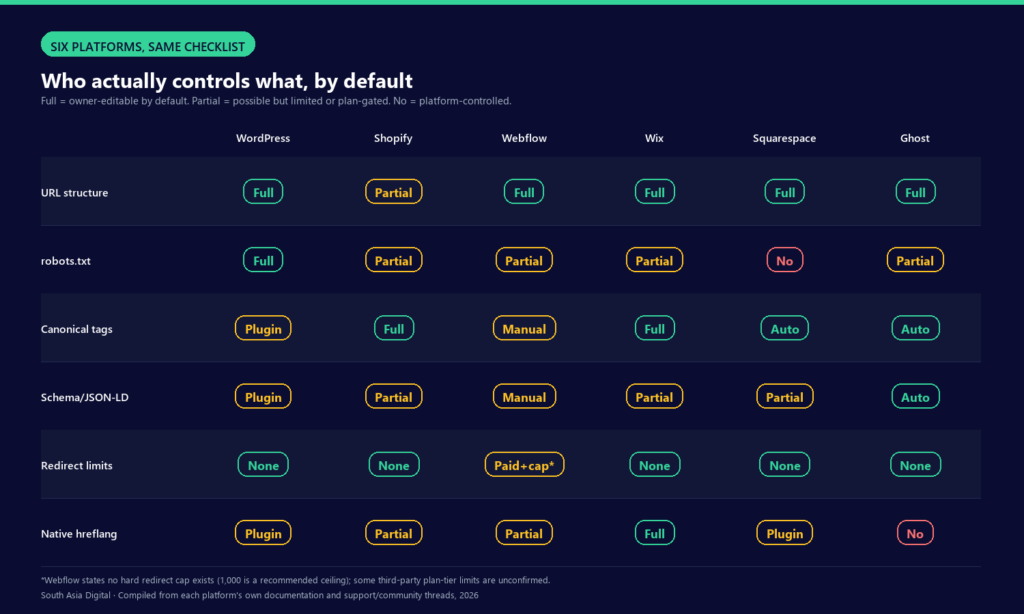
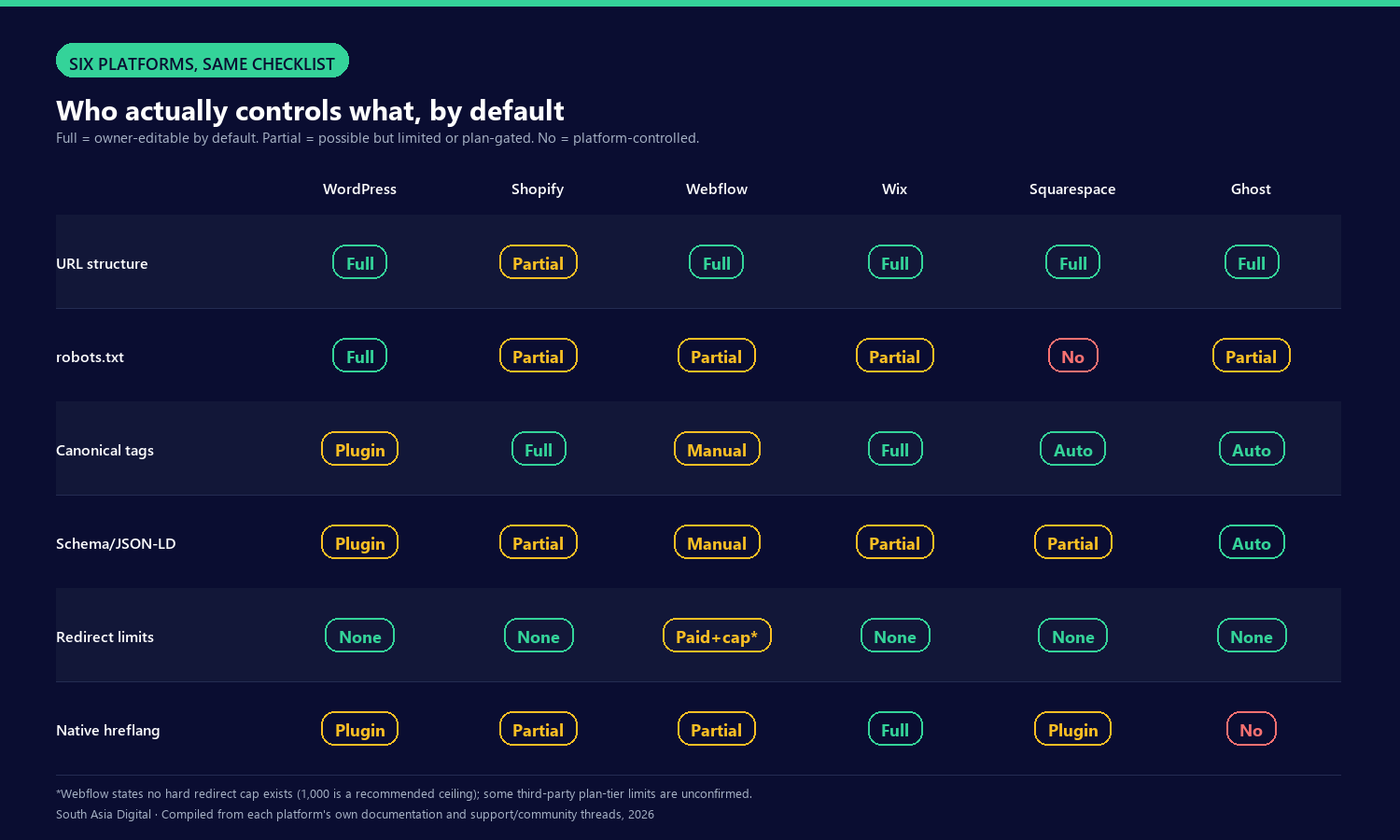
The matrix below shows how much control the site owner has over each setting. “Full” means you can change it without a workaround. “Partial” means it is possible but limited, tied to a paid plan, or requires replacing a platform default. “No” means the platform decides.
Which CMS performs best on Core Web Vitals?
Independent performance comparisons between CMS platforms are rare. The most reliable source is the HTTP Archive Core Web Vitals Technology Report, which matches real-user Chrome UX Report data to the CMS each site runs on. Search Engine Journal reports on this dataset regularly, and its coverage gives the clearest side-by-side view.
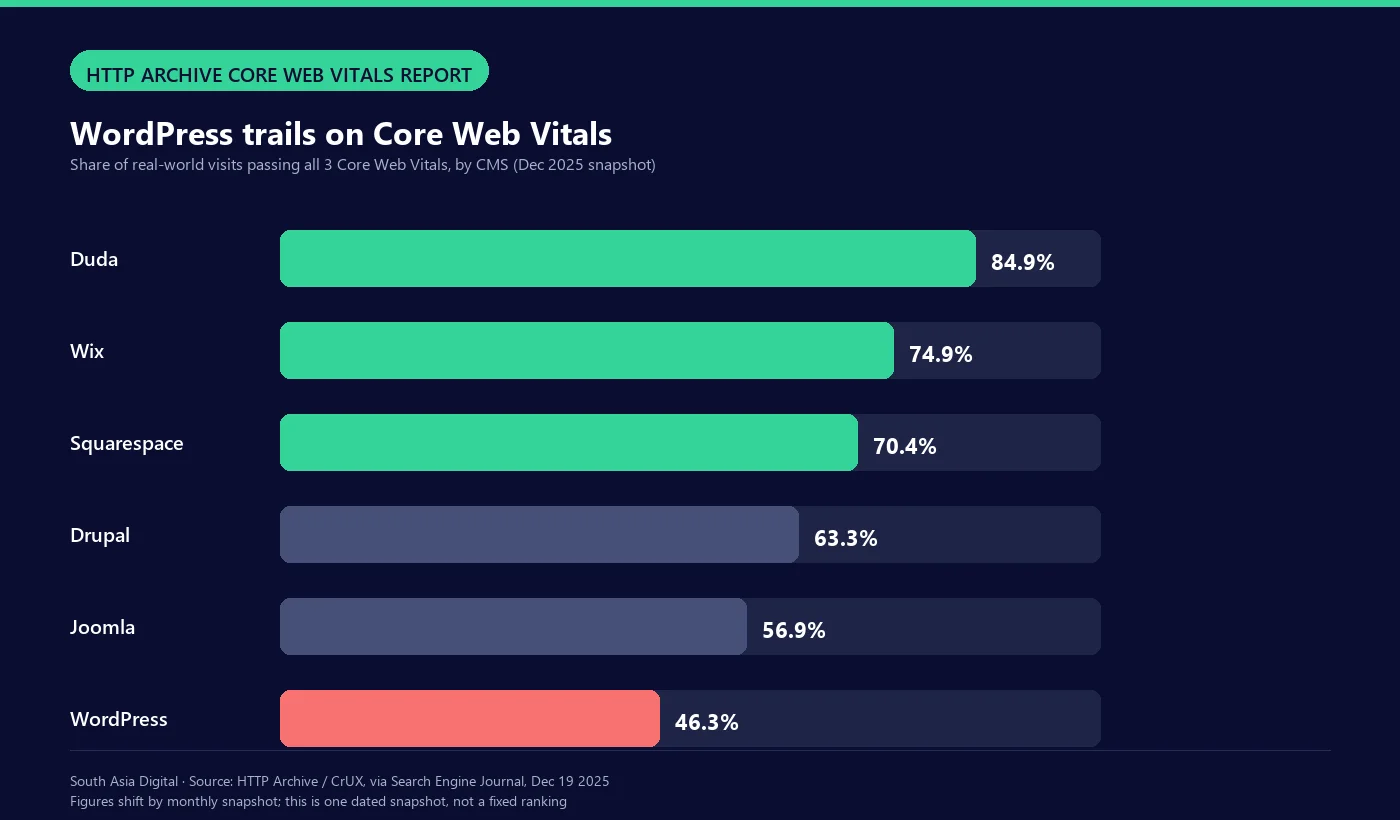
These figures shift from month to month. Other snapshots of the same data have put WordPress anywhere between 44% and 60%. Read the numbers below as a December 2025 snapshot rather than a permanent ranking. What stays consistent across months is the pattern: WordPress trails the hosted platforms on aggregate Core Web Vitals.
| Platform | All 3 CWV pass rate | Snapshot date |
|---|---|---|
| Duda | 84.87% | Dec 2025 |
| Wix | 74.86% | Dec 2025 |
| Squarespace | 70.39% | Dec 2025 |
| Drupal | 63.27% | Dec 2025 |
| Joomla | 56.92% | Dec 2025 |
| WordPress | 46.28% | Dec 2025 |
Shopify is not included in this comparison. Separate CrUX-based reporting has consistently placed it near the top for Largest Contentful Paint, largely because Shopify’s hosting and CDN handle much of the performance work for merchants.
WordPress: the most control, the fewest defaults
WordPress gives you more control than any other platform here, and does the least for you out of the box. Core has generated an automatic /wp-sitemap.xml since version 5.5, but there is no admin screen for excluding individual posts from it; you need a filter or a plugin. WordPress core also has no schema.org or JSON-LD API. A proposal for one (Trac ticket #65836) is still open. All structured data on a WordPress site comes from a plugin, usually Yoast or Rank Math.
- URL structure: fully configurable in permalink settings, with no forced prefixes.
- robots.txt: WordPress serves a virtual file by default. Upload a physical
robots.txtto the site root and it replaces the virtual one, so you have full control either way. - Canonical tags: not in core. Yoast and Rank Math both generate them automatically and let you override them page by page.
- Schema: none in core; it depends entirely on plugins.
- AI crawlers: no built-in setting for blocking GPTBot, ClaudeBot or similar bots. You need a plugin that writes the rules into the virtual robots.txt, or a physical file.
Plugins also explain most of WordPress’s Core Web Vitals gap. A fresh install is lean, but the plugins that add schema, SEO controls and page builders tend to slow sites down, which fits the 46.3% pass rate above. To close that gap, a WordPress site needs ongoing technical SEO work. Hosted platforms handle more of it for you.
Shopify: strong defaults, fixed URLs
Shopify’s core URL paths, /products/, /collections/, /pages/ and /blogs/, cannot be changed. You can edit the handle after the prefix, but you cannot remove or restructure the prefix itself, and collections cannot be nested into a true hierarchy. Shopify does not publish an official list of these limits, but merchants raise them constantly in Shopify’s community forums. To reduce duplicate content, Shopify automatically adds a canonical tag to collection-based product URLs that points to the main product URL.
- URL structure: partial. Prefixes are fixed; handles are editable.
- robots.txt: the default works for most stores, and you can override it completely with a
robots.txt.liquidtemplate. The catch is that you stop receiving Shopify’s automatic updates to the default rules. - Canonical tags: handled automatically.
- Schema: modern themes such as Dawn include Product, Organization and BreadcrumbList JSON-LD by default. It is often incomplete for rich results, so most stores need to add to it.
- AI crawlers: no stated default. Shopify’s robots.txt documentation does not mention GPTBot, ClaudeBot or any other AI crawler; its examples use generic bots such as
adsbot-google. You can add your own rules throughrobots.txt.liquid.
Webflow: design freedom, more manual SEO setup
Webflow publishes less SEO detail than the other platforms here, and some widely repeated claims about it, such as a 500-redirect limit on the CMS plan, do not appear in Webflow’s own documentation. Webflow states that there is no hard cap on redirects and recommends staying under 1,000. Redirects require a paid site plan and a custom domain. Canonical tags are not automatic: you set them in Site Settings, either site-wide or for individual static pages.
- URL structure: fully configurable.
- robots.txt and AI crawlers: Webflow’s documentation says little about default AI crawler handling, so check your published robots.txt before relying on any setting.
- Canonical tags: manual, set in Site Settings or per page.
- hreflang: Webflow Localization generates hreflang tags automatically and adds localized URLs to the sitemap.
Wix: better for SEO than its reputation
Wix still carries an old reputation for weak SEO, and even its rendering history is told inconsistently. A 2017 Wix blog post said every Wix site was already server-side rendered, while a later Google web.dev case study describes Wix moving from client-side to server-side rendering “a few years” before that study, without giving a date. The popular claim that “Wix fixed SEO in 2019” does not appear in either source. The current data is clearer: Wix ranked second of six platforms in the December 2025 Core Web Vitals snapshot at 74.9%, and in 2021 Wix published a statement from Google’s John Mueller that Wix is fine for SEO.
- URL structure: fully configurable.
- AI crawlers: the built-in Robots.txt Editor lets you block AI bots. Wix’s example list covers CCBot, GPTBot, ChatGPT-User and BingAI; ClaudeBot and PerplexityBot are not included, so add them yourself.
- hreflang: Wix Multilingual adds hreflang tags to every language version of every page, and each language gets its own URLs.
- Schema: Wix Stores, Bookings, Blog and Events pages include preset structured data automatically.
Squarespace: tidy defaults, no robots.txt access
Squarespace is the most locked-down platform here in one important way: you cannot edit robots.txt directly. Third-party SEO guides agree on this, though Squarespace’s own documentation does not spell it out. Around October 2023, Squarespace added an opt-in setting under Settings, then Crawlers, labeled “Block known artificial intelligence crawlers.” It covers GPTBot, ChatGPT-User, Anthropic’s crawlers, CCBot, Google-Extended and PerplexityBot. Because it is off by default, a Squarespace site is open to AI crawlers unless the owner switches it on.
- robots.txt: no direct editing.
- AI crawlers: an opt-in toggle names the major AI bots, but it is off by default.
- Schema: automatic since late 2016 for blog posts, events, local businesses, organizations, products and the site itself. It is limited and cannot be customized, and there is no automatic FAQPage, Recipe or JobPosting markup.
- Rendering: mixed. Some blocks, such as the Summary Block, render on the server in the initial HTML; others, such as the Calendar Block, load in the browser afterwards, according to independent technical analysis.
Ghost: everything on by default
Ghost has the fewest features on this list, and it is also the most automatic. Its SEO documentation says Ghost adds structured data to every post and page, creates and updates an XML sitemap, and adds canonical tags across the site. None of it needs configuring, so there are no settings to toggle.
- Schema, sitemap and canonical tags: all automatic, as stated in Ghost’s help documentation.
- robots.txt: not covered in Ghost’s SEO documentation. Community forum posts describe adding a custom file through the theme.
- Multilingual and hreflang: no native feature.
- Control trade-off: Ghost users note that it lacks the granular SEO controls WordPress plugins provide. You get strong defaults and fewer manual overrides.
How does each CMS handle AI crawlers like GPTBot?
AI crawler access is the least documented SEO area on every platform. Only WordPress (through plugins), Wix (through its Robots.txt Editor) and Squarespace (through an opt-in toggle added around October 2023) give you a documented way to control it. Shopify, Webflow and Ghost do not publish a default policy for GPTBot, ClaudeBot or PerplexityBot. On most platforms, that means setting the rules up yourself. If AI search visibility matters to your business, check your live robots.txt rather than assuming your platform handles it.
Which CMS should you choose?
The right platform depends on what you are building and who will maintain it.
- Content-heavy sites and blogs with technical support: WordPress’s control is worth the setup effort, as long as you budget for ongoing technical SEO. The defaults alone will not get you there.
- E-commerce, where speed and conversion matter more than perfect URLs: Shopify’s fixed prefixes are permanent, so plan your site structure around them from the start. Its Core Web Vitals and canonical handling are strong by default.
- Marketing and brochure sites run by small teams: Wix and Squarespace now perform well on Core Web Vitals and need the least maintenance, in exchange for less low-level control, especially Squarespace’s locked robots.txt.
- Publications and newsletters: Ghost’s automatic schema, sitemap and canonical tags remove setup work that WordPress leaves to plugins.
- Design-led marketing sites: Webflow gives you layout control that would otherwise need custom development, with more SEO settings to configure yourself.
None of these defaults lock you in. Every platform here can be improved with the right technical work. Before choosing, ask which set of trade-offs your team can realistically maintain. Whichever platform you land on, the reporting setup that tracks whether those fixes move the needle works the same way regardless of CMS; how to automate SEO reporting covers that piece.
Common questions about choosing a CMS for SEO
What is the best CMS for SEO?
It depends on your team. WordPress offers the most control but the weakest default performance, with a 46.3% Core Web Vitals pass rate in December 2025. Wix and Squarespace offer stronger defaults with less low-level control. Choose WordPress if you can maintain technical SEO yourself, or a hosted platform if you need more handled automatically.
Is WordPress still good for SEO in 2026?
Yes, with conditions. WordPress gives full control over URL structure, robots.txt and content, but has no built-in schema and the weakest aggregate Core Web Vitals results of the major platforms compared here. With ongoing technical SEO work and a lean set of plugins, you can close most of that gap.
Does Shopify hurt SEO?
Not on its own, but its URL structure is a hard limit. Shopify uses fixed prefixes such as /products/ and /collections/ that cannot be removed. In return, it handles canonical tags and basic product schema automatically and performs well on Core Web Vitals.
Which CMS gives the most control over robots.txt and AI crawlers?
WordPress and Wix. On WordPress you can replace the virtual robots.txt with your own file, and Wix has a built-in Robots.txt Editor. Squarespace does not allow direct editing but offers a one-click toggle that blocks the major AI crawlers. Shopify, Webflow and Ghost do not publish a default policy for AI bots.