
ChatGPT Ads Manager is OpenAI’s self-serve advertising platform, live at ads.openai.com since early 2026. We ran South Asia Digital through the signup flow ourselves rather than describing it secondhand, and stopped before creating an advertiser account so nothing went live or got charged. This covers what we saw firsthand, what the setup recommends for a B2B SaaS business, and the one eligibility detail that can quietly waste a B2B budget on this channel.
What do you need before you start?
- An existing OpenAI or ChatGPT account. There’s no separate advertiser login to create; the flow runs on the account you already use to sign in.
- Your SaaS product’s live URL. The first screen uses it to auto-generate an ad preview by reading your actual site content.
- A one-line answer to “what question is someone asking when they’d want this.” Targeting here runs on written context, not keywords or job titles, so you need this framed in advance.
- A daily budget ceiling you’re comfortable with. OpenAI recommends one automatically; decide your own number first so you’re not anchored to theirs.
- A destination URL matched to the ad’s intent. A trial signup page and a marketing homepage will perform differently; pick deliberately rather than defaulting to the homepage.
- Confirmation that your actual buyers use ChatGPT’s free tier. Covered in detail below, this one detail can make the whole channel a mismatch for some B2B audiences.
What is ChatGPT Ads Manager, and do you need a new account?
It’s OpenAI’s advertising platform, reached at ads.openai.com. The landing page’s own framing is “reach people as they explore options, compare choices, and make decisions in ChatGPT.” Clicking “Start now” doesn’t ask for a new username or password; it runs through your existing OpenAI account, the same one you’d use to sign into ChatGPT itself.
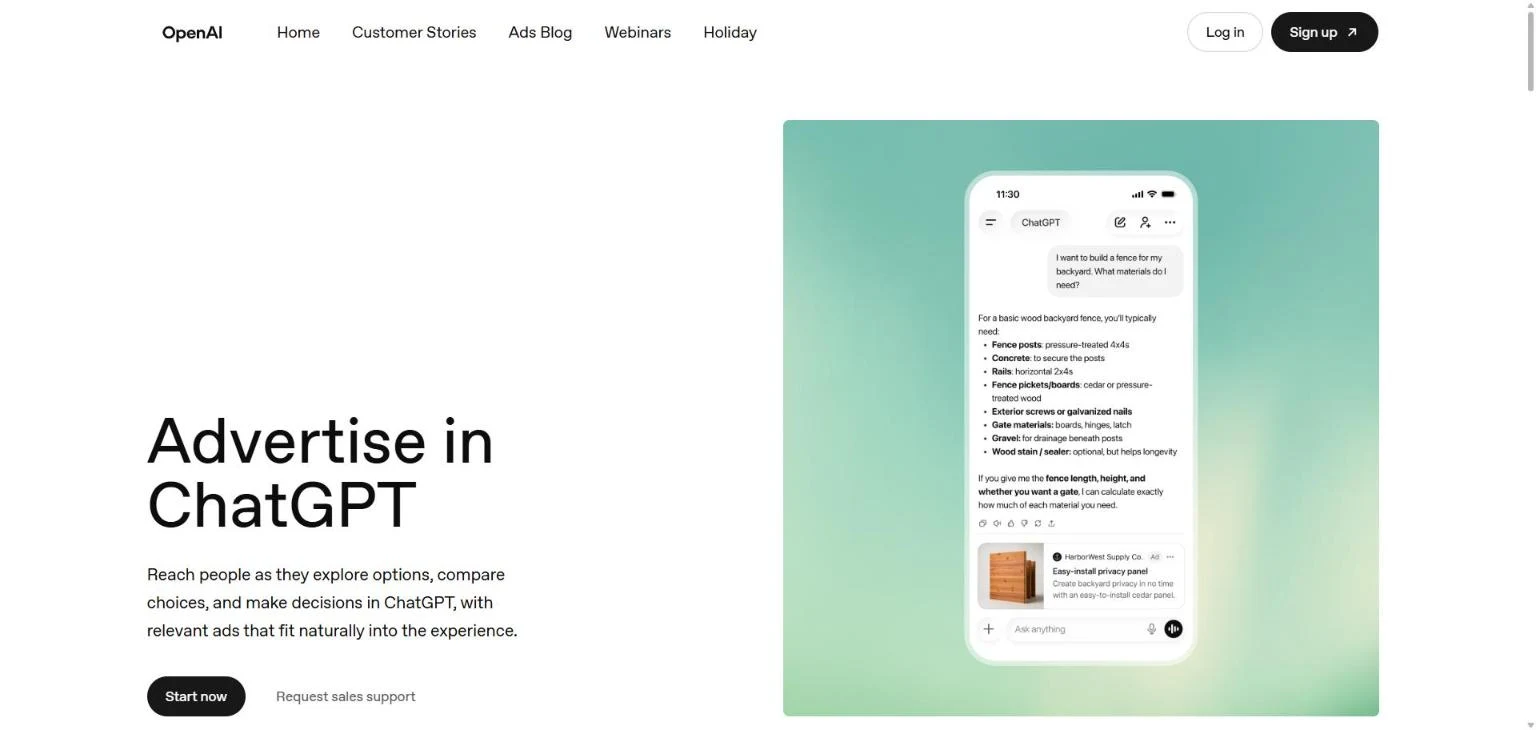
Our own screenshot of the ads.openai.com landing page.
How does ChatGPT generate your first ad automatically?
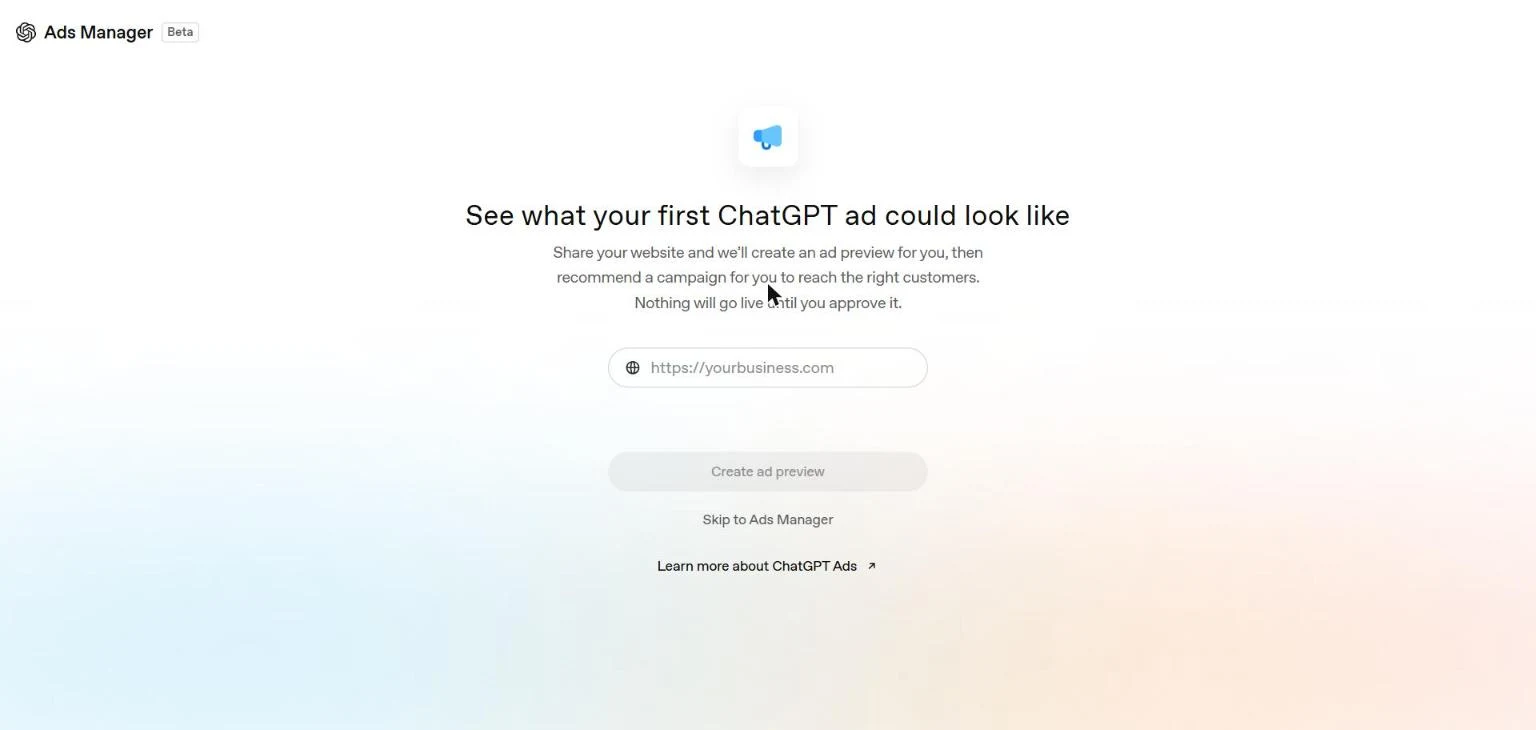
After signing in, the flow asks for your website URL before anything else: “Share your website and we’ll create an ad preview for you, then recommend a campaign for you to reach the right customers. Nothing will go live until you approve it.” We entered southasiadigital.com.
What came back is the most useful part of this test. The tool read our site, identified two distinct audience themes on it, and said so directly: “We built this ad around ‘SaaS teams comparing SEO help for more signups and visibility’ and ‘Shopify brands looking to grow organic traffic and conversions,’ two themes that stood out across your website.” It then built the ad around the SaaS theme specifically: headline “AI SEO for SaaS,” body copy “Grow visibility in Google and AI search.”
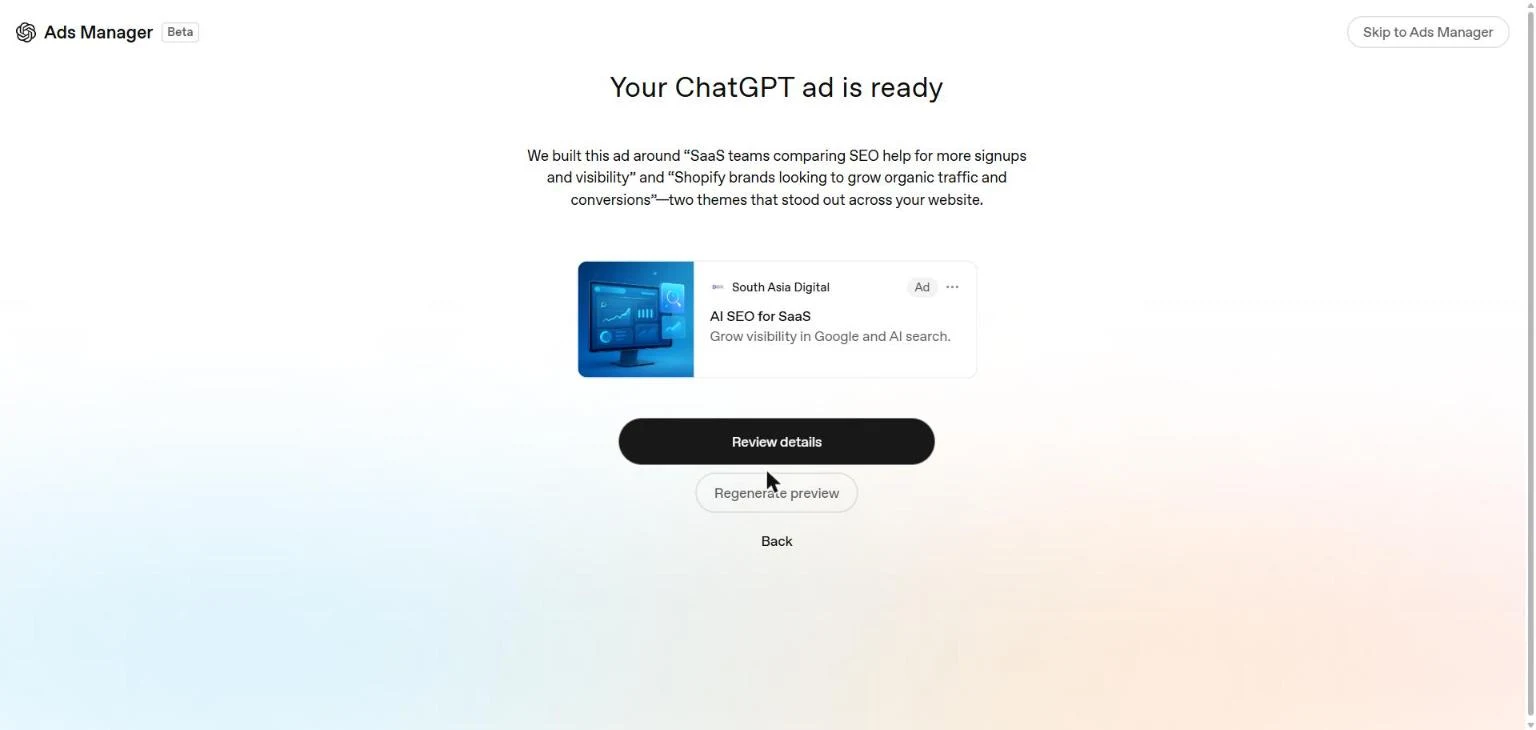
Our own test result. The tool explicitly named the SaaS and Shopify audiences it found on our site before picking one to build the ad around.
For a SaaS business specifically, this matters beyond the demo: it means the ad copy you start from is already shaped by whatever your site’s own content emphasizes. A site that talks mostly about enterprise features will get enterprise-sounding ad copy; a site that leads with self-serve trial language will get that instead. Check what the tool pulls out before accepting it, since it’s reading your positioning back to you.
What does a recommended campaign include?
Clicking “Review details” shows the full recommended setup, not a vague summary. Ours came back as: Objective: Clicks. Locations: Pakistan (pulled from the account’s own location, not something we set). Destination URL: southasiadigital.com. Bid strategy: Autobid. Average daily budget: PKR 8,500, roughly $31 at November 2026 exchange rates. Creative enhancement: On.
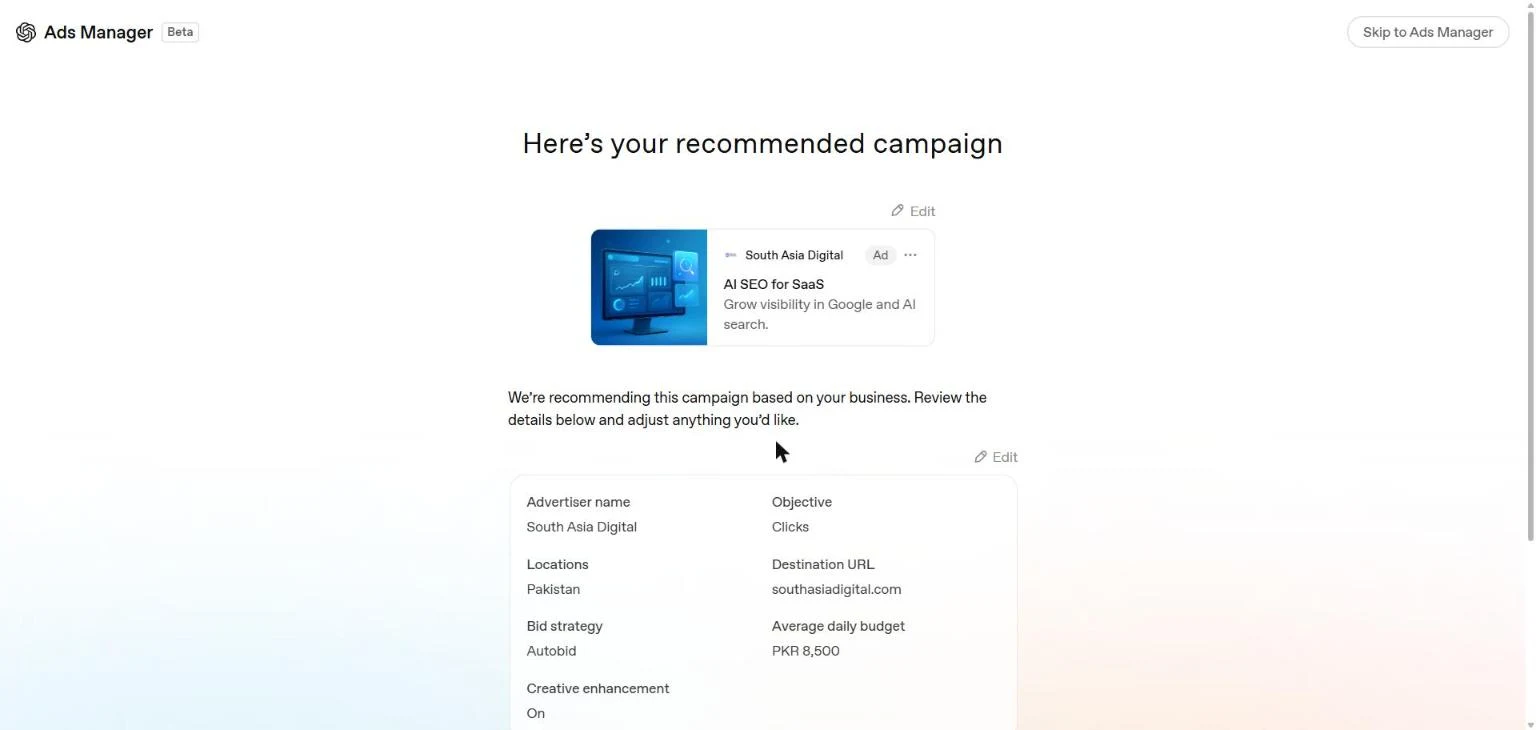
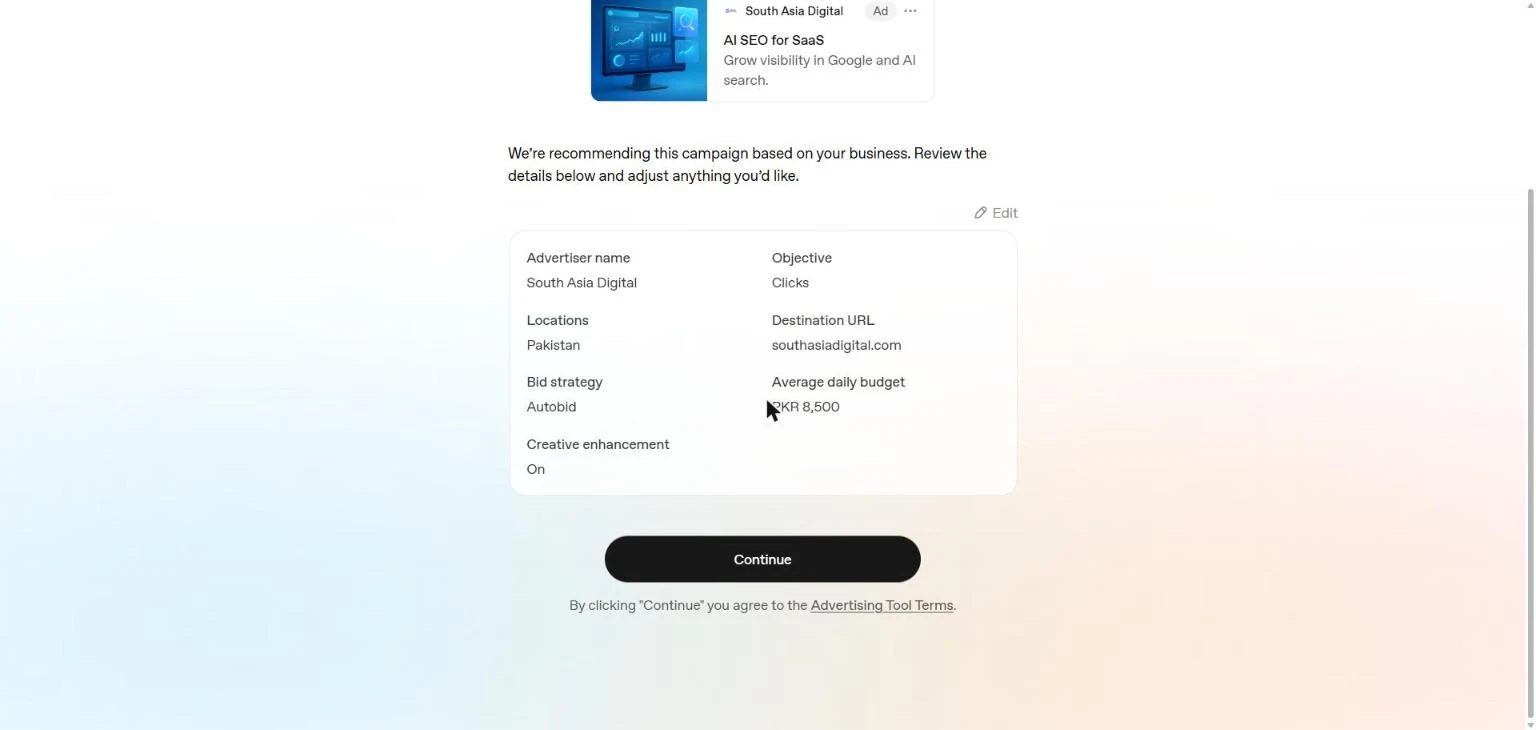
Our own test result: a recommended budget in local currency, not a generic placeholder.
That recommended figure is worth comparing against what third-party guides claim. Several agency blogs cite a flat $25 or $50 daily minimum for the “learning phase,” stated as if it were fixed everywhere. Our own recommendation came back closer to $31, in a market those guides weren’t testing from. The number clearly flexes by account location and business type rather than holding to one global figure, so treat any guide’s specific dollar minimum as a starting estimate, not a platform rule.
How does context-hint targeting work for B2B SaaS?
We stopped the live test before reaching the targeting editor, since going further meant creating the advertiser account. Third-party reporting on this step, consistent across several sources, describes a targeting model built on “context hints” rather than keywords or firmographic filters: short written descriptions of the conversations and questions a product is relevant to, which ChatGPT then matches against live chats. Negative exclusions, descriptions of conversations the ad should not appear against, work the same way in reverse.
This is a departure from how B2B SaaS teams usually buy ads. LinkedIn’s targeting runs on job title, company size, and seniority; ChatGPT’s doesn’t offer that level of firmographic control, and uploading an account-based marketing list isn’t a workable approach here the way it is on LinkedIn. The upside some reports describe: context-hint targeting catches a buyer while they’re actively comparing options or defining requirements inside a conversation, a moment LinkedIn’s ad format doesn’t intercept the same way.
Why ChatGPT Ads might miss your actual B2B buyer
This is the detail most “how to advertise on ChatGPT” guides skip. Reporting on eligibility consistently states that ads currently show to logged-in ChatGPT users on the Free and Go tiers, not Plus, Pro, Team, or Enterprise. A meaningful share of B2B software buyers, particularly at companies that have already standardized on a paid ChatGPT seat, may simply never see an ad running on this channel, no matter how well the targeting and budget are set.
Before committing budget, the question to answer isn’t “how many people use ChatGPT.” It’s whether your specific buyer persona is disproportionately on the free tier or the paid one, since that answer decides whether this channel can reach them at all.
What does ChatGPT Ads cost for a SaaS campaign, and is the sign-up credit real?
Billing is reported to be postpay: you’re charged after ads run rather than funding an account balance upfront. Vendor-reported cost-per-click figures for B2B campaigns cluster around $3 to $8, though that comes from agencies selling the service rather than OpenAI’s own published rate card, so treat it as directional.
A new-advertiser credit does appear to be real, but the amount is moving. The most recent reporting describes $500 in matching credit for $500 in ad spend; earlier promotions during the same year were reported at $50-for-$50 and a separate $100 tier. Confirm the live offer on the account-creation screen itself before budgeting around a number from an article, including this one.
What should SaaS ad creative avoid on this channel?
Ads appear inline inside a ChatGPT conversation, not in a separate banner slot, which changes what reads as acceptable. Reporting on early B2B campaigns points to one recurring mistake: copy that sounds like a traditional ad gets ignored inside a conversational interface where the surrounding text doesn’t. The same reporting suggests testing a self-serve entry point, a trial signup, a free tool, over a demo-request CTA when the product supports it, since a conversational surface favors a lower-friction next step.
Reported creative limits vary slightly by source but land in a similar range: a headline around 16 to 24 characters, body copy recommended at 32 to 48 characters with a hard cap near 100, and a square image. Tight enough that the one-line positioning statement from the checklist above has to carry the ad on its own, without room for a second supporting clause.
How does paid ChatGPT advertising fit with organic AI visibility?
They’re two separate budgets solving two different problems. A ChatGPT ad is a paid placement that disappears the day you stop funding it. Showing up unpaid when ChatGPT answers a relevant question is a different kind of work entirely, the same generative engine optimization fundamentals that get a SaaS product cited rather than advertised.
If a campaign is already running, track its clicks separately from any organic mention count your business profile reports. Conflating the two numbers hides whether the paid spend is doing anything the organic work wasn’t already covering.
Common questions about ChatGPT Ads for SaaS
Do you need a separate account to advertise on ChatGPT?
No. Confirmed directly: the signup flow at ads.openai.com runs on your existing OpenAI account rather than creating a new login. An advertiser profile does get created as part of the flow, but it’s attached to the account you already have.
How does ChatGPT decide what my first ad should say?
It reads your website and identifies audience themes directly from the content, then writes a headline and description around one of them. In our own test, it correctly identified both a SaaS audience and a Shopify audience on the same site before building the ad around the SaaS theme. Review what it pulls out before accepting it, since it reflects whatever your site already emphasizes.
What’s the minimum daily budget for ChatGPT Ads?
There’s no single fixed figure. Third-party guides commonly cite $25 or $50 per day for the learning phase, but our own recommended budget came back at roughly $31 in local currency, pulled from the account’s own market rather than a flat global number. Treat any specific dollar figure as an estimate, not a platform rule.
Will ChatGPT Ads reach B2B decision-makers who pay for ChatGPT Plus or Team?
Reporting on eligibility says no, not currently. Ads are described as showing to logged-in users on the Free and Go tiers, not to Plus, Pro, Team, or Enterprise subscribers. If your buyer persona skews toward companies that have already standardized on a paid ChatGPT seat, this channel may not reach them regardless of targeting or budget.
Does ChatGPT Ads support firmographic targeting like LinkedIn?
Not to the same degree. Targeting runs on written “context hints,” descriptions of relevant conversations and questions, rather than job title, company size, or seniority filters. Uploading an account-based marketing list isn’t a workable approach here the way it is on LinkedIn, which remains the stronger option when precise firmographic targeting matters more than catching a buyer mid-conversation.
Does this process work the same way for an e-commerce store?
The signup and AI-generated preview work identically. What changes is the creative and feed requirements: a Shopify store depends on structured product-feed data uploaded separately, rather than written positioning alone. How to create ChatGPT ads for Shopify covers the feed side in detail.
Written by Nadir Yaqoob, founder of South Asia Digital. Nadir has a software engineering background and runs the agency’s AI SEO and GEO work for SaaS and Shopify clients directly.