
Most “how to use Claude for SEO” guides stop at prompts: paste this into the chat box, get a blog outline back. That covers maybe a third of what Claude can do for SEO work. The bigger shift, and the one almost no guide covers, is agentic: giving Claude direct access to your site’s data and letting it run a multi-step workflow on its own, not just answer one prompt at a time.
This guide covers both. The prompt-based techniques work in any Claude chat window today, free tier included. The agentic section covers Claude Code and Model Context Protocol (MCP) connections, the setup that lets Claude read a WordPress site’s content, research a competitor, write a draft, add internal links, generate images, and publish, as one run instead of fifteen separate chat messages. South Asia Digital runs exactly this kind of workflow for client SEO work, so the limitations and failure modes below come from doing it repeatedly, not from testing it once for this article.
What is Claude good at for SEO?
Claude is strongest at three things: reading and reasoning over long documents in one pass (a full competitor page, a raw keyword export, a whole content brief), writing long-form content that stays consistent in tone and structure across thousands of words, and generating clean, correct code for technical SEO tasks like schema markup, redirect rules, and meta tag templates.
None of that requires the agentic setup described later. A free Claude.ai account handles all three well. Where Claude pulls ahead of a plain prompt-based tool is when a task needs more than one step: reading a competitor page, then checking it against your own site’s existing content, then drafting a gap-filling outline, in sequence, without you manually copying output between steps.
What can’t Claude do for SEO?
Three real limits, worth knowing before you build a workflow around any of them. Claude has no built-in access to live search volume, keyword difficulty, or current rankings, so any number it states with confidence is an estimate, not a query against real search data. Claude’s training data has a cutoff, so “what’s ranking right now” questions need you to paste in current page content or connect a live data source (covered below), not rely on memory. And by default, in a plain chat window, Claude can’t touch your actual website, files, or other tools at all, every connection described in this guide has to be set up deliberately.
What’s the difference between chatting with Claude and running Claude as an SEO agent?
Chatting with Claude means you paste something in, read the response, and decide what to do with it yourself, one exchange at a time. Running Claude as an agent, through Claude Code or a similar setup, means Claude has direct access to tools: it can read files, call your CMS’s API, run a script, search the web, and chain those actions together across a multi-step task without you relaying output between steps by hand.
For SEO specifically, that difference shows up in tasks a single prompt can’t finish: auditing every post on a site for thin content, cross-checking a new draft’s internal links against pages that exist, or taking a competitor teardown all the way through to a published, formatted post. A chat window can help with pieces of that. An agentic setup can run the whole sequence and show you the result.
How do you set up an agentic Claude workflow for SEO?
Three pieces, in order of how much setup they take.
- Claude Code or the Claude Agent SDK. This is what turns Claude from a chat window into a tool-using agent: it can read and write files, run shell commands, and make its own decisions about which tool to use next inside a task you give it.
- MCP (Model Context Protocol) connections to your real data. MCP is the standard way to connect Claude to a live system, a CMS, a search console account, a keyword-data provider, instead of you manually exporting and pasting data in. This is also where Claude stops guessing at rankings and starts reading real ones, if the connected tool provides them.
- A CMS API connection with its own credentials. For a WordPress site specifically, that usually means an application password scoped to the REST API, not your main admin login, so Claude can read and publish content directly without ever holding your actual account password.
None of these are required to get value from Claude for SEO. They’re what separates “Claude helped me write this post” from “Claude ran this post from research through publishing.”
What does a real Claude-assisted SEO workflow look like end to end?
The pattern that holds up across most content work has seven steps, and skipping the last two is where most AI-assisted content goes wrong.
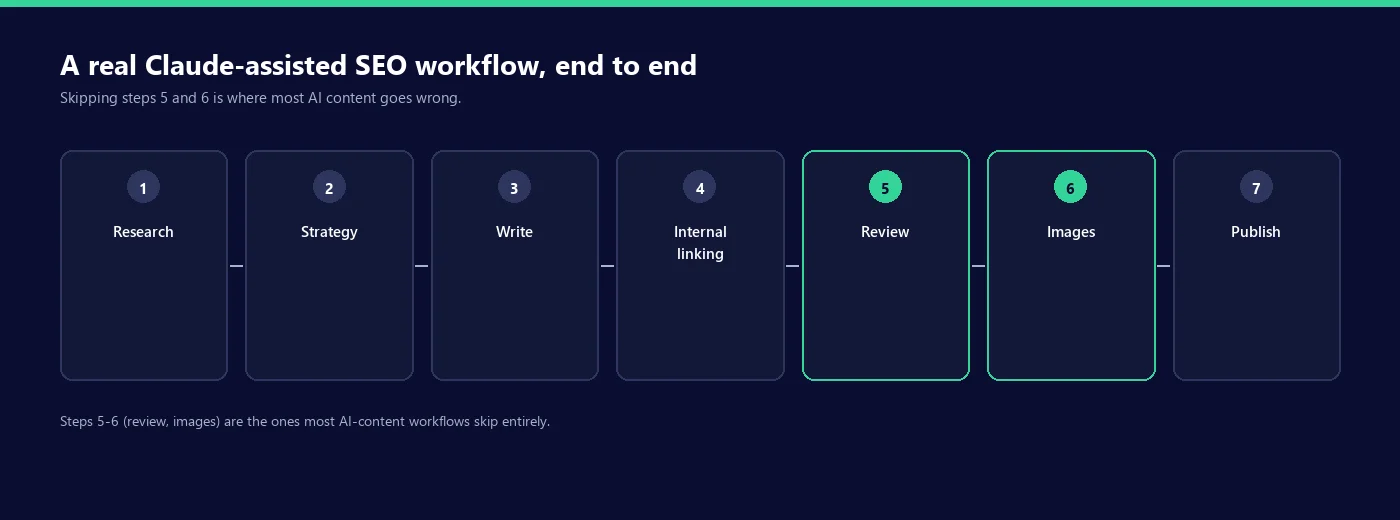
- Research. Pull real competitor pages and real keyword data (from Search Console exports or a connected keyword tool), not Claude’s own guess at what’s ranking.
- Strategy. Identify the specific gap: what the top-ranking pages don’t cover, cover weakly, or get wrong, based on the research above, not a generic “make it more comprehensive” instruction.
- Write. Draft against that specific gap, with every external statistic checked against a real, dated source before it goes in, not generated and trusted.
- Internal linking. Connect the new piece to existing site content both directions, which needs Claude to see what already exists on the site, not guess at URLs.
- Review. A dedicated pass for AI writing tells, forced contrasts, filler words, repetitive sentence openers, and a fact-check pass on every number and claim.
- Images. Built to the site’s actual visual style, not a generic stock photo or an off-brand AI image.
- Publish. Pushed through the CMS’s real API, checked after the fact that it rendered correctly, not just that the API call returned success.
Steps five and six are the ones most “AI content” workflows skip, and it shows: unreviewed AI drafts carry a recognizable set of tells (see below), and auto-generated images that don’t match a site’s actual design read as obviously bolted on.
What are the real failure modes of using Claude for SEO?
Four, specifically, based on recurring issues rather than hypotheticals.
Fabricated statistics. Asked to write about a topic with “include some stats,” Claude will produce plausible-sounding numbers that aren’t attached to a real source. The fix is procedural, not a smarter prompt: require every statistic to come with a named, dated source, and check that the source says what the draft claims before publishing.
Confident ranking claims it can’t back up. Without a connected live data source, Claude will sometimes answer “does this page rank for X” with a plausible-sounding guess instead of declining to answer. Treat any ranking or position claim from a plain chat session as unverified until checked against real Search Console or SERP data.
Default AI phrasing. Left unreviewed, Claude’s first draft tends to reach for the same patterns every other model does: forced three-item lists, a contrast sentence that adds emphasis without adding information, bolded labels on every list item. None of this is wrong exactly, it’s just recognizable, and a dedicated edit pass for these patterns matters more than a cleverer prompt.
Treating “I don’t have current data” as “I’ll estimate instead.” Claude will sometimes answer a time-sensitive question (current pricing, this week’s algorithm update, a live ranking) with a caveated guess rather than clearly saying it doesn’t have that information. Ask directly whether an answer is based on current, verified information or an estimate, and expect an honest answer when you do.
How do you keep Claude’s SEO content from sounding like AI wrote it?
Run a dedicated pass that looks specifically for AI writing patterns, separate from a normal proofread. The patterns worth checking for, in order of how often they show up unreviewed: not-X-but-Y contrasts that add weight without adding a claim, one-line closers that restate the paragraph above them, forced three-item lists where two examples would say the same thing, dashes used as the default connector between every clause, and bold labels applied to every item in a list whether or not it needs emphasis.
None of these make a sentence factually wrong. They just make it recognizable, and recognizable AI phrasing works against you in exactly the context this guide is about: content meant to demonstrate expertise reads worse, not better, when it sounds like a template.
Claude vs ChatGPT vs Jasper for SEO: which should you use?
For the parts of SEO work covered in most guides, brainstorming, drafting, basic optimization, the three perform similarly enough that the differences come down to specific features, not raw quality. Where they diverge is agentic capability, the part this guide focuses on.
| Capability | Claude | ChatGPT | Jasper |
|---|---|---|---|
| Long single-pass document analysis | Strong: handles a full competitor page or large export in one message | Capable, more prone to chunking very large pastes | Built for shorter marketing-copy inputs, not large document analysis |
| Agentic, multi-step tool use (files, APIs, shell) | Native via Claude Code and the Agent SDK | Available via custom GPTs and plugins, less direct file/shell access | Not a core focus; built around templated marketing workflows |
| Live web search by default | Depends on interface and settings, not always on | Available in-product | Limited, mainly template-driven generation |
| Code generation for technical SEO (schema, redirects) | Strong, consistently clean output | Strong | Not a core focus |
For keyword research specifically, including side-by-side prompt examples across Claude, ChatGPT, Gemini, and Perplexity, see our guide to using AI for keyword research.
Want this workflow running on your own site, not DIY?
Everything above, research through publishing, is a workflow South Asia Digital runs for clients directly, not a theoretical setup. If you’d rather hand off the agentic SEO/GEO pipeline than build and maintain it yourself, that’s exactly what our GEO and AI search services cover. Get in touch and we’ll walk through what that looks like for your site.
Common questions about using Claude for SEO
How do I use Claude as an SEO assistant?
Start with the prompt-based tasks that need no setup: competitor content analysis, keyword clustering, content briefs, and schema or redirect code. Move to an agentic setup, Claude Code with MCP connections to your CMS and data sources, once you need Claude to act on a live site rather than just draft text for you to paste in yourself.
Is Claude better than ChatGPT for SEO?
Not universally. Claude’s advantage is long single-pass document analysis and native agentic tool use through Claude Code. ChatGPT’s advantage is a broader plugin and GPT ecosystem and built-in live search by default. For a prompt-only workflow, the two are close enough that either works; the real gap opens once you need an agent that can act on your site, not just answer in a chat window.
Do you need a paid Claude plan for SEO work?
No, for the prompt-based techniques. Every prompt-based task in this guide works on Claude’s free tier. An agentic setup through Claude Code typically runs on a paid plan or the metered API, since it involves more usage than a single chat session.
Can Claude replace a real SEO tool like Ahrefs or Semrush?
No. Claude has no built-in access to verified search volume, backlink data, or ranking history. It’s a strong accelerant for the analysis and writing work that sits around that data, not a replacement for the data itself, unless it’s connected to a real data source through MCP or a similar integration.
What’s the biggest mistake people make using Claude for SEO?
Publishing its first draft unreviewed. Claude is strong at research synthesis and long-form consistency, but a first draft still needs a fact-check pass on every statistic and a dedicated edit pass for recognizable AI phrasing before it should go live on a site meant to demonstrate expertise.
Written by Nadir Yaqoob, founder of South Asia Digital. Nadir has a software engineering background and runs the agency’s AI SEO and GEO work for SaaS and Shopify clients directly, including the agentic Claude workflows described in this guide.