A site owner adds a long list of AI bot names to robots.txt, feels good about keeping GPTBot and ClaudeBot off a catalog nobody wants scraped for free, then opens Search Console a few weeks later to check why a new page still isn’t indexed. The URL Inspection tool won’t fetch the page. Crawl allowed says no. Nothing in the list that was just added mentions Search Console by name, so the obvious next question is which line did this.
This mix-up shows up often enough in technical SEO circles to be worth untangling properly, because getting the diagnosis wrong cuts two ways. Blame the wrong rule and you either leave a debugging tool broken that didn’t need to be, or you strip protection from the real AI crawlers to fix a problem they were never actually causing. We went to Google’s own crawler documentation and checked exactly how robots.txt matching decides which rule applies to which bot, rather than guessing from the symptom.
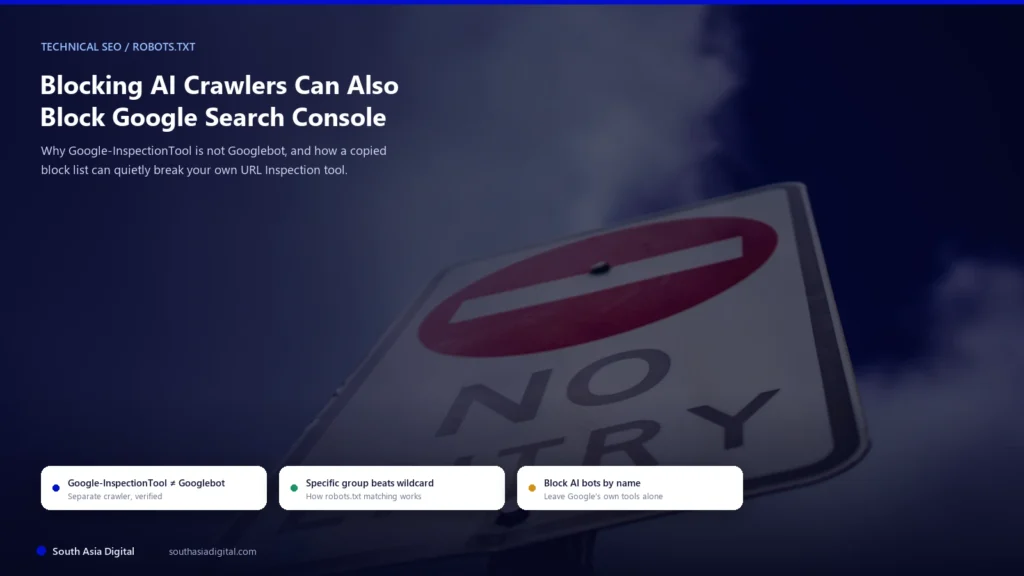
The short version is that Google-InspectionTool, Googlebot, and GoogleOther are three separate, independently documented crawlers, and robots.txt treats them that way too. What actually breaks Search Console’s inspection features is narrower and more specific than “blocking AI bots,” and it’s avoidable once you see the exact mechanism.
Key Takeaways
- Google-InspectionTool is Google’s own crawler for Search testing tools, specifically Search Console’s URL Inspection tool and the Rich Results Test, documented separately from both Googlebot and GoogleOther.
- Per Google’s own documentation, blocking Google-InspectionTool “has no effect on Google Search or other products.” It breaks your ability to test and debug a page, not your page’s actual ranking or indexing.
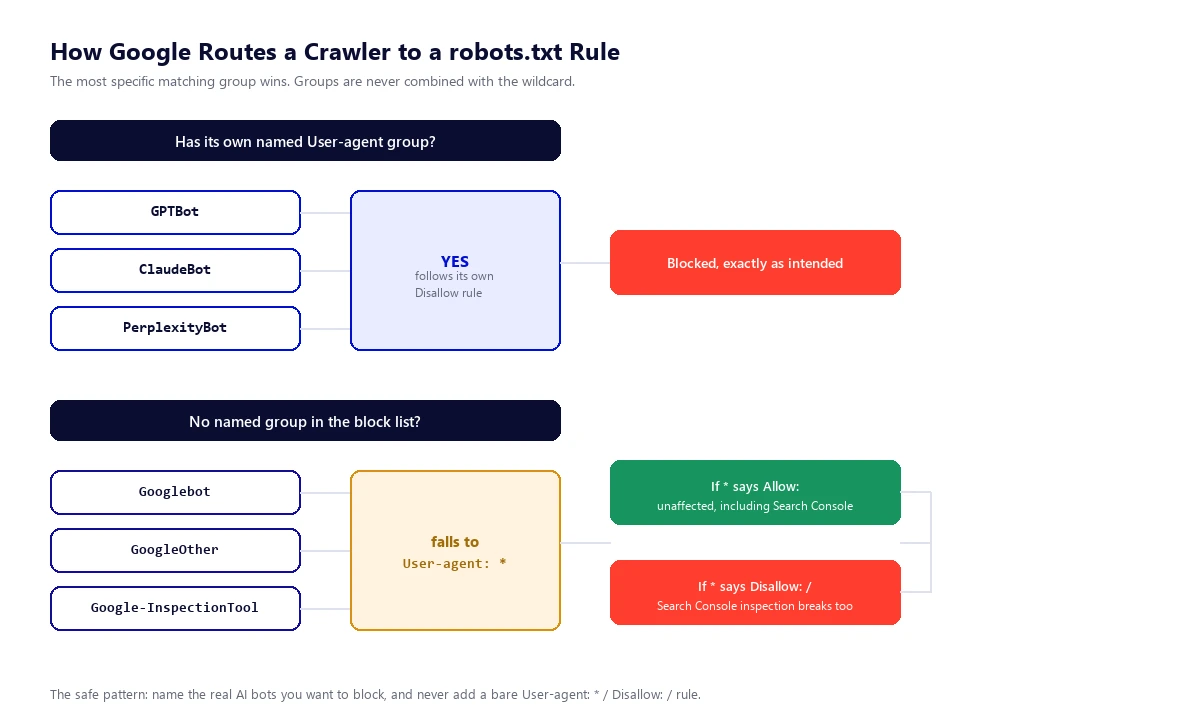
- Google’s robots.txt matching uses only the most specific group that applies to a given crawler. A rule written for one bot’s exact token name does not apply to a differently named bot, groups are never combined.
- A commonly used AI-crawler block list we reviewed lists well over 100 bot tokens individually, each with its own specific Disallow rule, and does not include a blanket wildcard rule or an entry for Google’s inspection tool. Used exactly as published, it does not appear to catch Google-InspectionTool.
- The real risk appears when a copied block list is combined with a separate catch-all
User-agent: *Disallow: /rule, since any crawler without its own named group, Google-InspectionTool included, falls back to whatever that global group says. - Not every Google crawler behaves the same way here. AdsBot-Google ignores the wildcard group entirely and needs an explicit rule to be blocked; Google-InspectionTool gets no such exemption and follows the wildcard like any other unmatched crawler.
- The fix is to block real AI bots by their exact token names and leave the wildcard group permissive, or omit it, rather than ever writing a bare
User-agent: *Disallow: /rule you don’t fully intend.
Google-InspectionTool Is Not Googlebot
Confirmed directly against Google’s crawler documentation: Google runs several distinct crawlers under the Google name, each with its own robots.txt token and its own job. Three come up constantly in this specific confusion, and they are not interchangeable.
| Crawler | robots.txt token | What it actually affects |
|---|---|---|
| Googlebot | Googlebot | The crawler whose rules govern whether your pages get crawled and indexed for Search, Google Images, and Discover. |
| GoogleOther | GoogleOther | A generic crawler various Google product teams use for one-off fetches and internal research. Google’s docs say its rules “don’t affect any specific product.” |
| Google-InspectionTool | Google-InspectionTool | Powers Search testing tools specifically: Search Console’s URL Inspection live test and the Rich Results Test. No effect on Search or any other product, per Google’s own wording. |
| AdsBot-Google | AdsBot-Google | Checks ad landing page quality for Google Ads. A special case covered separately below, since it doesn’t behave like the three crawlers above. |
Google’s own documentation for Search Console’s inspection feature is just as direct about which crawler is involved: it names Google-InspectionTool as the crawler behind the rendered screenshot in a live test and states plainly that a live test “only confirms if Google-InspectionTool can access your page for indexing,” not whether Googlebot can. Those are two separate claims, and only the first one is what URL Inspection is actually checking.
How robots.txt Actually Decides Which Rule Applies
The part most explanations of this skip is the matching mechanism itself, and it’s the whole reason the confusion exists. Per Google’s robots.txt syntax guide, matching is case-insensitive, and a crawler uses whichever group is the most specific match for its own name. Groups aren’t combined. If a robots.txt file has a group written for Googlebot and a separate global group written for *, a crawler with its own exact-named group follows that group only, and a crawler with no matching named group falls back to *.
That single rule explains both halves of this situation. A Disallow rule addressed to GoogleOther does not apply to Google-InspectionTool, because they’re different tokens and Google doesn’t merge them, even though it’s an easy assumption to make when you’re staring at a long list of Google-prefixed names and trying to figure out which one broke your inspection tool. But a bare User-agent: * Disallow: / rule applies to every crawler that doesn’t have its own specific group, and that includes Googlebot, GoogleOther, and Google-InspectionTool all at once, since none of them get special treatment by default.
Not every Google crawler is subject to that fallback the same way. AdsBot-Google is what Google classifies as a special-case crawler, and its documentation states outright that it “ignores the global robots.txt user agent (*).” AdsBot needs its own explicit rule to be blocked or allowed, wildcard rules simply don’t reach it. Google-InspectionTool gets no such exemption. It’s classified as a common crawler, and common crawlers, in Google’s own words, “always obey robots.txt rules,” including deferring to the wildcard group when they have no dedicated one.
What a Commonly Used AI-Crawler Block List Actually Contains
We checked one of the widely adopted, community-maintained AI-crawler block lists that circulates among site owners trying to keep AI training bots off their content. As currently published, it lists well over 100 individual bot tokens, GPTBot, ClaudeBot, PerplexityBot, Bytespider, Amazonbot, and a long tail of lesser-known scrapers, each as its own User-agent group with its own Disallow: / line underneath it. There is no blanket User-agent: * group anywhere in the file, and there is no entry naming Google-InspectionTool.
Applied strictly as published and the matching rule above, that structure does not catch Google-InspectionTool, Googlebot, or GoogleOther. Each of those crawlers looks for its own named group, doesn’t find one, and since there’s no wildcard group either, is simply unrestricted by that file. A handful of the list’s entries do use Google-prefixed names, things like Google-Extended and a couple of Google research-tool tokens, but those are separate, deliberately named AI-training and agent tokens, not Google-InspectionTool, and blocking them has no bearing on Search Console.
Where this actually goes wrong in practice is rarely the list itself. It’s what gets added around it. A site that merges a downloaded block list with an existing “block everything, then allow what I trust” template, a leftover staging robots.txt, or a security plugin’s own generated rules, can easily end up with a trailing User-agent: * Disallow: / line somewhere in the combined file. Once that line exists, it doesn’t matter how carefully the AI bots above it were named individually, every crawler without its own specific group, Google’s inspection tool very much included, inherits that blanket block. The instinct to “close the gap” for AI bots the list doesn’t name yet is exactly what introduces the wildcard that catches Google’s own tools instead.
How to Check If This Has Actually Happened to Your Site
Open Search Console, run URL Inspection on a real page, and look at two fields rather than guessing from symptoms. In the indexed report, Crawl allowed? answers whether robots.txt is blocking the crawl. If you run a live test on the same URL, Page fetch will show a failure if the fetch itself was blocked, since that live test’s own help documentation confirms it runs as Google-InspectionTool specifically. A blocked result on the Rich Results Test for the same URL is a second, independent confirmation, since it uses the same crawler.
What that result does and doesn’t tell you matters just as much as catching it. If your robots.txt has an explicit, narrowly written rule that happens to name Google-InspectionTool directly, that’s the entire blast radius, your actual Search indexing is unaffected, matching Google’s own statement that this crawler has no effect on Search. If the real cause is a wildcard Disallow: / catching everything with no specific group, Googlebot is caught by the exact same rule, and that’s a materially bigger problem than a broken debugging tool, since your organic crawling and indexing are now genuinely at risk too. Knowing which of those two situations you’re actually in is the difference between a five-minute fix and an emergency one.
The Robots.txt Pattern That Blocks Real AI Bots Without Touching Google’s Tools
The safe structure follows directly from the matching rule above: name the specific AI bots you want to keep out, and never write a bare wildcard disallow unless you genuinely mean to block every crawler that isn’t explicitly listed, Google’s own tools included.
Because Googlebot, GoogleOther, and Google-InspectionTool have no named group of their own anywhere in that file, every one of them falls through to User-agent: *, which explicitly allows. You don’t need to add a positive rule naming Google-InspectionTool to protect it. Leaving it out entirely, and keeping the wildcard group permissive, is the correct and simplest way to leave it untouched. Add whichever genuine AI crawlers you actually want to keep off your content by their real, current token names, GPTBot, ClaudeBot, PerplexityBot, and the rest follow the same pattern, and resist the urge to close the list out with a catch-all Disallow once it feels long enough.
Google-Extended deserves a separate note here since it’s easy to lump in with the others. It’s a robots.txt control token with no crawler of its own, it governs only whether content Googlebot has already fetched can be used to train or ground Gemini, and Google states directly that it has no effect on Search ranking or inclusion. Disallowing it is a legitimate choice if you want to opt out of Gemini training specifically, but it’s an entirely separate decision from anything covered above, not a step required to protect Search Console.
Where This Fits Into a Technical SEO Audit
A robots.txt file that blocks real AI crawlers correctly while leaving Google’s own tools fully functional is a small file, but it’s the kind of detail that’s easy to get backwards once a list grows past a hundred lines and gets copied between sites without a second read. It’s also exactly the kind of check that belongs in a proper technical audit rather than something caught by accident months later when Search Console stops cooperating. If you’d rather have someone verify this against your actual live robots.txt instead of working it out line by line, it sits under South Asia Digital’s technical SEO services, not as a hard sell here, just worth knowing it’s a real part of the audits we run.
If you’re already auditing how AI crawlers interact with your site for other reasons, it’s worth pairing this with a check of what those crawlers can actually see once they’re allowed through, covered in our separate piece on auditing what AI crawlers actually see on JavaScript-rendered pages. And if llms.txt came up in your own research as a way to manage any of this, it’s worth reading why it doesn’t touch robots.txt behavior at all, see our piece on what llms.txt actually does before assuming it’s related.
Frequently Asked Questions
What is Google-InspectionTool, and how is it different from Googlebot?
Google-InspectionTool is a separate, independently documented Google crawler that powers Search testing tools, specifically Search Console’s URL Inspection live test and the Rich Results Test. Googlebot is the crawler whose rules govern actual crawling and indexing for Search. They have different robots.txt tokens and a rule written for one does not apply to the other.
Does blocking Google-InspectionTool hurt my Google rankings?
No, not by itself. Google’s own documentation states that crawling preferences addressed to Google-InspectionTool have no effect on Google Search or other products. Blocking it specifically breaks your ability to use Search Console’s URL Inspection live test and the Rich Results Test on that page, not your page’s indexing or ranking.
Will a popular AI-crawler block list automatically block Google Search Console?
Not on its own. A commonly used AI-crawler block list we reviewed names individual bot tokens one by one and includes no blanket wildcard rule and no entry for Google-InspectionTool, so used exactly as published it doesn’t appear to catch it. The real risk comes from combining that list with a separate catch-all User-agent: * Disallow: / rule, which does affect any crawler without its own named group.
How do I check if my robots.txt is blocking Google-InspectionTool?
Run URL Inspection in Search Console on a real page and check the Crawl allowed? field, then run a live test and check Page fetch for a failure, since that live test runs as Google-InspectionTool specifically. A blocked result on Google’s Rich Results Test for the same URL confirms it independently, since it uses the same crawler.
What robots.txt rule blocks real AI bots without blocking Google?
List each AI bot you want to block by its exact, current token name, such as GPTBot, ClaudeBot, or PerplexityBot, each with its own Disallow rule, and keep the wildcard group permissive with User-agent: * followed by Allow: /, or omit the wildcard group entirely. Googlebot, GoogleOther, and Google-InspectionTool all fall back to that permissive wildcard since none of them have a dedicated group in the file.
Does blocking GoogleOther also block Google-InspectionTool?
No. Google’s robots.txt matching uses only the most specific group for each crawler’s own name, and groups are never combined. A Disallow rule written for the GoogleOther token has no effect on Google-InspectionTool, since it’s a different, separately documented token.
Is AdsBot-Google affected the same way as Google-InspectionTool?
No. AdsBot-Google is classified by Google as a special-case crawler and, per Google’s own documentation, ignores the global User-agent: * group entirely. It requires its own explicit named rule to be blocked or allowed. Google-InspectionTool gets no such exemption and follows the wildcard group like any other unmatched crawler.
Do I need to block Google-Extended to stop my content training Gemini?
That’s a separate, deliberate choice. Google-Extended is a robots.txt control token with no crawler of its own that governs only whether content Googlebot already fetched can be used to train or ground Gemini. Google states it has no effect on Search ranking or inclusion. Disallowing it is unrelated to protecting Search Console’s inspection tool.
Should I ever use a bare User-agent: * Disallow: / rule?
Only if you genuinely want to block every crawler that doesn’t have its own specific rule, including Googlebot, GoogleOther, and Google-InspectionTool. For a normal public site, that line is almost never intentional, and it’s the single most common way an AI-crawler block list ends up catching Google’s own tools as collateral damage.
What’s the fastest fix if I’ve already broken this?
Open your live robots.txt and look for a trailing User-agent: * Disallow: / line, or any line that explicitly names Google-InspectionTool or Googlebot. Remove it, or replace the wildcard group with Allow: /, then re-run URL Inspection’s live test on an affected page to confirm Page fetch and Crawl allowed? both come back clean.