
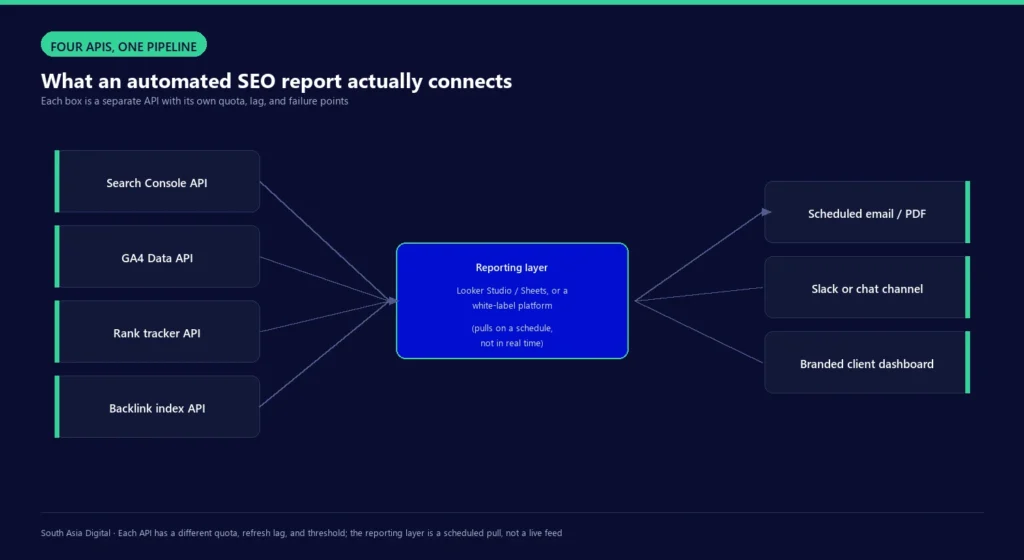
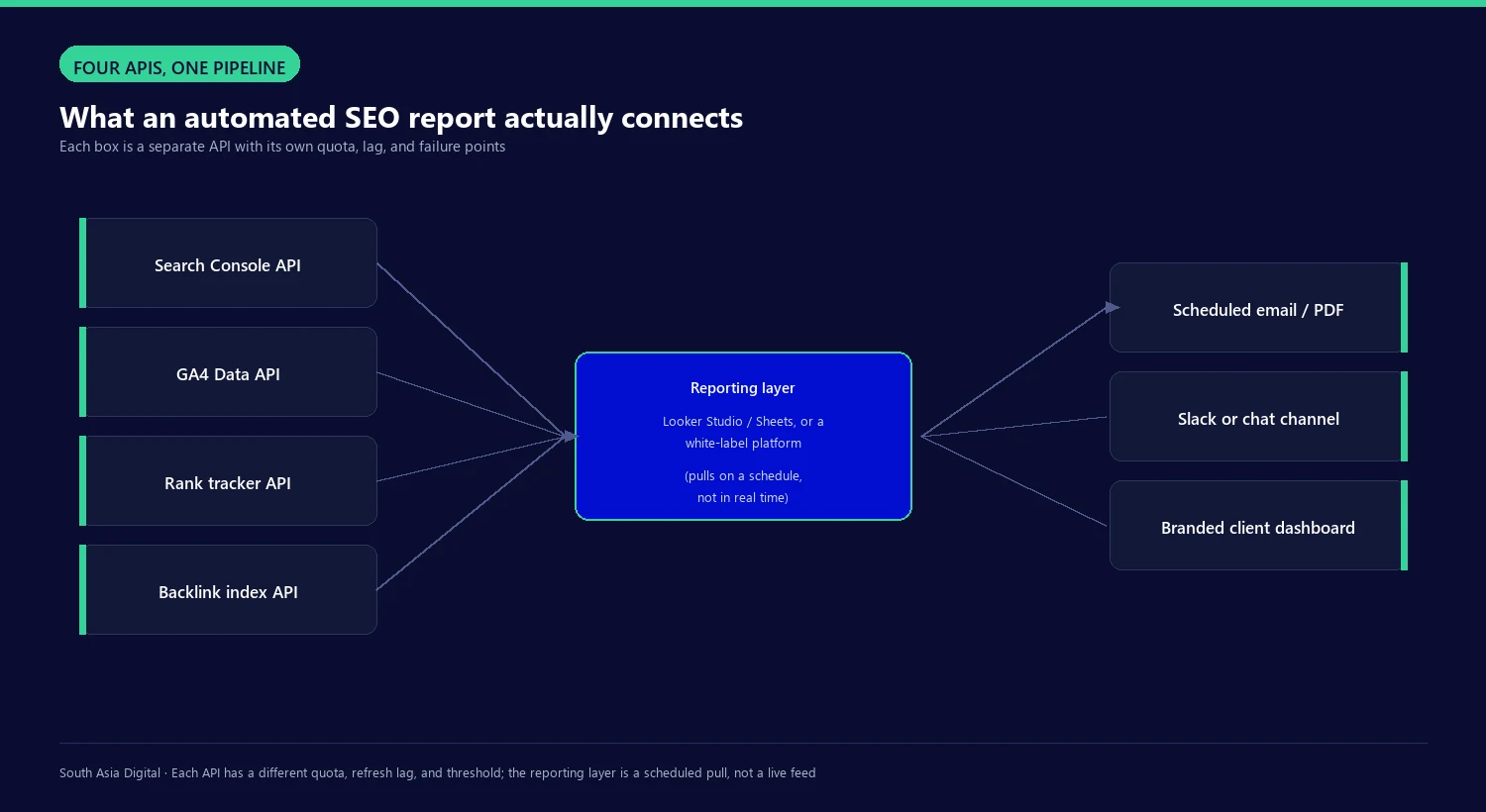
An automated SEO report pulls from several APIs on a schedule, not one live feed. Search Console, GA4, a rank tracker, and a backlink index each have different update lags, quotas, and blind spots, and most reporting guides skip that part entirely. This walks through what data feeds the report, which tools handle the pull and delivery, where the numbers commonly stop matching what you see in the Search Console UI, and a setup to start from.
How do you automate SEO reporting in 6 steps?
Six steps cover the setup end to end: decide the metrics first, then connect, structure, schedule, and verify.
- Decide which metrics the report needs per client, typically clicks, conversions, keyword rankings, and AI citation visibility.
- Connect Search Console and GA4 to Looker Studio, or a white-label platform, through their native connectors.
- Add rank tracker and backlink data as a separate source, either through a built-in connector or a Sheets import.
- Build the report template once, then duplicate it per client rather than rebuilding the layout each time.
- Schedule delivery by email, Slack, or a branded dashboard, matched to how often the client checks it.
- Check the output against the live Search Console UI on a recurring basis rather than trusting the pipeline indefinitely.
The rest of this covers why each step works the way it does: the API limits behind steps 2 and 3, the tools that handle steps 4 and 5, and why step 6 is not optional.
What data feeds an automated SEO report?
Four data sources cover most SEO reports: Search Console, GA4, a rank tracker, and a backlink index. Each one is a separate API with its own limits.
Google’s Search Analytics API allows 1,200 queries per minute per site and per user, with a per-project ceiling of 30,000,000 queries per day (Google’s usage limits documentation). Grouping results by both page and query at once is the most expensive query type and the one most likely to hit a short-term load limit, which clears after about 15 minutes.
Search Console’s own interface and API keep the last 16 months of data, a window Google confirms on its own Analytics help page, so a pipeline built for long-term trend reporting needs to start archiving data from day one rather than assuming the history will still be there next year.
GA4’s Data API works on a token system. A standard property gets 200,000 tokens per day and 14,000 tokens per property per hour at the project level; Analytics 360 properties get ten times that. These figures are higher than the quotas commonly cited in older GA4 setup guides, so a blog post describing GA4 limits from a year or two ago is worth re-checking against Google’s current documentation rather than trusted as-is.
GA4 also applies data thresholding, a privacy filter that suppresses rows below a minimum user count Google has not published publicly, documented only as a mechanism in Google’s own thresholding help page. It hits low-traffic sites and properties harder, and a BigQuery export bypasses it.
Rank tracker and backlink APIs work differently: they run scheduled crawls against a keyword list or link index and expose cached position or link snapshots through an endpoint your reporting tool polls. Neither gives live data; both run on their own crawl schedule.
What tools automate SEO reporting?
Looker Studio connects directly to GSC and GA4 through free native connectors, which covers most of what a single-site report needs at no cost. A common alternative pulls data into Google Sheets through Apps Script on a time trigger, then feeds that sheet into Looker Studio or an email macro, useful when a report needs data the native connectors do not expose cleanly.
For agencies managing several clients, white-label platforms bundle data connections, branded delivery, and scheduling into one subscription. Pricing and what counts toward it varies by vendor.
| Tool | Entry price (Nov 2026) | Billed by | White-label included |
|---|---|---|---|
| AgencyAnalytics | $20/client/mo | Client count | Yes |
| Swydo | €69/mo | Connected data sources | Yes |
| DashThis | $44/mo | Dashboards and sources | Yes, every plan |
| Whatagraph | €699/mo | Source credits | Yes, top tier |
| SE Ranking | $103.20/mo (billed annually; $129/mo month-to-month) | Reports and export rows | No, +$69/mo add-on |
Prices come directly from each vendor’s current pricing page and change often, so confirm before budgeting against them. The pricing logic differs more than the headline number: AgencyAnalytics and Swydo bundle unlimited reports into one price, DashThis and SE Ranking cap the report count per tier, and SE Ranking is the only one here where white-label delivery sits behind a separate add-on rather than the base plan. Zapier and Make.com both offer native Search Console and Slack connectors for teams that want a lighter setup than a full reporting platform, pulling data on a schedule and posting a formatted summary to a channel.
How does Looker Studio schedule automated delivery?
Looker Studio’s free scheduled email has firm caps, confirmed on Google’s own scheduling documentation. A single scheduled email can reach up to 50 recipients. Individual Google accounts are limited to 200 recipient-sends per day and 800 per month; Google Workspace accounts get 500 per day and 3,000 per month.
Reports without Looker Studio Pro can only be scheduled once a day. With Pro, a report can have up to 200 schedules running as often as hourly, and reports saved as organizational assets skip the send caps entirely, though a report still sitting in a personal “Owned by me” folder stays subject to them even on Pro. There is no usage dashboard to check against: once an account exceeds its quota, further scheduled emails simply stop sending.
Why doesn’t automated report data match Google Search Console?
Three separate incidents in 2025 showed the Search Console API running behind the web interface for days at a time. In February, Search Engine Roundtable reported the API stuck on data from February 20th and 21st, and Google’s John Mueller confirmed on Bluesky on February 26 that it should catch up soon. In late April, the API was stuck on data from April 22nd while the web interface stayed current, a gap of roughly a week. In June, the API stopped returning new data after June 3rd for about ten days, with one report noting Looker Studio’s GSC connector only pulls “Final” data rather than the more current “All” data, which pushed some practitioners toward a BigQuery export for fresher numbers.
Separate from lag, totals can differ between the Search Console UI and the API by design. The UI caps most tables at 1,000 rows regardless of tab, while the API can return far more, so a UI total and a summed API total will not match. Both interfaces exclude anonymized low-volume queries for privacy, and that exclusion grows with how narrowly a report filters its data. One user on Google’s own help community reported API-summed page impressions differing from the UI’s Pages tab by more than 50%, which shows the gap can be substantial rather than cosmetic.
A pipeline also depends on the API it was built against staying available. Universal Analytics API access ended entirely on July 1, 2024, confirmed on Google’s own Analytics help page; every report still pointed at a UA property stopped returning data and had to be rebuilt against the GA4 Data API. It is the clearest precedent for a report quietly breaking because the API underneath it was retired, not because anything in the report itself changed.
What’s a practical setup to start with?
Connect Looker Studio directly to Search Console and GA4 using the native connectors for a single site; it costs nothing and covers most of what a monthly report needs. Add a rank tracker as a separate data source once keyword position tracking matters beyond what GSC’s query data shows. Build the first version around a monthly cadence that matches how a standing SEO engagement typically reports progress, then tighten the schedule only where a client specifically needs weekly or daily visibility.
Branded delivery and per-client access control, not the underlying data connections, become the deciding factor once a report moves across multiple clients, which is the point a white-label platform starts to pay for itself over a DIY Looker Studio setup. Pick based on how pricing scales for the account list: per-client pricing like AgencyAnalytics suits a roster of similar-sized accounts, while per-data-source pricing like Swydo or DashThis suits fewer clients each pulling from many connected accounts.
None of this depends on which CMS the client runs; Search Console, GA4, and rank tracker APIs work the same regardless of platform. What changes is how fast a flagged issue gets fixed once the report surfaces it, and that varies by how much SEO control the CMS itself allows.
How do you report AI search visibility?
Clicks and rankings from Search Console and GA4 cover classic organic search, not whether a brand gets cited inside an AI Overview, a ChatGPT answer, or a Perplexity response. That’s a separate measurement problem: Google doesn’t expose AI Overview citation data through the Search Analytics API the way it exposes classic query data, so tracking AI visibility means a different data source layered on top of the same reporting cadence, not a new column in the same pull. This is increasingly part of what clients buying AI SEO services expect inside a monthly report, not an optional add-on.
A workable setup logs which queries trigger an AI Overview or AI Mode response for a tracked keyword set, whether the client’s domain appears among the cited sources, and which competitor domains get cited instead, refreshed on the same schedule as the rest of the report rather than checked separately. The same tracking applies to ChatGPT and Perplexity citations for branded and category queries relevant to the client.
This is the piece most reporting guides for this topic skip entirely, and it’s the one a client running a generative engine optimization engagement alongside classic SEO will ask about directly.
The reporting layer only measures what’s already in scope. What an AI SEO service should include covers the rest of that scope beyond what a dashboard shows.
Where automation still needs a human check
An automated number that looks stable from month to month is not the same guarantee as a number that matches what a client would see if they logged into Search Console themselves. The documented 2025 lag incidents and the row-count gap between the UI and the API are not edge cases. They showed up at least three separate times in one year on a platform most reports are built around, so a report pulling silently for months can drift without anyone noticing until a client spot-checks it personally. Build in a manual comparison against the live Search Console UI on a recurring basis rather than trusting the pipeline once it is set up, and treat any month where a number moves sharply as a reason to check the source before reporting it, not after.
We build this check into the same cadence as the report itself, not as a separate audit that’s easy to skip when a deadline is tight. The tool choice matters less than this habit. A free Looker Studio setup checked regularly beats an expensive white-label platform nobody double-checks against the source.
Questions about automating SEO reports
What is automated SEO reporting?
It is a scheduled pull from SEO data sources, typically Search Console, GA4, a rank tracker, and a backlink index, into a dashboard or document that updates and sends itself on a set interval instead of being rebuilt by hand each time. The data still comes from each platform’s own API on its own refresh schedule, so it is automated collection, not a live feed.
Is Looker Studio enough to automate SEO reports?
For a single site or a small number of clients, yes. Looker Studio’s native GSC and GA4 connectors are free and cover most standard reporting needs. It becomes limiting once an agency needs branded, per-client delivery at scale, fully custom scheduling beyond daily on the free tier, or data blending across many disconnected sources, which is where a dedicated white-label platform usually takes over.
Why does automated SEO report data sometimes not match Google Search Console?
Two separate causes. First, the Search Console API has had documented multi-day lag incidents against the live UI, including in February, April, and June of 2025. Second, the UI and API handle row totals differently by design: the UI caps most tables at 1,000 rows, and both interfaces exclude low-volume anonymized queries, so a summed API total and a UI total will not always agree even with no lag involved.
What’s the difference between Looker Studio and a white-label reporting tool?
Looker Studio is a free dashboard builder with native connectors for Google’s own data sources, built by Google and not designed around agency client management. White-label platforms like AgencyAnalytics, Swydo, or DashThis add client-branded delivery, per-client access, and bundled connectors to third-party tools like rank trackers and backlink indexes, at a monthly cost that scales with client or data-source count.
Can an automated report also track AI Overview and ChatGPT citations?
Yes, but not through the same Search Console and GA4 connectors used for classic organic data. AI citation tracking needs a separate data source that checks whether a domain appears among the cited sources for a tracked keyword set across AI Overviews, AI Mode, ChatGPT, and Perplexity, pulled on the same schedule as the rest of the report rather than monitored as a one-off check.
Written by Nadir Yaqoob, founder of South Asia Digital. Nadir has a software engineering background and runs the agency’s AI SEO and GEO work for SaaS and Shopify clients directly.